When automatic flight check-in is enabled for your company in Payhawk Labs, the Travel AI Agent can check you in for the flights you booked through it and send your boarding pass to the chat. You can accept the AI Agent's check-in offer or ask it to check you in at any time within the check-in window.
Checking in from the AI Agent's check-in message
When online check-in opens for a flight you booked through the Travel AI Agent, usually 24 hours before departure, the Travel AI Agent sends you an in-app chat message with the flight details and the travel document it will use. The flight details include the route, departure and arrival times, airline, booking reference, fare conditions, and baggage allowance.
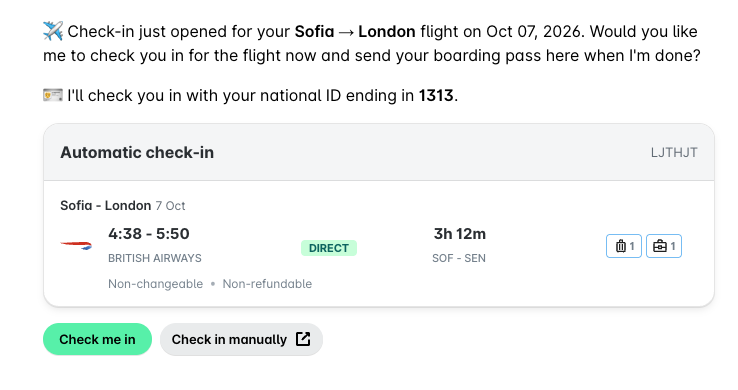
To check in for your flight:
Open the AI Agent's check-in message in the AI Office.
Click on Check me in.
If the AI Agent asks for your travel document, fill in the Travel document form and click on Save and continue.
Wait for the AI Agent to complete the check-in and send your boarding pass.
If you prefer to check in yourself, click on Check in manually to open the airline's website. For airlines that do not yet support automatic check-in, the AI Agent's message offers only manual check-in.
Providing your travel document details
If Payhawk has no travel document on record for you, the AI Agent shows a secure Travel document form in the chat.
In the form, you need to fill in the following fields:
Issuing country
Document number
Expiry date
Nationality
Country of residence
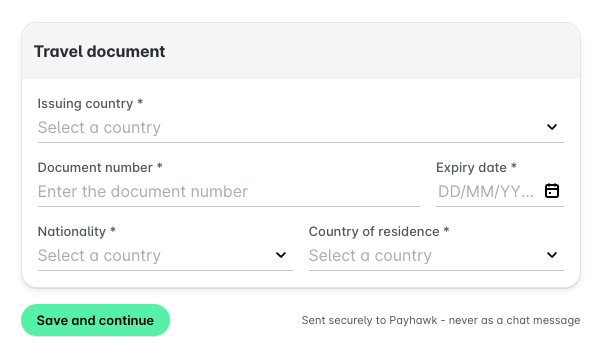
The form sends your details directly to Payhawk and never as a chat message. Payhawk keeps the document on record, so the AI Agent uses it by default the next time it checks you in.
Helping the AI Agent complete the check-in
In most cases, the AI Agent completes the check-in without any input from you. If the airline's website asks you to log in, or shows a CAPTCHA, the AI Agent pauses and sends you a message with a button that opens the airline's check-in page. Complete the step on that page, and the AI Agent continues the check-in.
Getting your boarding pass
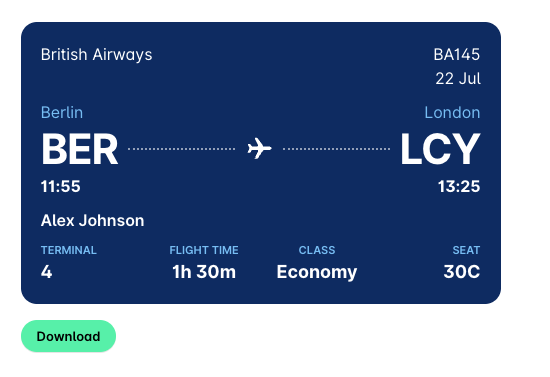
When the check-in is complete, the AI Agent sends your boarding pass to the chat. The boarding pass shows your flight number, date, route, departure and arrival times, terminal, flight time, travel class, and seat. To save the boarding pass, click on Download.
Coming soon
You'll soon be able to add your boarding passes to your digital wallet.
Starting a check-in from the chat
You do not have to wait for the AI Agent's check-in message. At any time within the 24-hour check-in window before your flight, you can ask the AI Agent directly, for example: Check me in for my flight to London.
If you have several flights within the check-in window, the AI Agent asks you which flight to check in for.
If check-in has not opened yet for your flight, the AI Agent tells you when to expect its check-in message.