You can receive structured electronic invoices directly in Payhawk through Italy’s national eInvoice system, the Sistema di Interscambio (SDI). The integration between Payhawk and SDI is available only for Italian-registered entities.
This integration helps you reduce manual invoice handling and keeps invoice data consistent from receiving to export.
Before you start
Make sure you have:
An Italian VAT number (partita IVA) or tax code (codice fiscale) on your Payhawk account.
Access to the Agenzia delle Entrate portal, or an accountant (commercialista) who can register the recipient code for you.
Connecting the two systems
To connect your Payhawk account to SDI:
Log in to the Payhawk Web Portal.
Go to Settings > Integrations > eInvoicing tab.
On the SDI card, click on Connect.
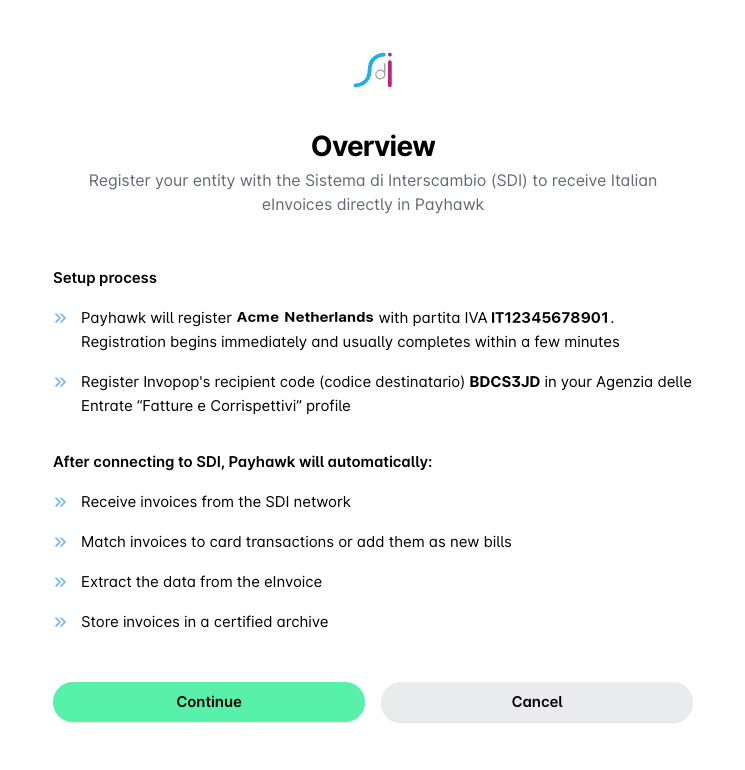
On the Overview page, check the Italian VAT number or tax code shown for your company, confirm that you authorize Payhawk to receive eInvoices on your behalf, and click on Continue.
On the next page, confirm that you’ve registered the recipient code.
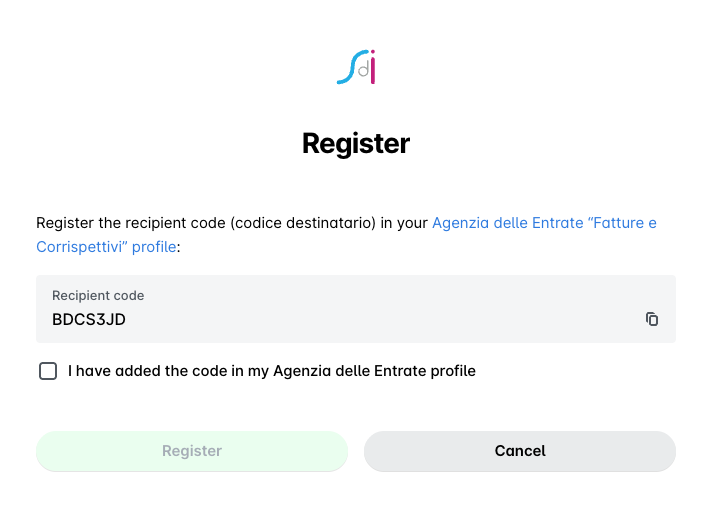
Click on Register.
Click on Done.
Registering the recipient code with the Italian tax authority
SDI delivers each invoice to the electronic address that your company has registered with the Agenzia delle Entrate. Register Payhawk’s recipient code (codice destinatario) so that your suppliers’ invoices reach Payhawk. You have to complete this step yourself, because only your company or your accountant can sign in to the tax authority portal.
To register the recipient code:
Go to the Fatture e Corrispettivi portal at ivaservizi.agenziaentrate.gov.it and log in with SPID, CIE, CNS, or your Entratel or Fisconline credentials.
Go to Fatture e Corrispettivi.
Open the registration of the electronic address (Registrazione dell’indirizzo telematico).
Select Codice destinatario.
Enter the recipient code BDCS3JD.
Confirm the registration.
Once the registration is active, SDI sends your invoices to Payhawk even when a supplier uses a different recipient code on the invoice. Invoices that suppliers issue before the registration becomes active go to the address they already have for your company, so those invoices don’t reach Payhawk.
Receiving invoices in Payhawk
Payhawk receives invoices in the FatturaPA format, versions 1.2.x, and keeps the original signed XML file for audit and export. Payhawk also generates a PDF preview, so you can read the invoice like any other document. Payhawk stores all received invoices in a certified archive.
Useful resources