Fehlermeldung
Please select expense amount.

(Bitte wählen Sie den Ausgabenbetrag.)
Betroffene ERP-Integrationen
DATEV
Exact Online
MS Business Central
Microsoft Dynamics 365 Finance & Operations
Oracle NetSuite
QuickBooks Online
Grund
Dieser Fehler tritt auf, wenn der Gesamtbetrag der Ausgaben 0 (Null) beträgt. Payhawk kann keine Ausgaben mit einem Betrag von Null in Ihre ERP-Integration exportieren.
Lösung
So beheben Sie dieses Problem:
Gehen Sie im Payhawk-Webportal zur App Ausgaben.
Klicken Sie auf die Ausgabe, die nicht exportiert werden konnte, um die Detailansicht zu öffnen. Sie können den Filter Fehlgeschlagener Export verwenden, um die Ausgabe schnell zu finden.
Überprüfen Sie das Feld Betrag. Wenn dort 0 angezeigt wird oder das Feld leer ist, geben Sie den korrekten Betrag ein.
Klicken Sie auf Speichern und versuchen Sie erneut, die Ausgaben zu exportieren.
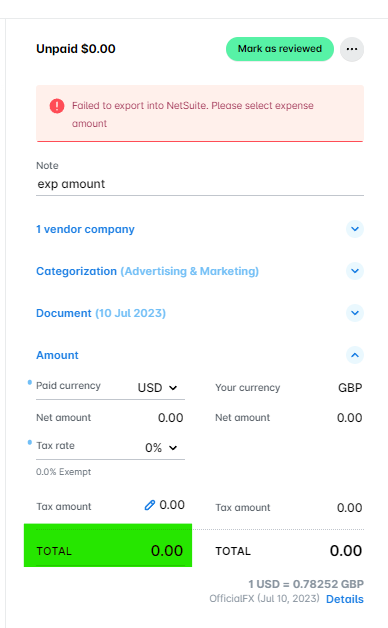
Falls die Ausgabe tatsächlich keinen Betrag aufweist, beispielsweise weil sie versehentlich angelegt wurde, sollten Sie in Erwägung ziehen, die Ausgabe zu löschen, anstatt sie zu exportieren.