Payhawk can export your card transactions to Oracle NetSuite as credit card charges. A credit card charge records card spend that is already paid, so it posts the expense and the payment in one record instead of a vendor bill followed by a bill payment.
For more information, go to the article about exported data between Oracle NetSuite and Payhawk.
Before you begin
Before you export card transactions as credit card charges, make sure that:
Your Oracle NetSuite account has at least one general ledger account of type Credit Card. An Other Current Liability account does not work for this record type.
Your Oracle NetSuite role has the Credit Card permission at Full level. The accounts payable permissions you use for vendor bills do not cover this record type.
Setting up credit card charge exports
When you connect Payhawk to Oracle NetSuite, select the record type for card expenses, or change it later in the integration settings:
In the Payhawk Web Portal, go to Settings > Integrations.
On the Oracle NetSuite integration, click on the three-dot menu and select Edit configuration.
Under the card expense export settings, select Credit Card Charges as the record type.
Select the credit card general ledger account to charge.
Click on Save changes.
Posting credit card charges in Oracle NetSuite
Payhawk exports a card transaction as a credit card charge after the transaction has settled and the expense has been reviewed. Payhawk doesn’t create a separate payment journal entry for it, because the charge covers both the expense and the payment.
The charge posts as soon as Oracle NetSuite saves it, and then Oracle NetSuite performs the following steps:
Debits the expense or item account with the net amount.
Debits the VAT or GST on purchases account with the tax amount.
Credits the credit card account with the gross amount.
The credit card account balance ties to your card statement from that moment. You clear the balance later with the statement settlement itself, not with a bill payment.
A credit card charge carries a Vendor field, and your card spend stays visible in supplier spend and purchase reports. The charge creates no accounts payable entry, so it does not appear in accounts payable aging, in payment runs, or in payables-based cash forecasting.
Exported data
Payhawk exports the following data to a credit card charge:
Supplier
Category, mapped to the Oracle NetSuite chart of accounts
Document date
Service period, shown as the posting period in Oracle NetSuite
Note, shown in the Memo field
Document image
Amount, net of tax
Currency and FX rate
VAT rate
Classifications, including departments, classes, locations, and custom segments
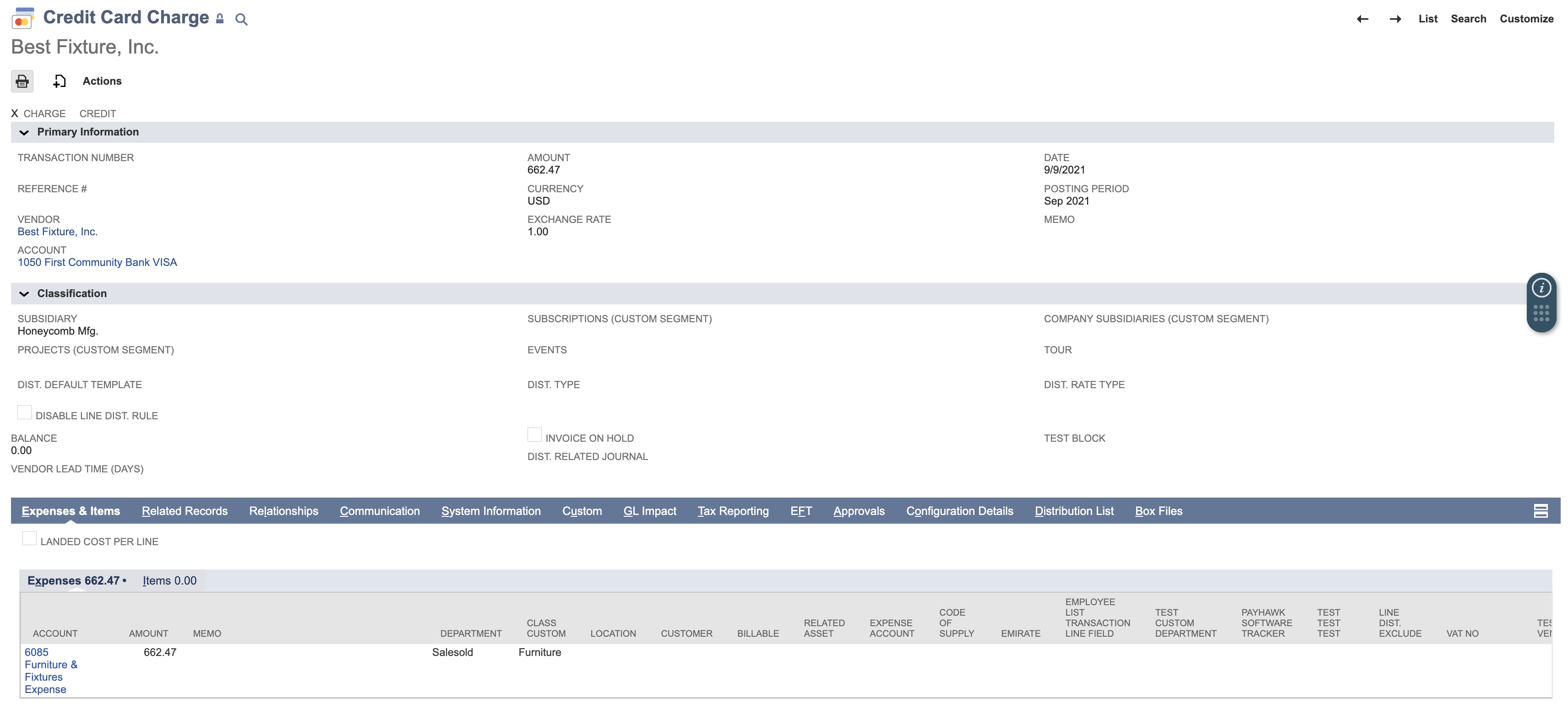
Credit card charges don’t have Due date, Amortization start date, Amortization end date, and purchase order links, so Payhawk skips them.
Notes on credit card charge exports
If you switch Payhawk card expenses from a bank account mapping to a credit card general ledger account, make the change at the end of a month. This keeps the credit card account balance tied to your card statement and avoids mixed records within one accounting period.
A credit card charge posts the expense directly against the credit card general ledger account, so there is no open payable for a payment to be linked to.
Useful resources