Error message
Invalid Cost Unit selection in expense.Affected ERP integrations
Exact Online
Cause
This error occurs for one of two reasons:
A cost unit was synced to Payhawk as a custom field option but has since been deleted from Exact Online. When Payhawk attempts to attach the deleted cost unit reference to the expense during export, Exact Online cannot find it and rejects the transaction.
The cost unit selected for an expense in Payhawk has an End date configured in Exact Online that has already passed, making the cost unit inactive.
Solution
You can resolve this issue in one of the following ways:
Re-sync custom fields and select an existing cost unit.
In the Payhawk Web Portal, go to Settings > Integrations > Exact Online.
Click on its three-dot menu and select Manually sync.
Open the expense that failed to export.
Update the cost unit selection to an existing, active cost unit from the refreshed list.
Save the expense and attempt to export it again.
Extend the cost unit's End date in Exact Online.
Log in to your Exact Online account.
Navigate to Master Data > Financial > Cost unit.
Locate and click on the cost unit that is selected in your Payhawk expense.
Review the End date field.
Update the End date to a date in the future to reactivate the cost unit:
If the cost unit must remain active indefinitely, consider removing the End date entirely.
If the cost unit must only be active for a specific period, set an appropriate future date.
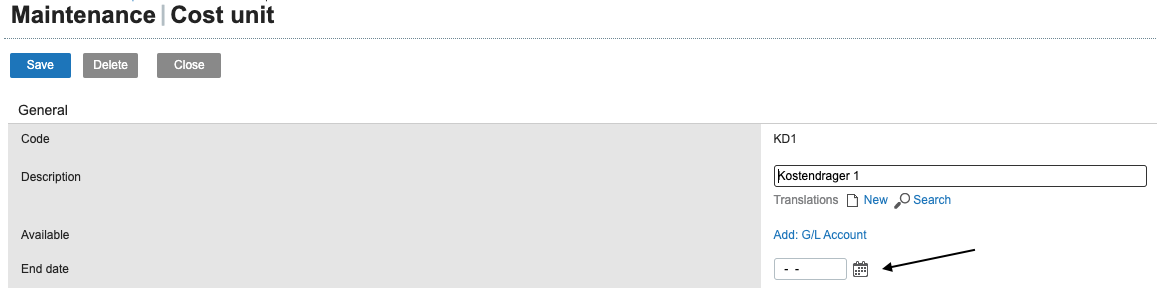
Click Save.
Return to Payhawk and attempt to export the expense again. The export must now be successful.
Ensure that the service date of the expense in Payhawk also falls within the cost unit's active period in Exact Online, as this is a separate validation that Exact Online performs.