Error message
Failed to export expense. Invoice approval is turned on in Exact Online but no approver is set. Please add one in Settings > Invoice Approval.Affected ERP integrations
Exact Online
Cause
This error occurs when the Invoice Approval feature is enabled in your Exact Online account, but no approver has been designated for purchase invoices. When invoice approval is turned on, Exact Online requires at least one approver to be assigned to process purchase invoices. Without an assigned approver, the system cannot complete the export of expenses from Payhawk.
Solution
To resolve this issue:
Log in to your Exact Online account.
Go to Settings > Invoice Approval.
Select Purchase invoice approval.
In the approval settings, add at least one approver who will be responsible for reviewing and approving purchase invoices.
Configure any additional approval workflow settings as needed for your business requirements.
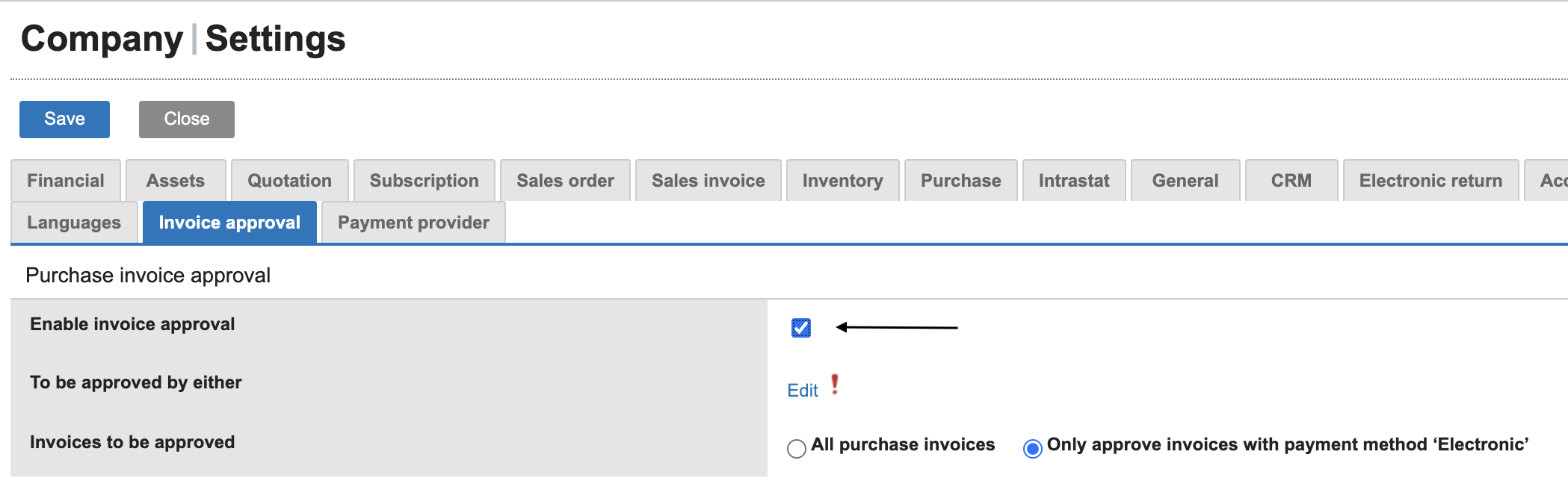
Click Save.
Return to Payhawk and attempt to export the expense again. The export must now be successful.