Error message
The selected Project is not currently active in Exact Online.Affected ERP integrations
Exact Online
Cause
This error occurs when the project selected for an expense in Payhawk has an Active from and Active to date range configured in Exact Online, and the current date falls outside of that range. When Payhawk attempts to attach the project reference to the expense during export, Exact Online rejects the transaction because the project is considered inactive.
Solution
To resolve this issue:
Log in to your Exact Online account.
Navigate to Master Data > Projects > Projects.
Locate and click on the project that is selected in your Payhawk expense.
Review the Active from and Active to fields.
Adjust the date range so that the current date falls within the active period:
Update the Active from date if the project's start date is set to a future date.
Update the Active to date if the project's end date has already passed.
If the project remains active indefinitely, consider removing the Active to date entirely.
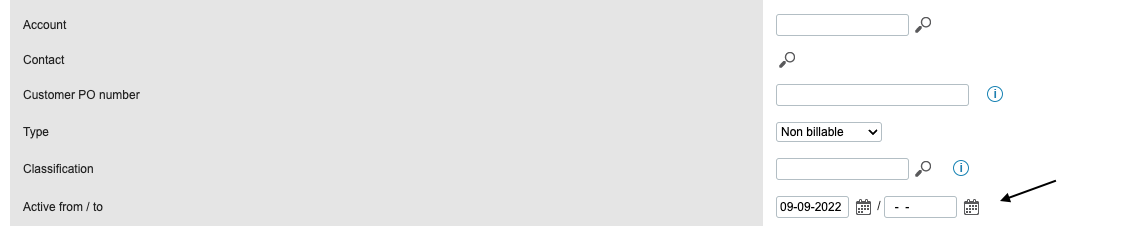
Click Save.
Return to Payhawk and attempt to export the expense again. The export must now be successful.