Foutmelding
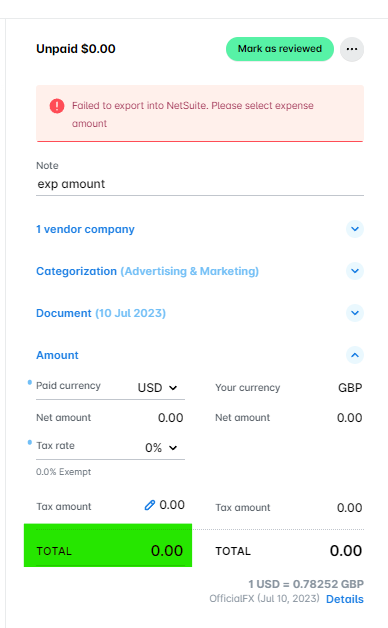
Please select expense amount.

(Selecteer het bedrag van de onkosten.)
ERP-integraties waarop deze fout betrekking heeft
DATEV
Exact online
MS Business Central
Microsoft Dynamics 365 Finance & Operations
Oracle NetSuite
QuickBooks Online
Oorzaak
Deze fout treedt op wanneer het totaalbedrag van de onkosten 0 (nul) is. Payhawk kan onkosten met een bedrag van nul niet exporteren naar je ERP-integratie.
Oplossing
Zo los je dit probleem op:
Ga in het Payhawk-webportaal naar de app onkosten.
Klik op het onkosten-item dat niet kon worden geëxporteerd om de details te bekijken. Je kunt het filter mislukte export gebruiken om het item snel terug te vinden.
Controleer het veld bedrag. Als het 0 is of leeg, voer dan het juiste bedrag in.
Klik op opslaan en probeer de onkosten opnieuw te exporteren.
Als er echt geen bedrag moet worden ingevuld voor de onkosten, bijvoorbeeld omdat deze per ongeluk zijn aangemaakt, overweeg dan om ze te verwijderen in plaats van ze te exporteren.