Fehlermeldung
Failed to export into Microsoft Dynamics 365 Finance. Document number is too long.

(Der Export nach Microsoft Dynamics 365 Finance fehlgeschlagen. Die Dokumentennummer ist zu lang.)
Betroffene ERP-Integrationen
Microsoft Dynamics 365 Finance & Operations
Grund
Dieser Fehler tritt auf, wenn die Dokumentennummer die standardmäßige maximale Länge von 20 Zeichen überschreitet, die für den Export nach Microsoft Dynamics 365 Finance & Operations zulässig ist.
Lösung
So beheben Sie dieses Problem:
Melden Sie sich bei Ihrem Microsoft Dynamics 365 Finance & Operations-Konto an.
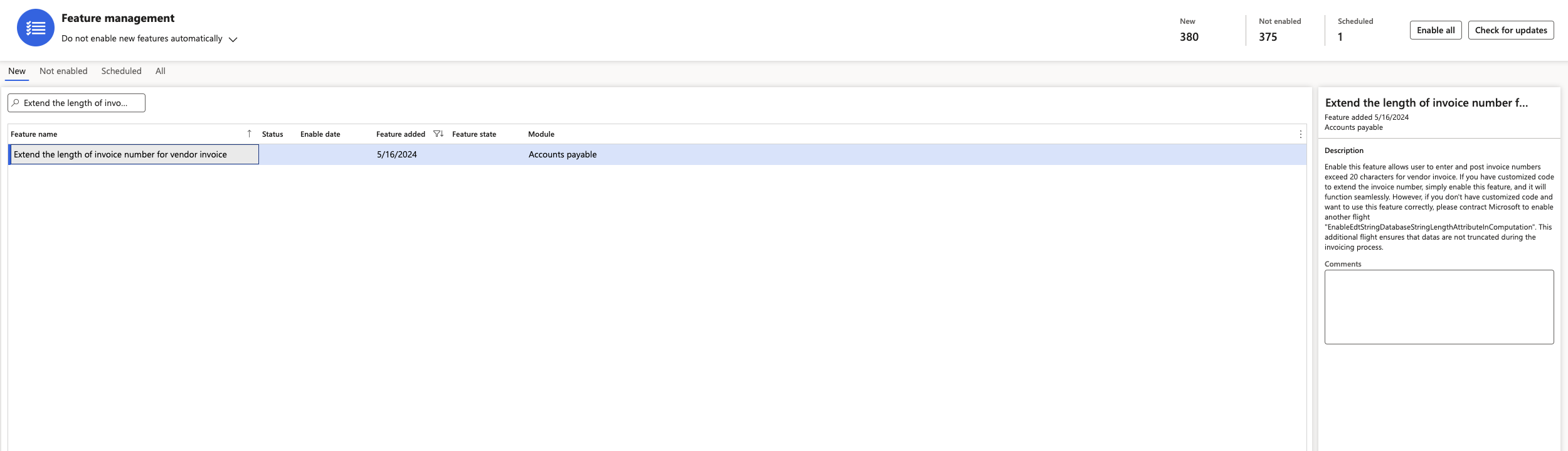
Navigieren Sie zu Funktionsverwaltung.
Wählen Sie die Funktion Rechnungsnummer für Lieferantenrechnungen verlängern aus und aktivieren Sie sie. Sobald die Funktion aktiviert ist, kehren Sie zum Payhawk-Webportal zurück und versuchen Sie erneut, die Ausgabe zu exportieren.