If a Payhawk Administrator at your company has enabled the Travel AI Agent, the Agent will be available both in the Payhawk Web Portal and Payhawk Mobile App.
The Travel AI Agent allows you to book flights and accommodations for business trips directly in the Payhawk platform, and ensures that they align with your company's travel policies.
If your company uses more than one trip type, the Travel AI Agent asks about the purpose of your trip at the start of the conversation and selects the matching type, then tells you which type it chose. You can change the type any time before you submit the request by selecting the trip type button and telling the Agent which type to use.
Selecting flights and hotels
Employees can search for flights and hotels directly in the Payhawk Web Portal and Mobile App, using the Travel AI Agent:
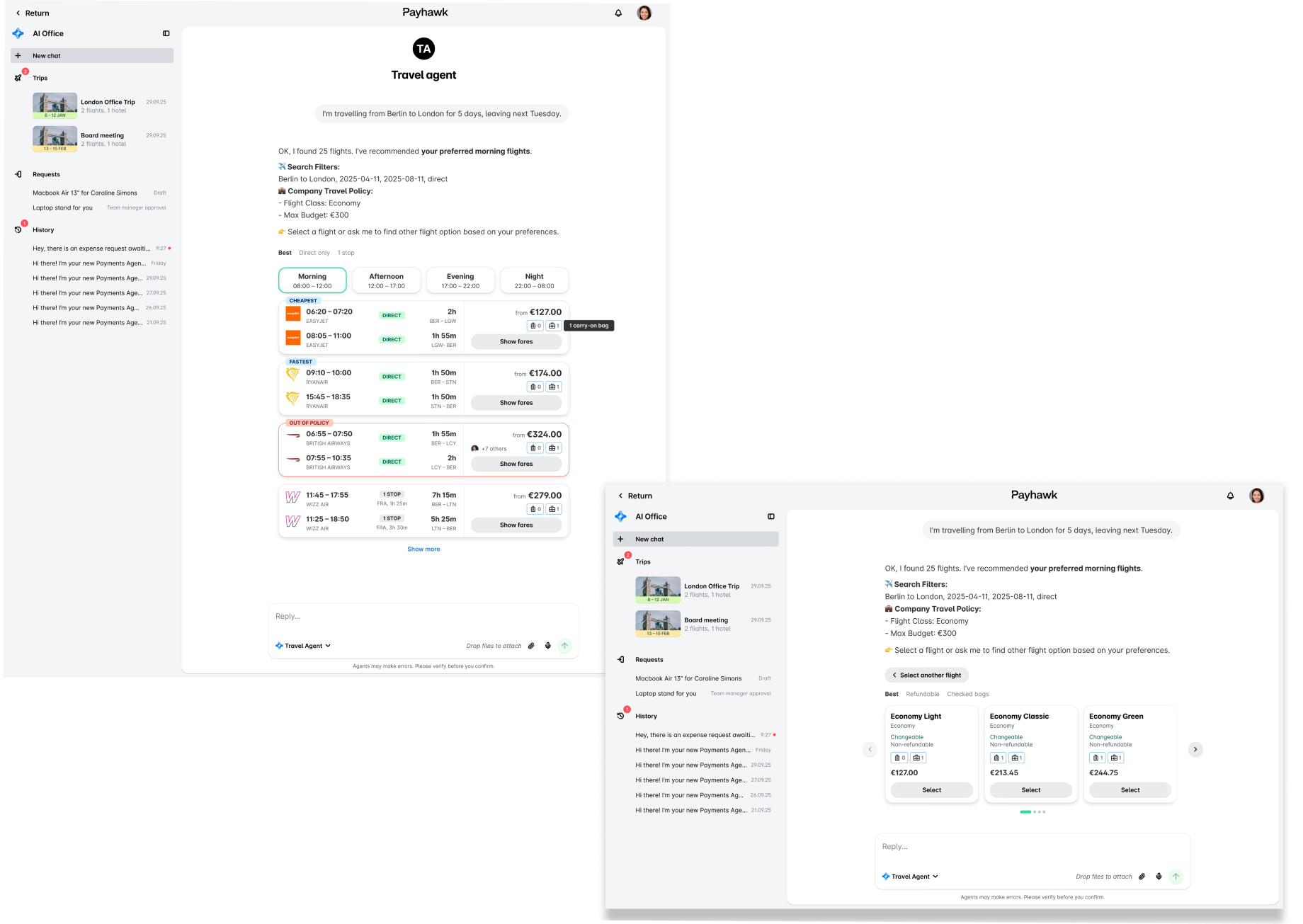
You can search for flights in a fully conversational manner by providing the necessary details about your destination and dates. For example, if you want to travel from Berlin to London on a specific date, you can ask the Agent directly:
You can also search for hotels in a fully conversational manner by providing the necessary details about your stay destination and dates. For example, if you want to stay in London on specific dates, you can ask the Agent directly:

Selecting round-trip flights
When you book a round-trip flight, the Travel AI Agent handles one leg at a time - your departure first, then your return. For each leg, you can sort results, filter by time of day, and compare prices shown as a "from" amount. The IN POLICY badge marks policy-compliant options, and the Preferred airline badge marks recommended carriers.
You can pick a different airline for each leg. Your choice determines how the trip is fared, paid, and expensed:
If you have selected the same airline for both legs, the AI Agent will combine your flights into one round-trip fare with a single payment and a single expense. This combined fare can cost less than the two one-way "from" prices added together.
If you have selected different airlines for each leg, the AI Agent will book two separate tickets, each with its own payment and its own expense.
After you select a flight for every leg, click on Confirm fares to finalize pricing and policy compliance. Then continue through the trip request flow and click Submit.

Selecting multi-city trips
When you book a multi-city trip, the Travel AI Agent handles one leg at a time - first the initial destination city, then the next city, and so on.
For each flight, you can sort results, filter by time of day, and compare prices shown as a "from" amount. The IN POLICY badge marks policy-compliant options, and the Preferred airline badge marks recommended carriers. You can pick a different airline for each leg. After you select a flight for every leg, click on Confirm fares to finalize pricing and policy compliance.
Then, you can continue through the trip request flow to select hotels by clicking on Add hotels. For each city, you can see the recommeded options closest to your preferred location. Under POLICY, you can see max hotel rate per night and the hotel rating, as defined in your organization’s travel policy. After you select a hotel for every leg, click Submit.

Submitting trip requests in the Portal
The Travel AI Agent is a conversational tool, which means that you can provide it with the necessary information to submit a trip request in a conversational manner:
In the the Payhawk Web Portal, navigate to the AI Office.
Tell the Agent where you want to travel and on which dates.
Provide the information requested by the AI Agent conversationally to complete your trip request. For example, specify whether you need fewer or more allowances than those included in your company's policy. Once all required data is collected, the AI Agent summarizes your trip request before submission.
Click on the Submit button.

Submitting trip requests in the App
You can also submit your trip requests for approval directly in the Payhawk mobile app using the Travel AI Agent.
To submit a trip request in the App:
In the Payhawk Mobile App, navigate to the AI Office.
Tell the Agent where you want to travel and on which dates.
Provide the necessary information to the Agent in a conversational manner so it can fill out the trip request data required for submission. Once the necessary data is collected, the Agent will summarize the state of your trip request.
Tap on Submit.

After you submit the trip request in the Payhawk Mobile App, you can track its approval status and view its itinerary from the Trips tab of the AI Office. For details, see the article on viewing and updating existing trips.
Daily spend on your trip request
Depending on your company's travel policy, a trip can include daily spend on top of the flights and hotels. This is either a card allowance or a per diem, and the Travel AI Agent adds it to your request automatically. The request summary shows the amount so you can review it before you submit.
Card allowance - Your company adds a cash amount to your card for the trip, approved together with the request. You can spend it from approval until the last day of the trip, and any unspent amount is removed when the trip ends.
Per diem - You do not fill in a per diem claim. The request summary shows the per diem as a total with one line for each day of the trip. Payhawk reimburses the per diem after the trip, and once your request is approved, it creates a draft per diem expense and notifies you to review and submit it.
Recovering from a payment failure
Most trip requests are approved and paid without any issue. If a payment does fail after approval, the Travel AI Agent tells you which part of the trip needs attention and lets you fix it without submitting a new trip request or waiting for approval again.
If a payment fails, you will see a message that some of the bookings require your attention and will be asked by The AI Agent whether you want to search for alternatives.
How you recover depends on which leg failed:
If the departure flight was successfully paid, but the return one failed, your departure flight will be kept and you will have to choose a new return flight only. In this case, you will select, confirm, and submit the return flight on its own.
If the departure flight payment failed, you will have to restart your flight selection for both flights. This prevents you from paying for a return flight with no departure in place.
For a combined round-trip fare (same airline for both flights), the payment succeeds or fails as a whole - there is no partial booking. If it fails, you will have to restart the flight selection for both departure and return flights.
Replacement flights follow the same budget rule as the original request: you can rebook within the approved budget plus a 10% buffer without needing a new approval, and anything above that needs re-approval. Because a restart keeps the same trip request, the original approval stays valid as long as the new flights stay within budget plus 10%.
Notes on booking flights and hotels with the Travel AI Agent
Payhawk Administrators and employees with the required permissions can book flights and hotels on behalf of other employees. The booking flow is the same as if booking for yourself - the Travel AI Agent applies the traveler's policy and preferences throughout. For details, see the article on booking travel on behalf of other employees.
You can modify or cancel your flight or hotel booking directly through the Travel AI Agent. The AI Agent shows your fare conditions, calculates costs, and handles approvals inline for flight modifications, and retrieves your current cancellation terms, shows the refund amount, and handles approvals if you rebook a hotel. For details, see the article on changing and cancelling your travel bookings.
You can add baggage to your booking directly during the booking process. When the selected fare does not include a baggage option, the Travel AI Agent automatically suggests a smart bundle. In some cases, adding or modifying baggage after booking may require arranging directly with the airline.
When you add a new request to an existing trip, both requests must be of the same trip type. If you start a request of a different type and then ask to add it to an existing trip, the Travel AI Agent changes the type so that they match.