Mensaje de error
Failed to create bank statement for expense payment in Microsoft Dynamics 365 Finance.

(No se ha podido crear el extracto bancario para el pago del gasto. La cuenta bancaria seleccionada en la configuración no tiene habilitada la Conciliación bancaria avanzada. Actívala y vuelve a intentar la exportación.)
Integraciones de ERP afectadas
Microsoft Dynamics 365 Finance & Operations
Motivo
Este error se produce cuando la función Conciliación bancaria avanzada no está habilitada para la cuenta bancaria especificada en la configuración de la integración de Payhawk en Microsoft Dynamics 365 Finance & Operations.
Solución
Para resolver este problema:
Inicia sesión en tu cuenta de Microsoft Dynamics 365 Finance & Operations.
Ve a Gestión de efectivo y bancos > Cuentas bancarias.
Selecciona la cuenta bancaria configurada en tu integración con Payhawk, por ejemplo, la cuenta utilizada para los pagos de gastos.
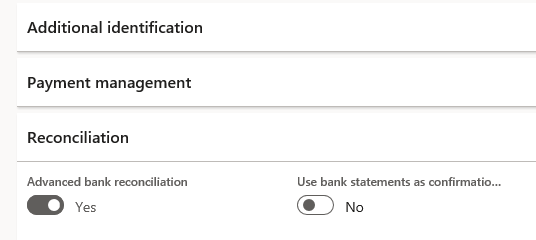
Ve a la sección Conciliación o a la configuración de esa cuenta bancaria.
Activa el interruptor Conciliación bancaria avanzada.
Guarda los cambios.
Vuelve al portal web de Payhawk e intenta exportar el gasto de nuevo.