Error message
Failed to export expense. Invalid vendor specified.Affected ERP integrations
Exact Online
Cause
This error occurs when the supplier selected for an expense in Payhawk is not considered active in your Exact Online account. Exact Online cannot post transactions to inactive suppliers, which causes the export to fail.
A supplier can be considered invalid or inactive for two primary reasons:
The supplier has been deleted and the supplier record no longer exists in Exact Online.
The supplier's account has an End Date in the past, effectively deactivating them for any new transactions.
Solution
You can resolve this issue in one of the following ways:
Reactivate the supplier in Exact Online.
Log in to your Exact Online account.
Navigate to Master Data > Accounts > Suppliers.
Locate the supplier that is causing the error.
Click on the supplier's name and go to the Information tab.
Check the End Date field. If a date is set that is in the past, you must remove it or change it to a future date to reactivate the supplier.
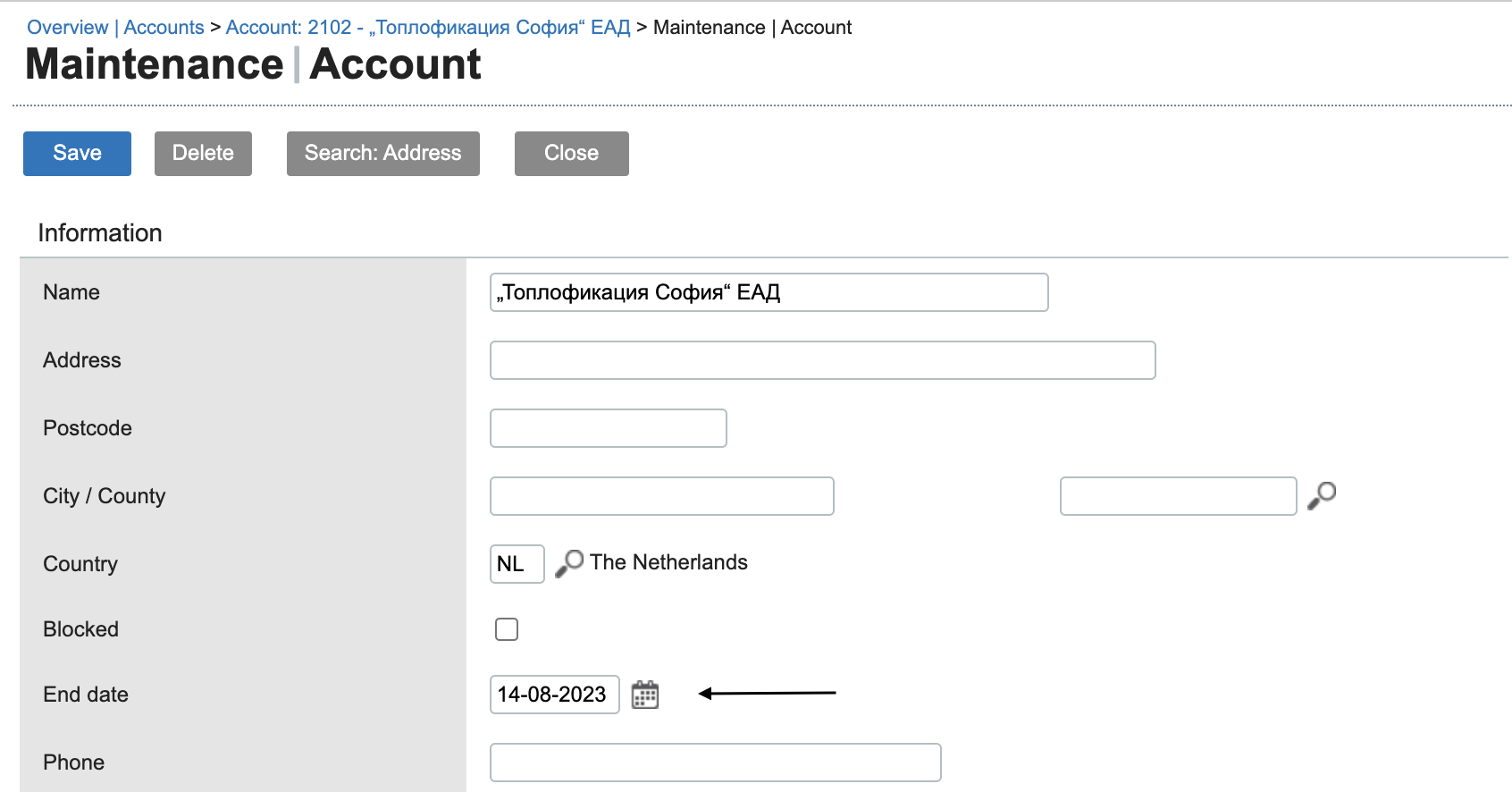
Click Save.
Select an active supplier in Payhawk.
In the Payhawk Web Portal, go to Expenses.
Click on the expense that failed to export.
Change the selected supplier to an active one that exists in your Exact Online account.
Save the expense and attempt to export the expense again. The export must now be successful.