Error message
The selected Cost Center is not allowed with the selected category. Please check the G/L account Cost analysis in Exact Online.Affected ERP integrations
Exact Online
Cause
This error occurs when the General Ledger (G/L) account mapped to your expense category in Payhawk has specific restrictions on which cost centers can be used with it in Exact Online. If the selected cost center in your Payhawk expense is not part of the allowed list for that G/L account (as defined in its Cost analysis settings), Exact Online will reject the export.
Note that if the expense includes fees, the error can be related to the Fees account configured in your Payhawk integration wizard, rather than the G/L account mapped to the expense category itself.
Solution
To resolve this issue:
Log in to your Exact Online account.
Navigate to Master Data > Financial > G/L Accounts.
Locate the G/L account that is mapped to your expense category in Payhawk. If the expense has fees, also check the G/L account configured as your Fees account in Payhawk's Exact Online integration settings.
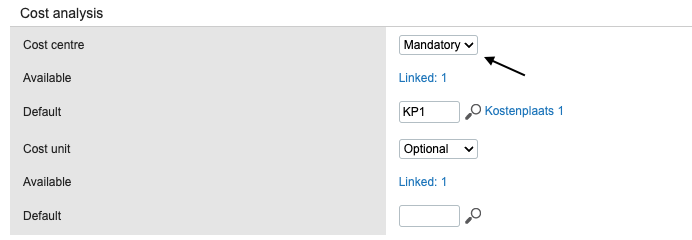
Click on the G/L account to view its details, and go to the Cost analysis section.
Review the settings for Cost center.
Check if a mandatory set of cost units is specified.
Verify that the cost center selected in your Payhawk expense is included in the Available property for that G/L account. If the selected cost center is not allowed, you will need to either:
Adjust the G/L account's Cost analysis settings in Exact Online to include the desired cost center.
Select a different, permissible cost center in Payhawk for the expense.
Select a different expense category in Payhawk that maps to a G/L account allowing the desired cost center.
Click Save.
Return to Payhawk and attempt to export the expense again. The export must now be successful.