Foutmelding
Failed to create bank statement for expense payment. Selected bank account in the configuration is missing Advanced bank reconciliation. Please enable it and retry export.

(We konden geen bankafschrift genereren voor de onkostenvergoeding. De geselecteerde bankrekening in de configuratie heeft geen Geavanceerde bankafstemming. Schakel deze in en probeer opnieuw te exporteren)
ERP-integraties waarop deze fout betrekking heeft
Microsoft Dynamics 365 Finance & Operations
Oorzaak
Deze fout treedt op wanneer de functie geavanceerde bankafstemming niet is ingeschakeld voor de bankrekening die is opgegeven in de Payhawk-integratieconfiguratie binnen Microsoft Dynamics 365 Finance & Operations.
Oplossing
Zo los je dit probleem op:
Log in op je Microsoft Dynamics 365 Finance & Operations-account
Navigeer naar Kas- en bankbeheer > bankrekeningen.
Selecteer de bankrekening die is geconfigureerd in je Payhawk-integratie, bijvoorbeeld de rekening waarop je onkostenvergoedingen ontvangt.
Ga naar het gedeelte afstemming of de instellingen voor die bankrekening.
Schakel de optie geavanceerde bankafstemming in.
Sla de wijzigingen op.
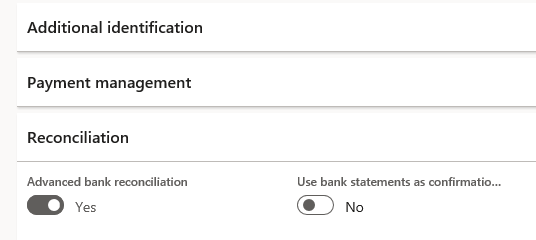
Ga terug naar het Payhawk-webportaal en probeer de onkosten opnieuw te exporteren.