The direct integration between Payhawk and Rillet provides a comprehensive solution for exporting both expense management and payment transaction data.
The integration encompasses all financial activities within the platform, including both centrally managed expenses as well as employee-related expenses and separate FX and POS fees.
Once connected, your chart of accounts, tax rates, suppliers, and custom fields flow from Rillet to Payhawk, and every reviewed expense and settled payment is exported to Rillet as the matching accounting document. There is no need for manual data entry or CSV uploads.
Master data and custom fields
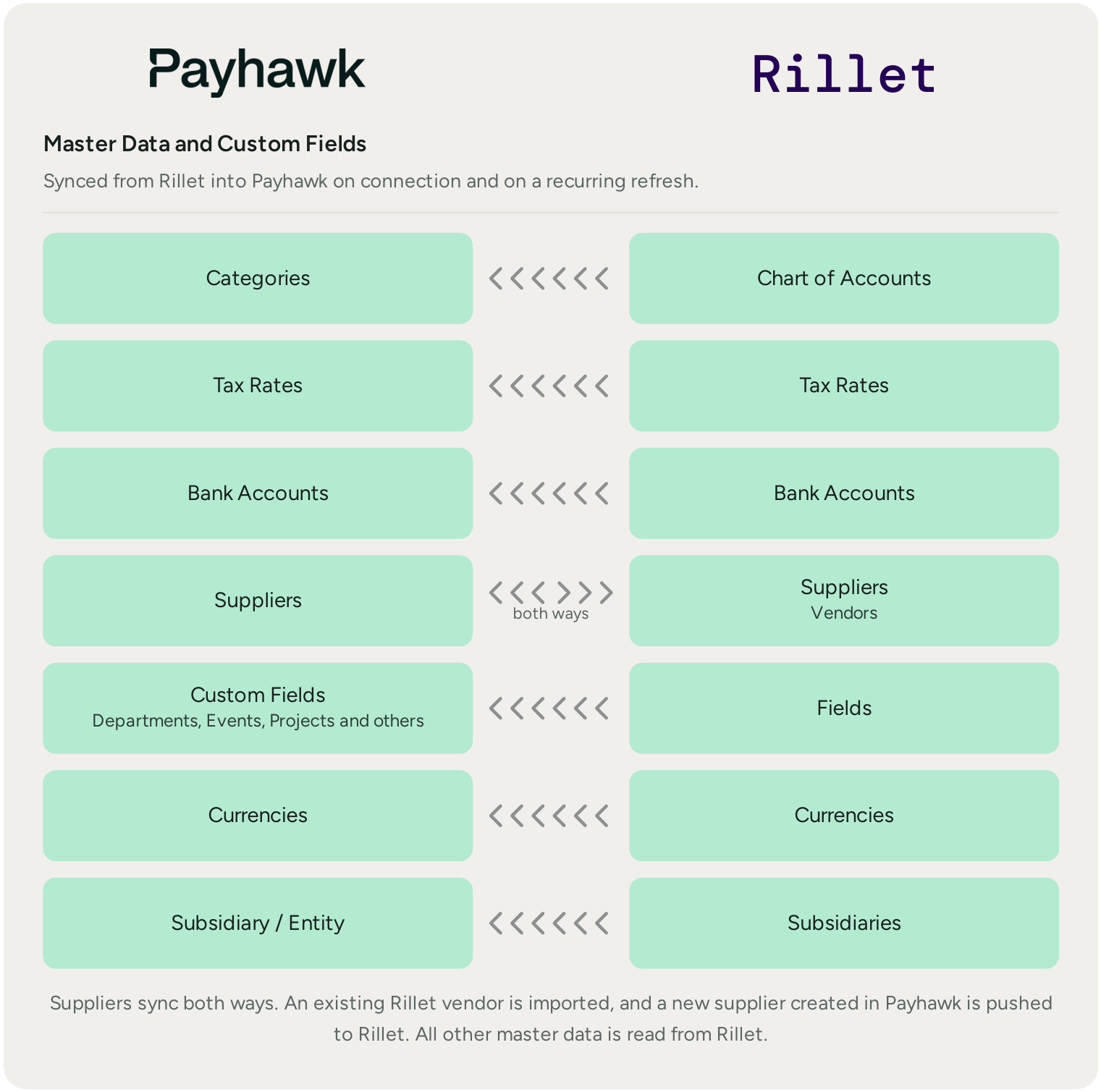
When you connect, Payhawk imports your master data from Rillet, so that you code expenses against the same data that is in your ledger. The data refreshes on a recurring basis, so new accounts or vendors that you create in Rillet appear in Payhawk automatically.
The following diagram summarizes the data that is automatically synced between the two systems.
Reviewed expenses and settled payments
Once an expense is reviewed in Payhawk, it is immediately exported to Rillet as a bill, together with its coding and document. Once the payment settles, Payhawk also exports the matching bank transaction, so that your ledger reconciles.
The following diagram shows the exchanged data regarding reviewed expenses and settled payments between the Payhawk and Rillet systems.

Exported data fields to Rillet
Payhawk exports the following data fields to the Rillet system:
Supplier - If the supplier does not yet exist in the Rillet, Payhawk will notify the user that this may be a new supplier and will display the option to create it from Payhawk or, if the user role is Employee, to request so from an Administrator role. A supplier that you create in Payhawk is also pushed to Rillet as a vendor. Supplier invoices are exported as bills against the matched Rillet vendor. Reimbursements, mileage, and per diems are exported as bills or reimbursements, against either a single dummy vendor or account, or the employee, created as a vendor in Rillet, so that you can track the amounts owed per employee.
Category - Mapped to the Rillet chart of accounts.
Document number
Document date
Service period - Once the Payhawk administrator changes the Service period date in Payhawk, it will overwrite the Document date of the expense posted in the ERP system. You can use it to post an expense to a future accounting period.
Due date - For all bank expenses, Payhawk exports the due date. If no due date has been entered, Payhawk uses the expense date as a due date.
Note - The Note field for the expense in Payhawk is shown as the line description of the expense in Rillet.
Document image - The receipt or invoice attached to the expense.
Amount - The total amount minus the tax rate for the expense. Refunds are exported so that they offset the original spend and keep the net amount correct in Rillet.
Currency
Tax rate - The tax rate provided by Rillet.
Payhawk bank account - Mapped to the matching bank account in Rillet.
Custom fields - Payhawk imports the Rillet fields, such as Departments, Events, and Projects, and allows them to be used as expense fields.
Fees - FX and POS fees are exported as separate bank transactions, posted to a custom accounting code, so that fees stay separate from the spend.