Payhawk integrates with SAP S/4HANA® in order to allow you to have full control over the data exchanged between the two systems.
Payhawk performs data synchronization when connected to SAP S/4HANA for the first time. Optionally, as a Payhawk Administrator, you can trigger the data sync on demand.
The integration creates a bank account for each active currency in Payhawk. You can also specify the starting date of the balances that you want to synchronise between Payhawk and SAP S/4HANA. See the exact data fields shared between the two systems.
Master data and custom fields
The following diagram summarizes the data that is automatically synced between the systems.
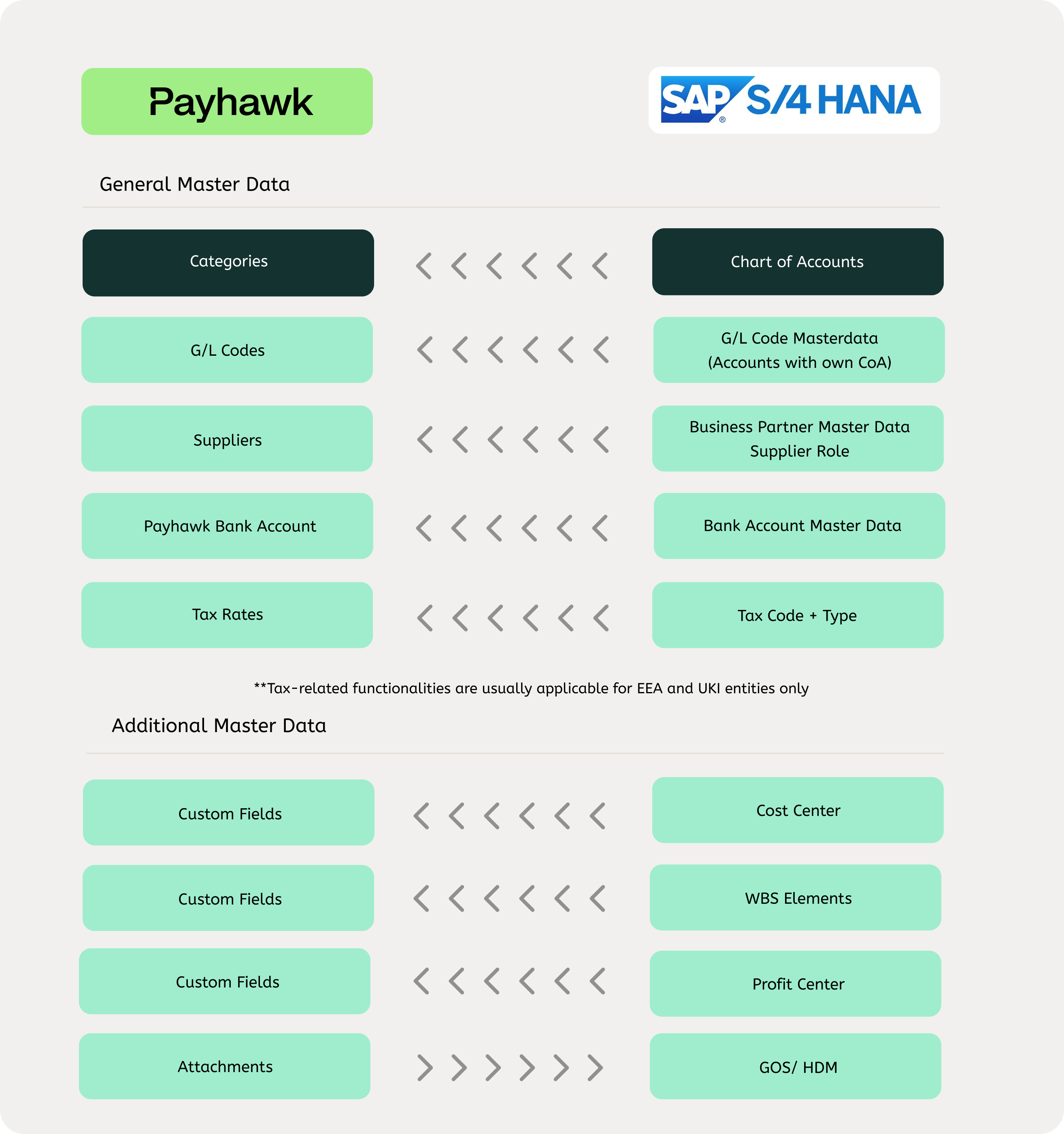
The integration works in two directions:
SAP S/4HANA to Payhawk: Your SAP S/4HANA master data, such as GL accounts, tax codes, cost centers, and suppliers, is pulled into Payhawk so your team can categorize expenses using real SAP S/4HANA data.
Payhawk to SAP S/4HANA: When an expense is reviewed, it is automatically posted to SAP S/4HANA as a journal entry or supplier invoice, complete with payment details and receipt attachments.
Reviewed expenses and settled payments
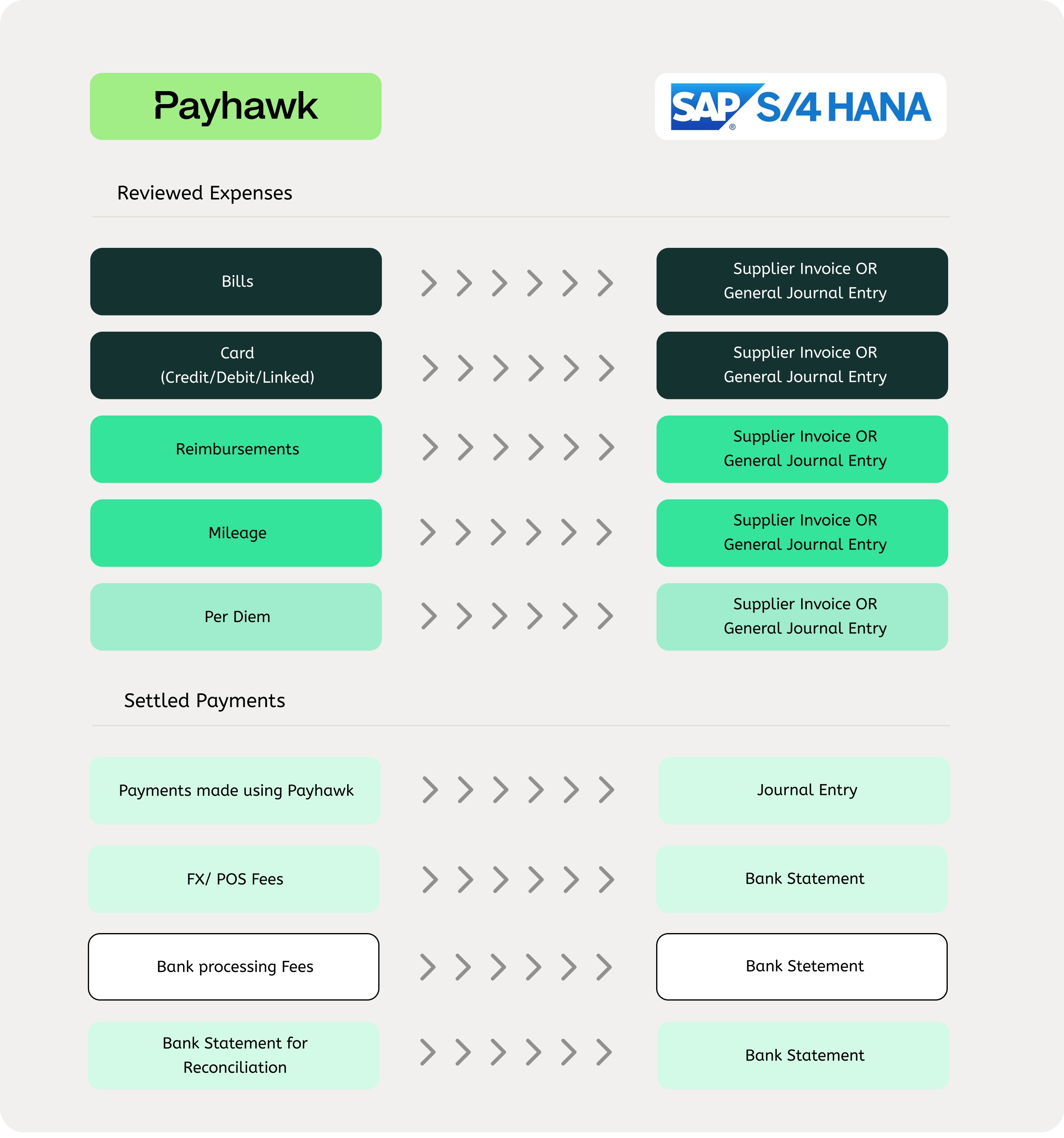
The following diagram shows the exchanged data regarding reviewed expenses and settled payments between the Payhawk and SAP S/4HANA systems.
Pushing expenses and payments to SAP S/4HANA
Once an expense is marked as reviewed by a Payhawk Accountant or Administrator, Payhawk will push that expense to SAP S/4HANA as a journal entry or supplier invoice depending on the expense type and your configuration setup.
Card and bill expenses are exported as journal entries or supplier invoices, while reimbursements, mileage, and per diems are always exported as journal entries.
Payments are automatically exported when they are cleared and settled by the bank.
Bank statements are exported as bank statements.
Exported data fields to SAP S/4HANA
Payhawk exports the following data fields to the SAP S/4HANA system:
Currency - The Transaction currency.
Note - The Note field for the expense in Payhawk is shown in the Document description field of the expense in SAP S/4HANA.
Document date
Bookkeeping date - The Posting date.
Expense ID - The External reference.
Supplier - business partner
Category - Mapped to the SAP S/4HANA GL account.
Amount - The total amount minus the tax rate for the expense.
Cost center - It is either mapped to a Payhawk team, or synced as a custom field.
Tax code
Description
FX rate - When a card is used for a transaction in a currency different from the card's currency, Visa or Mastercard applies an FX rate. Payhawk then exports this expense to SAP S/4HANA in the card's currency, using that FX rate. However, if the card's currency also differs from SAP S/4HANA's base currency, two FX translations will occur: one from Visa or Mastercard and another from the accounting system, for example, for a foreign currency invoice.