Fehlermeldung
Dimensions already exist. Please ensure no default dimensions have effect on that expense in MS Business Central.

(Dimensionen sind bereits vorhanden. Bitte vergewissern Sie sich, dass für diese Ausgabe in MS Business Central keine Standardabmessungen wirksam sind.)
Betroffene ERP-Integrationen
MS Business Central
Grund
Dieser Fehler tritt auf, wenn in MS Business Central automatisch Standarddimensionen zugewiesen werden, was zu einem Konflikt mit den Dimensionen führt, die Payhawk auf Grundlage der benutzerdefinierten Felder der Ausgabe festlegen möchte. Diese automatische Zuweisung kann folgende Ursachen haben:
Auf dem Kreditor festgelegte Dimensionen: Ihr Buchhaltungssystem weist Einkaufsbelegen möglicherweise automatisch Dimensionen zu, die auf den Einstellungen des Kreditors basieren.
Auf dem Sachkonto festgelegte Dimensionen: Ebenso können Standardgrößen direkt auf dem Sachkonto konfiguriert werden, das für die Ausgabe verwendet wird.
Lösung
Sie können dieses Problem auf folgende Weise lösen:
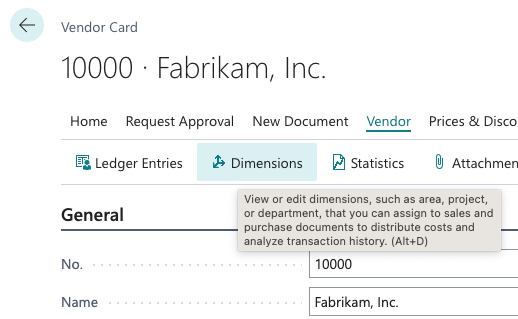
Entfernen Sie die Dimensionen aus dem Lieferantendatensatz.
Melden Sie sich bei Ihrem MS Business Central-Konto an.
Navigieren Sie zu der Lieferantenkarte, die mit dem Kosteninhaber oder der Transaktion verknüpft ist.
Überprüfen Sie die Einstellungen unter Dimensionen für diesen Anbieter.
Entfernen Sie alle Standarddimensionen, die automatisch eingefügt werden und zu Konflikten führen.
Speichern Sie die Änderungen am Lieferantendatensatz.
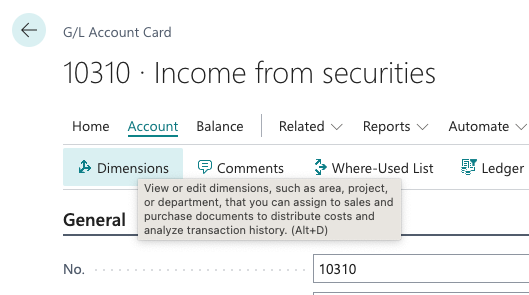
Entfernen Sie Dimensionen aus dem Sachkonto.
Melden Sie sich bei Ihrem MS Business Central-Konto an.
Identifizieren Sie das Sachkonto, das mit dem Aufwand verbunden ist, der nicht exportiert werden kann.
Navigieren Sie zu den Einstellungen oder Details des betreffenden Sachkontos.
Überprüfen Sie die Einstellungen unter Dimensionen und entfernen Sie alle Standarddimensionen, die automatisch ausgefüllt werden.
Speichern Sie die Änderungen am Sachkonto.
Nachdem Sie eine oder beide der oben genannten Optionen durchgeführt haben, kehren Sie zum Payhawk-Portal zurück und versuchen Sie erneut, die Ausgabe zu exportieren. Payhawk muss in der Lage sein, die Dimensionen auf Grundlage der benutzerdefinierten Felder der Ausgabe ohne Konflikte festzulegen.