Error message
Failed to export expense. Purchase journal is blocked for creating entries in Exact Online. Please unblock it or select another journal.Affected ERP integrations
Exact Online
Cause
This error occurs when the specific Purchase journal selected for exporting expenses in Payhawk is blocked for creating entries in Exact Online. Exact Online journals can be configured to prevent new entries, which will cause any attempted exports to that journal to fail.
Solution
You can resolve this issue in one of the following ways:
Unblock the Purchase journal.
Log in to your Exact Online account.
Navigate to Master Data > Financial > Journals.
Locate the Purchase journal that is being used for your Payhawk exports.
Click on the journal to edit its settings.
In the General section of the journal settings, check if the Blocked or similar option is selected.
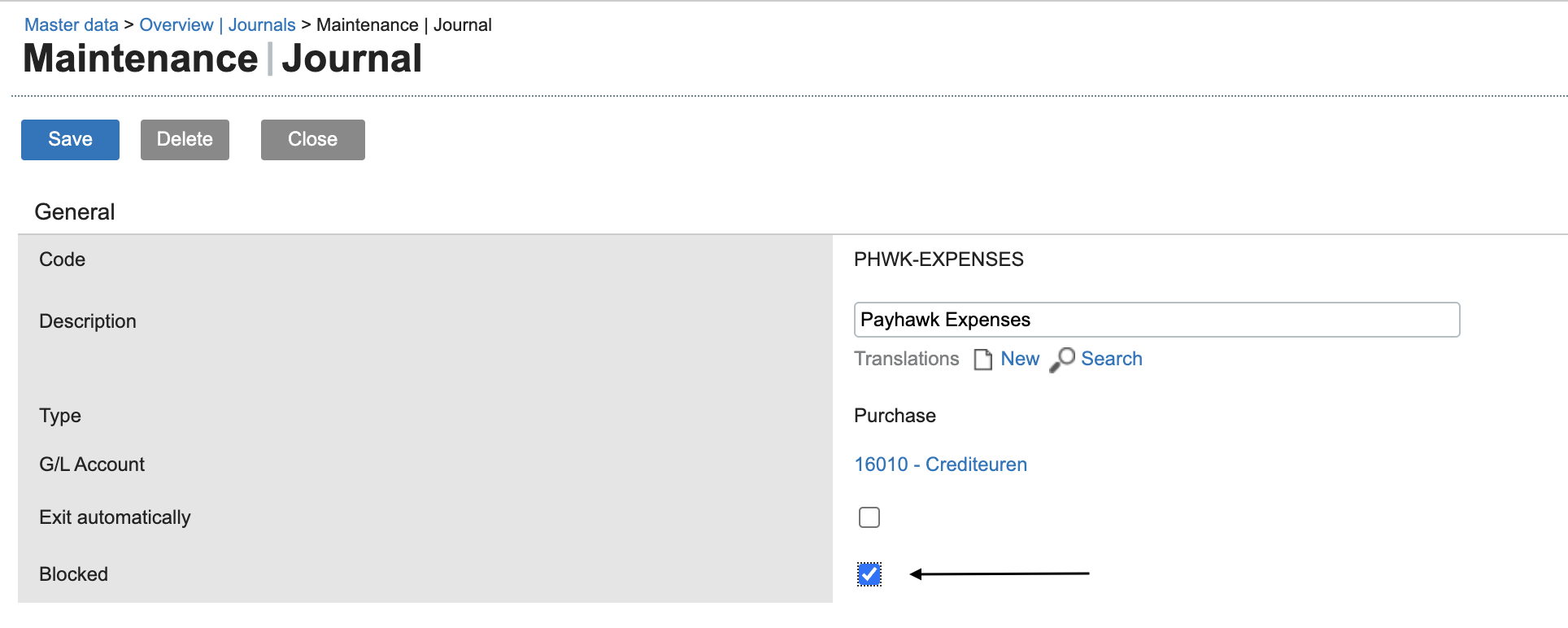
Deselect or uncheck this option to unblock the journal for entries.
Click Save.
Select another Purchase journal.
In Payhawk, go to your integration settings for Exact Online.
Locate the setting where you define the Purchase journal for exports.
Select an alternative Purchase journal that is not blocked for entries in Exact Online.
Click on Save.
Return to Payhawk and attempt to export the expense again. The export must now be successful.