Foutmelding
Failed to export into MS Business Central. An upgrade for Purchase Credit Memo API is required in MS Business Central. Please contact your MS Business Central administrator.

(Exporteren naar MS Business Central is mislukt. Je moet een upgrade voor de API voor inkoopcreditnota's installeren in MS Business Central. Neem contact op met je beheerder van MS Business Central)
ERP-integraties waarop deze fout betrekking heeft
MS Business Central
Oorzaak
Deze foutmelding geeft aan dat de versie van de Purchase Credit Memo-API in MS Business Central verouderd is dat de gegevens die uit Payhawk worden geëxporteerd zonder upgrade niet kunnen worden verwerkt.
Oplossing
Zo los je dit probleem op:
Log in op je MS Business Central-account.
Zoek en open de Overzicht van gegevensupdates API via de zoekfunctie.
Selecteer in de lijst het regelitem voor creditnota aankoop en klik vervolgens in de werkbalk op upgrades inplannen.
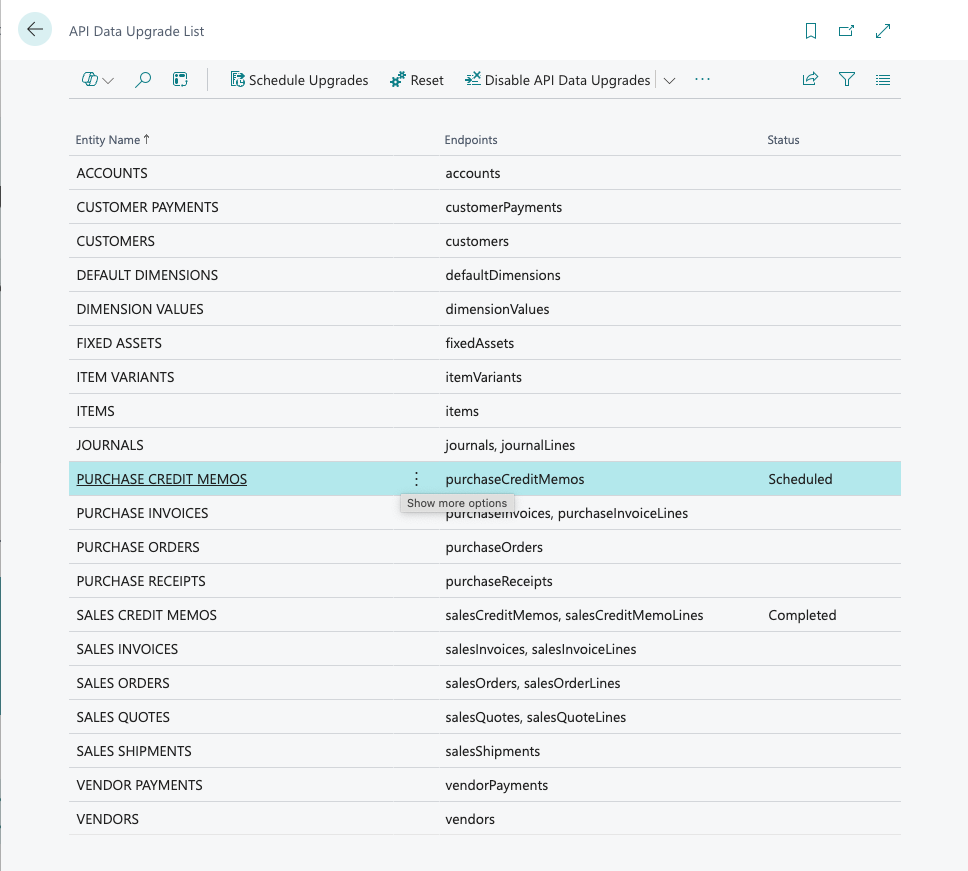
Volg de aanwijzingen in de volgende vensters om de upgrade te plannen en te installeren.
Als je de upgrade geïnstalleerd hebt, ga je terug naar het Payhawk-webportaal en probeer je de creditnota opnieuw te exporteren.