Foutmelding
Dimensions already exist. Please ensure no default dimensions have effect on that expense in MS Business Central.

(Dimensies bestaan al. Controleer of er voor het betreffende onkosten-item in MS Business Central geen standaarddimensies actief zijn)
ERP-integraties waarop deze fout betrekking heeft
MS Business Central
Oorzaak
Deze fout treedt op wanneer standaarddimensies automatisch worden toegepast in MS Business Central, waardoor er een mismatch ontstaat met de dimensies die Payhawk probeert in te stellen op basis van de aangepaste velden van het onkosten-item. Dit kan voorkomen als gevolg van:
Dimensies die zijn ingesteld op de leveranciers: Je boekhoudsysteem kan automatisch dimensies toewijzen aan inkoopdocumenten op basis van de instellingen van de leverancier.
Dimensies ingesteld op de grootboekrekening: Op dezelfde manier kunnen standaarddimensies direct worden geconfigureerd op de grootboekrekening die wordt gebruikt voor de onkosten.
Oplossing
Je kunt dit probleem als volgt oplossen:
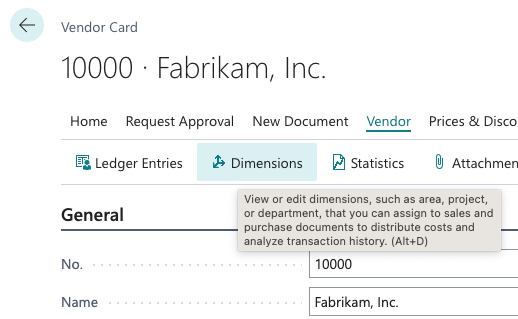
Verwijder dimensies uit het record van de leverancier.
Log in op je MS Business Central-account.
Navigeer naar de leverancier die is gekoppeld aan de eigenaar van de onkosten of de transactie.
Bekijk de instellingen voor dimensies voor die leverancier.
Verwijder alle standaarddimensies die automatisch worden ingevuld en een mismatch veroorzaken.
Sla de wijzigingen op in het leveranciersrecord.
Verwijder dimensies uit de grootboekrekening.
Log in op je MS Business Central-account.
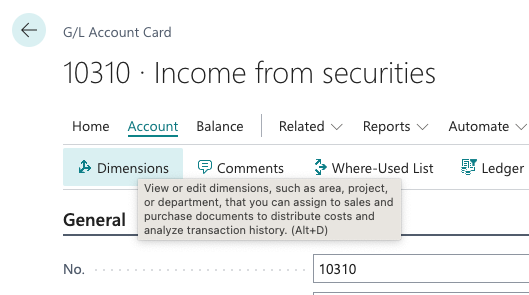
Ontdek welke grootboekrekening gekoppeld is aan de onkosten die niet worden geëxporteerd.
Navigeer naar de instellingen of details van die specifieke grootboekrekening.
Controleer de instellingen van de dimensies en verwijder alle standaarddimensies die automatisch worden ingevuld.
Sla de wijzigingen op in de grootboekrekening.
Ga nadat je een of beide bovenstaande procedures hebt uitgevoerd terug naar het Payhawk-webportaal en probeer de onkosten opnieuw te exporteren. Payhawk moet de dimensies probleemloos kunnen instellen op basis van de aangepaste velden van de onkosten.