AI in accounts payable: what it automates and what humans verify
Sep 28, 202613 min


If your team is still processing invoices manually, you’re spending time and resources on work that slows down month-end and increases the risk of errors, delays, and inconsistent data. By automating your approval workflows, you can remove these bottlenecks, improve accuracy, and gain clearer visibility and control over spend. Learn how.

By submitting this form, you agree to receive emails about our products and services per our Privacy Policy.
As your company scales, invoice approvals become harder to control across teams, entities, and systems. Automation helps finance teams reduce manual AP work, keep approvals moving, and maintain real-time visibility without adding headcount.
To get you started, we've broken down the key parts of the process, the benefits, and what to expect from a good solution.
An invoice workflow is the full journey a vendor invoice takes from receipt to payment. It covers capture, data extraction, validation, PO matching, approval routing, payment scheduling, ERP reconciliation and archiving. Invoice approval is one stage within this wider workflow, and usually the slowest.
Every invoice needs an approval process to confirm it is accurate and legitimate before it is paid. A typical invoice approval process involves receiving an invoice from a vendor, reviewing it, approving it, processing it and paying it.
An effective process uses clear, automated approval workflows to maintain financial control and visibility. It also captures data automatically, which gives finance a more strategic view of spend.
How PinPoint Media took control of spend & cut chaos with custom workflows

Manual approvals create three problems: slow sign-off, errors that slip through, and weak controls. The last one is the costliest. The ACFE's 2026 study covered 2,402 fraud cases in 143 countries. More than half involved either a lack of internal controls or an override of existing ones. The median scheme ran for 12 months before it was found. Organizations using proactive, automated monitoring saw median losses 53% lower (ACFE 2026; PBMares summary).
Lucy Payne, Head of Financial Control and Reporting at Astrid & Miyu, says: "Since moving to Payhawk, we've been able to close our accounts payable ledgers two days earlier than with our previous platform!"
Accounts payable approval software automates one part of the AP process: routing, reviewing and authorizing vendor invoices before they are paid. It replaces email chains and spreadsheets with rules. Each invoice goes to the right approver based on its amount, team, cost center or entity. The software chases approvers who don't respond and records who approved what and when.
AP approval software covers the sign-off step. Full accounts payable software covers the whole invoice workflow: capture, matching, approval, payment and reconciliation. Many finance teams start by automating approvals because that is where invoices stall. They later find that approval works best when it sits in the same platform as capture and payment, with no handover between tools.
An approval matrix sets who signs off which invoices. A simple version:
| Invoice amount | Approver |
|---|---|
| Under $500 | Team manager |
| $500 to $5,000 | Team manager, then department head |
| Over $5,000 | Department head, then CFO |
AP approval software turns this matrix into rules that run on every invoice, so nobody needs to check the policy by hand.
| Manual approval workflow | Automated approval workflow |
|---|---|
| AP enters invoice data manually | OCR extracts vendor, amount, tax and PO data |
| Finance checks details by hand | Matching rules flag discrepancies |
| Approvers are chased by email | Approvers get automatic reminders |
| Comments sit across tools | Comments stay attached to the invoice |
| ERP is updated later | ERP sync happens automatically |
| Month-end cleanup builds up | Spend is processed continuously |
Optical Character Recognition (OCR) makes capturing invoice data easy. Once an invoice is uploaded, OCR captures vendor details, dates, amounts and tax IDs automatically.
Payhawk's OCR reads documents in more than 60 languages and multiple alphabets. It extracts the data, fills in the relevant fields and matches invoices to purchase orders. This removes manual entry and the errors that come with it.
Nadia Vanuytrecht, HR and Operations Manager at Explose Agency, says: "Payhawk makes accounting activities easier; the OCR does part of my job by identifying duplicate invoices and populating the fields."
Two-way matching checks the vendor's invoice against the purchase order: vendor, quantities and prices. Three-way matching also checks the goods receipt (or receiving report), which confirms the items arrived as ordered. Both protect against errors, fraud and disputes. In Payhawk, you set discrepancy thresholds, and an invoice above the threshold triggers its own review workflow.
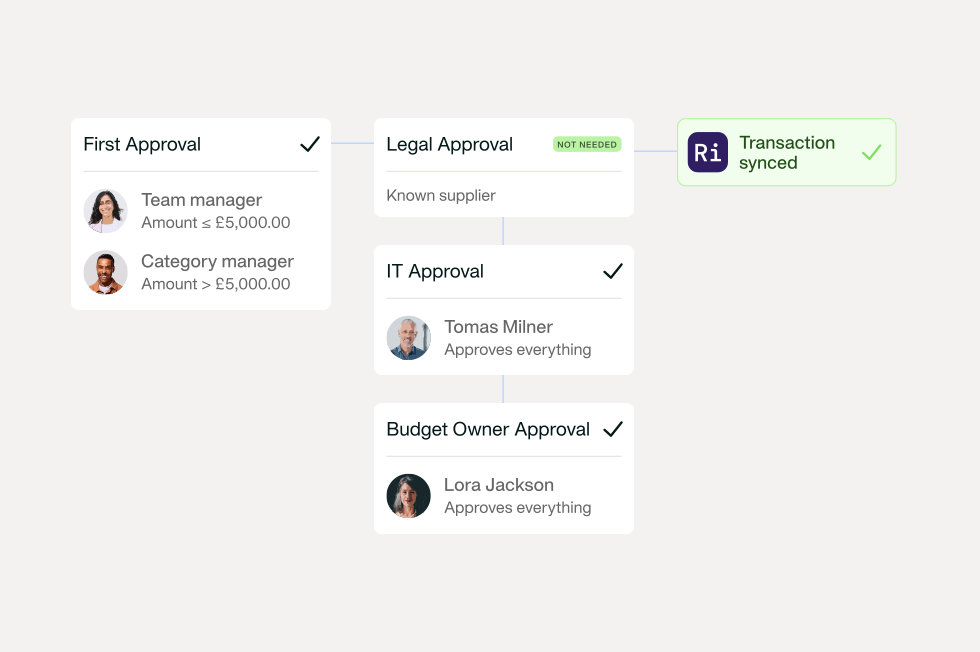
Customizable workflows let you sign off invoices in a way that fits your structure and policies. Payhawk's workflow designer supports:
Daniel Tang, Finance Manager at PinPoint Media, says: "Payhawk's workflow designer has improved the overall ease of use by being very intuitive. It has also improved the customisation functionality."
Some invoices need more than one approver. Sequential steps send an invoice to a team manager, then a department head, then finance. Parallel steps send it to several approvers at once, for example Legal and IT on a software contract. This shortens the time a multi-approver invoice takes.
The person who submits an invoice should not be the one who approves it. With segregation of duties switched on in Payhawk, sensitive actions wait for the required number of approvals. The person who started the action can't approve it. This is one of the simplest controls against the internal fraud the ACFE describes.
Look for a solution with strong ERP and accounting integrations. MDM Props used to spend 32 hours, or four working days, reconciling accounts manually. With Payhawk, it takes minutes. Once an invoice is approved and paid, your ERP updates in real time.
Delays happen when you rely on manually notifying approvers. Automated notifications keep the requester updated on their invoice and remind approvers when an invoice is waiting.
When approval conversations happen in email or chat, they get lost. In Payhawk, you tag colleagues in comments on the invoice and get replies in your inbox, so the full history stays with the invoice.
Real-time visibility of budget spend helps you make better allocation decisions. You can see what has been spent on invoices and what is committed for the coming months, by department or project.
Every invoice follows a predefined workflow, with segregation of duties and matching built in. That closes the gaps behind more than half of the fraud cases in the ACFE's 2026 study: missing internal controls and overridden ones.
Manual approval takes more time as invoice volumes grow. Automation gives your team that time back for forecasting, planning and analysis.
With automated approvals, invoices don't sit in inboxes, so vendors get paid on time. OCR and matching catch data-entry mistakes before they turn into disputes.
All spend is signed off by the right person, however complex your structure. You decide who can spend, how much, and how it gets approved, and changes to an invoice are logged.
Choosing invoice management software is a big deal because finding the best fit means you can unlock better spend visibility, improved control, and increased efficiency and productivity when processing invoices and other business expense types.
But how do you sort the wheat from the chaff? Here are a handful of things you should consider when researching your options.
Finding a solution that integrates with the rest of your tech stack will further cut down manual data entry and boost process efficiency. Why? Imagine accessing just one dashboard to view financial data instead of having to log into multiple systems, ERP, accounting, and spend management, to manually sync data.
Check if your software option integrates with market-leading software or allows you to set easy-to-use and modify templates. This way, you can take advantage of real-time reconciliations.
As your organization scales, so does your staff pool, which means more employees to educate on your processes, more departments, and more supplier invoices to process. Waiting to automate your invoice approval process until it’s already too late will cause major problems and potentially stall your invoice management processes.
Robbie Hadfield, (ACCA-qualified accountant) and Senior Director of Product Engineering at Payhawk, says:
As your scaleup grows, CFOs face new challenges in expense management. Initially, formal processes may seem unnecessary in small teams where trust is high. However, as the company scales, managing expenses becomes more complex. With more people and more projects, the CFO often has to support the founder in shaking off 10 million approval threads and instead give accountability to the budget holders (without losing transparency and oversight). That’s where Payhawk comes in.
Make sure you choose a system that can grow and change with you. From customizable workflows to automatic policy compliance, it's time to future-proof and save yourself the hassle of changing to yet another platform in the future.
Managing all your spend under one roof means no more juggling disconnected tools; instead, you can manage spend across all entities from the same platform. This gives finance managers and CFOs complete control and visibility over all types of spend, as well as access to accurate financial data means better budgeting, forecasting, and planning for future growth.
Nick Yanev, Marketing Manager at Eleven Ventures, says:
Payhawk saves me a surprising amount of time. All of our marketing tools, subscriptions, and platforms are connected to my Payhawk card, which makes it very easy to not think about the next payment or where and how I should pay.
It may seem like a small thing, but scheduling payments can improve financial planning, help you stay on top of upcoming expenses, and pay suppliers on time. You can also use the built-in amortization scheduler to defer transactions and spread out costs more effectively.
Effective supplier management will help you keep your finances organized and improve oversight. With our solution, you can sync supplier data with your ERP, access a central database, track changes with audit logs, and categorize expenses — all in one place to streamline processes and stay in control.
Automation helps streamline every stage of your invoice process, from data capture to approvals to reconciliation. But when it comes to invoice approvals, automation can help you build better supplier relationships, ensuring timely invoice payments, clearer financial visibility, and easier budget
planning.
Without automation, errors are harder to spot, duplicate payments are more likely, and manual corrections continue to drain time and resources.
Want to see all the components of our automated invoice approval workflow in action? Request a demo to learn more.
Trish Toovey works across the UK and US markets to craft content at Payhawk. Covering anything from ad copy to video scripting, Trish leans on a super varied background in copy and content creation for the finance, fashion, and travel industries.