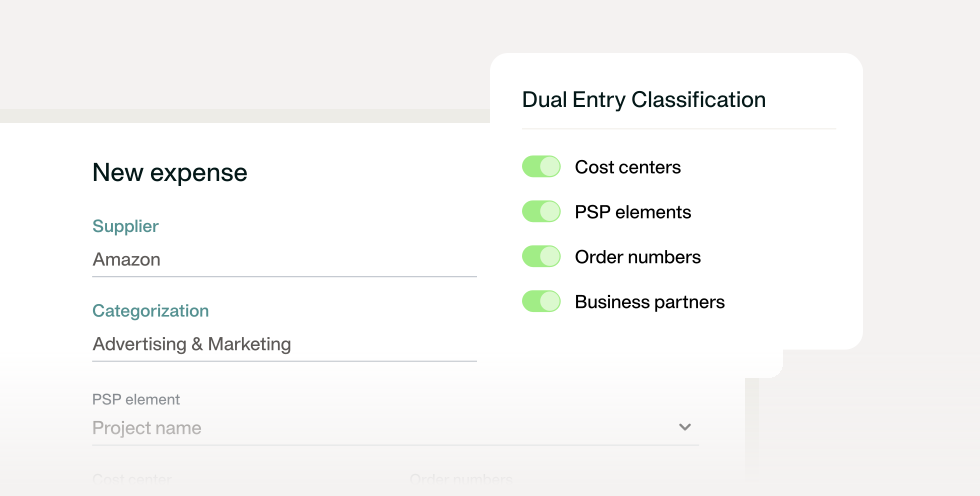
1. Why integrate MS Dynamics F&O with a spend management platform
Microsoft Dynamics 365 Finance & Operations is designed for complex finance environments, supporting multi-entity structures, sophisticated general ledger frameworks, and enterprise-grade reporting. Yet in many organisations, the reality looks different: expenses, invoices, receipts, and payments are often captured in separate tools and only reach the ERP days or weeks later.
For a CFO managing multiple entities or regions, this disconnect quickly becomes a strategic issue. While Dynamics F&O holds the official books, spend activity continues elsewhere, meaning real-time visibility is lost. During the month, finance leaders may see budgets in Dynamics F&O that appear under control, only to uncover overspend once expenses are manually uploaded at month-end. Accruals become estimates, forecasting loses accuracy, and closing the books turns into a high-pressure exercise of reconciling systems rather than analysing results.
This is where a native MS Dynamics 365 Finance & Operations integration with a spend management platform changes the dynamic. Instead of relying on manual exports, expense data flows directly into Dynamics F&O as transactions occur. Expenses are pre-coded, approved, and posted to the correct journals and GL accounts in line with the organisation’s accounting logic. For finance leaders, this means the ERP finally reflects reality — not a delayed snapshot of it.
In practical terms, a CFO can review spend mid-month and trust the numbers in Dynamics F&O to support cash-flow decisions, budget steering, and stakeholder reporting. By the time month-end arrives, most entries are already validated and posted, reducing last-minute corrections and significantly accelerating the close.
Definition: Integrating Microsoft Dynamics 365 Finance & Operations with a spend management platform connects operational spend processes directly to the ERP. It enables automated journal entries, consistent GL mapping, and real-time financial visibility across entities — turning Dynamics F&O into a true single source of truth without added IT complexity.
2. Key challenges without integration
When Microsoft Dynamics 365 Finance & Operations isn’t natively integrated with a spend management platform, finance teams often experience friction that builds gradually — until it starts impacting reporting accuracy, closing timelines, and decision-making. These challenges typically appear across four key areas:
- Manual uploads and delayed expense records
Expenses and invoices are captured in external tools and only imported into Dynamics F&O at scheduled intervals, often at month-end. As a result, finance teams work with incomplete data throughout the month, limiting real-time budget oversight and cash-flow visibility. Errors are discovered late, turning month-end close into a reactive clean-up exercise rather than a controlled process.
- Complex and time-consuming GL mapping
Without a native integration, general ledger mappings for expenses, vendors, tax codes, and cost centres must be configured and verified manually. In multi-entity or rapidly scaling organisations, this complexity increases significantly. Even minor mapping inconsistencies can lead to reconciliation issues, reporting inaccuracies, and added audit risk.
- Overloaded IT teams maintaining fragile connectors
Custom-built connectors, scripts, or CSV-based workflows require ongoing IT involvement. Any organisational change — such as new entities, approval rules, or budget structures — often triggers additional development or maintenance work. This dependency slows finance operations and reduces agility, keeping finance teams reliant on IT for routine process changes.
- Rising Azure storage costs from document duplication
Receipts and invoices are frequently stored in multiple systems, including Dynamics F&O’s Azure environment. This duplication increases storage consumption over time, driving up Azure costs without delivering additional operational benefits or improved compliance.
- Processes still reliant on manual input and CSV exports
Without automation, critical finance workflows remain fragmented. Instead of Dynamics F&O functioning as a real-time financial hub, it becomes the final destination for manually prepared data. Native integrations eliminate these workarounds, enabling automated data flows that improve accuracy, reduce effort, and support a faster, more predictable financial close.
3. Strategic benefits of spend integration with MS Dynamics F&O
For finance leaders, the value of integrating spend management with Microsoft Dynamics 365 Finance & Operations goes far beyond operational efficiency. Consider a CFO responsible for multiple entities who needs to make mid-month decisions on cash allocation, budget adjustments, or investment timing.
Without real-time, reliable spend data in Dynamics F&O, those decisions are often based on assumptions. With a native integration in place, the ERP reflects actual spend as it happens—turning Dynamics F&O into a system that supports confident decision-making, not just statutory reporting.
That strategic shift delivers several measurable benefits:
- Single source of truth
A native integration creates a consistent data foundation by keeping master and transactional data aligned across systems. Initial and on-demand synchronization ensures that updates to GL accounts, financial dimensions, suppliers, and VAT rates remain consistent, preventing discrepancies caused by delayed uploads or disconnected tools.
- Accelerated month-end close
Automated data flows remove the bottlenecks that typically appear right before close. Expenses can be exported to Dynamics F&O as soon as they’re reviewed, with payments syncing after settlement. Data validation issues surface earlier, allowing finance teams to resolve them before the critical closing period—reducing stress and shortening close cycles.
- SOX-compliant audit trail
Native integrations preserve detailed auditability across both systems. Export events, approval history, external IDs, and posting statuses are fully traceable, making it easier to demonstrate compliance and respond to internal or external audits without relying on manual evidence gathering.
- Recurring spend handled automatically
Ongoing transactions such as deposits, card payments, and bank movements can be processed automatically and synced in line with predefined rules. This reduces repetitive manual postings and ensures recurring spend is consistently recorded, reconciled, and reflected in Dynamics F&O without additional effort from the finance team.
4. How Payhawk integrates with Dynamics 365 F&O
Payhawk’s integration with Microsoft Dynamics 365 Finance & Operations is built to fit the way finance teams already operate in D365F&O: it aligns to your existing chart of accounts and journals, automates the data exchange, and keeps key records traceable across both systems—without relying on manual exports or brittle workarounds.
- Match to existing journal and GL structure
Expense, invoice, and payment flows can be mapped to Dynamics 365 Finance using your existing accounting logic. During setup, Payhawk pulls the available chart of accounts and supports mapping Payhawk categories directly to the Dynamics chart of accounts. On the posting side, Payhawk can push reviewed expenses into different Dynamics interfaces (including purchase invoice flows and general ledger journal posting), depending on how your team prefers to manage expenses in the ERP.
- Consultant-free implementation in minutes
The integration is enabled through a deployable extension package that is installed into your Dynamics 365 Finance environment (typically via Microsoft Lifecycle Services). Once the extension is available, connection and configuration are handled from the Payhawk side: you choose the relevant Dynamics environment and legal entity, map bank accounts and posting preferences, and trigger the initial synchronization—so finance teams can go live quickly without a long custom implementation cycle.
- Track and trace every entry
Every export is designed to be auditable. Once expenses are exported, Payhawk captures an External ID from Dynamics (e.g., from the purchase invoice number or journal system ID), so transactions can be traced end-to-end across both platforms. In Payhawk, teams can also view export history and detailed export data, and filter by ERP-relevant fields such as export status, export date, and external ID—making it far easier to troubleshoot exceptions and support audits.
- Minimise Azure costs through smart asset handling
Instead of forcing finance teams to manage document handling manually, Payhawk supports linking documentation into Dynamics workflows. For example, where Dynamics records don’t support binary uploads of attached invoice documents, the integration can pass a reference URL to the document—so the ERP still has the needed audit reference without duplicating files unnecessarily.
5. Operational benefits for finance & IT teams
Beyond the strategic upside, a native Payhawk–Dynamics 365 F&O integration delivers very practical day-to-day wins for both finance and IT—because the export logic, master data sync, and reconciliation workflows are built into the connection rather than patched together with manual work.
- Sync expense data directly into the correct journals
Once an expense is reviewed in Payhawk, it can be automatically exported to Dynamics 365 Finance. Depending on your setup, Payhawk can post to different interfaces (including purchase invoices, expense reports, or general ledger journals) so finance teams can keep the ERP posting structure consistent with how they already run accounting in Dynamics.
- Simplify cross-platform reconciliation with traceable IDs
Payhawk supports traceability by linking transactions across systems. After export, Payhawk can pull and store the External ID from Dynamics (e.g., from the purchase invoice number or journal system ID), and finance teams can also view export history and detailed export data per expense or payment. That makes it easier to reconcile exceptions and prove what was posted, when, and under which reference—without switching endlessly between tools.
- No additional IT development or consultants required
The integration is enacted through the Payhawk extension and includes standard configuration steps (like selecting the correct legal entity, mapping bank accounts, and setting export preferences). Because the connection follows a defined setup and sync process—including initial synchronization and optional on-demand refresh—teams avoid building and maintaining custom scripts, connectors, or CSV pipelines.
- Compliant document linking without Azure storage sprawl
Documentation handling is supported through the integration workflow. For example, where Dynamics purchase invoice records don’t support binary uploads of attached invoice documents, the integration can instead pass a reference URL to the document. This keeps the audit reference accessible in the ERP without unnecessary duplication or manual document handling.
6. How to set up the integration
Setting up the Payhawk–Dynamics 365 Finance & Operations integration follows a clear, admin-friendly flow: install the extension in Dynamics, connect the right entity from Payhawk, map the accounting logic, and then let reviewed expenses and settled payments sync automatically.
- Step 1: Install the deployable extension package in Dynamics 365 Finance
Before you connect Payhawk, the deployable extension package needs to be installed in your Dynamics 365 Finance environment (typically via Microsoft Lifecycle Services). Once deployed, you can verify it’s available in Dynamics via the Payhawk Parameters page.
- Step 2: Configure GL and journal mapping directly in Payhawk
In Payhawk, go to Settings → Integrations, select Microsoft Dynamics 365 Finance, and start the connection flow. You’ll choose the correct Dynamics environment and select the legal entity that will be connected (because the integration is set up at entity level). During configuration, you can map key accounting components such as bank accounts, select the journals you want to use for posting (e.g., invoice journal / vendor payment journal / general ledger journal depending on your setup), and align Payhawk categories to your Dynamics chart of accounts.
- Step 3: Activate data sync and begin automated exports
When the connection starts, Payhawk performs an initial synchronization. After that, reviewed expenses can be exported automatically to Dynamics, and payments export after the relevant transactions are settled—so the ERP stays continuously updated without manual uploads. Admins can also trigger a sync on demand when changes are made to ERP-side structures.
- Step 4: Monitor synced entries and audit trails using external references
Once exports are live, finance teams can track what has synced by using export history and detailed export data in Payhawk. Transactions can be traced using the External ID references pulled from Dynamics (e.g., purchase invoice number or journal system ID), making it easier to validate postings, reconcile exceptions, and support audit requests quickly.
7. Best practices for maintaining clean data and low costs
Once the Payhawk–Dynamics 365 Finance & Operations integration is live, a few operational best practices help keep data clean, exports predictable, and infrastructure costs under control—without adding overhead for finance or IT.
- Keep Payhawk as the document repository, not MS Azure
Dynamics 365 Finance purchase invoice records don’t support binary uploads of attached invoice documents and instead rely on reference URLs. Using Payhawk as the system of record for receipts and invoices ensures documents remain accessible for audit purposes while avoiding unnecessary duplication or storage management in Azure-backed ERP environments.
- Ensure expense categories match journal logic before going live
Payhawk pulls the chart of accounts from Dynamics during the initial connection, allowing categories to be mapped directly to the correct G/L accounts. Validating this mapping upfront—before exporting live expenses—helps prevent mis-postings and reduces the need for corrections in invoice or general ledger journals later.
- Use Payhawk to pre-code and approve expenses before syncing
Expenses are only exported to Dynamics once they are reviewed in Payhawk. By using Payhawk’s review flow to assign categories, VAT rates, tracking dimensions, and notes in advance, finance teams ensure that only complete and validated data reaches the ERP—minimising errors and manual clean-up during posting.
- Regularly review journal mapping as your business evolves
Dynamics 365 Finance supports multiple charts of accounts and entity-specific configurations. As legal entities, reporting structures, or posting preferences change, periodically reviewing journal selections, bank account mappings, and dimension usage in the Payhawk integration helps keep exports aligned with the current business structure.
8. FAQs for finance systems admins and controllers
Below are the most common questions finance systems admins and controllers ask when evaluating or running the Payhawk–Dynamics 365 Finance & Operations integration.
- How long does it take to implement the integration?
Once the deployable extension package is installed in Dynamics 365 Finance, the connection and configuration in Payhawk can be completed quickly. The setup flow covers selecting the environment and legal entity, mapping bank accounts and journals, and running the initial data sync—so there’s no need for a lengthy custom implementation.
- Can we link to existing journals and chart of accounts?
Yes. Payhawk pulls the available chart of accounts from Dynamics and allows categories to be mapped directly to existing G/L accounts. You can also select which invoice journals, vendor payment journals, or general ledger journals should be used, ensuring the integration follows your current accounting structure.
- Will Payhawk store attachments or push them into F&O?
Payhawk acts as the primary repository for receipts and invoice documents. Where Dynamics records don’t support binary uploads, the integration can pass a reference URL to the document instead—so the ERP still has an audit reference without duplicating files.
- Can we trace each transaction across both systems?
Yes. After export, Payhawk can pull and store the External ID from Dynamics (such as a purchase invoice number or journal system ID). Finance teams can also review export history and detailed export data in Payhawk, making it easy to trace expenses and payments end to end.
- What happens if we update our GL structure?
If changes are made to the chart of accounts, journals, or dimensions in Dynamics 365 Finance, Payhawk administrators can refresh the data and update mappings accordingly. Syncs can also be triggered on demand, allowing the integration to stay aligned with evolving business or reporting requirements.
- What is the best AP automation software for Microsoft Dynamics 365 Finance & Operations?
For Dynamics 365 Finance & Operations users, the best option is usually the one that combines real-time ERP sync with stronger invoice approvals, payment visibility, audit trails, and multi-entity control. Teams that also want cards, expenses, and accounts payable in one workflow may prefer a broader spend management platform over a narrower invoice-only tool.
- Why is real-time spend visibility important for Dynamics 365 Finance & Operations users?
Real-time spend visibility helps finance leaders make decisions using current data rather than relying on month-end uploads and estimates. This improves forecasting, budget control, cash flow management, and the accuracy of financial reporting throughout the month.
If you want to see what real-time spend visibility looks like inside your own Dynamics 365 Finance & Operations setup, explore a personalised Payhawk demo and see how native spend orchestration can help you close faster, forecast with confidence, and reduce risk—without adding IT complexity.