Best expense management for NetSuite: a shortlist
6 Oct 20266 min


NetSuite finance teams often run powerful ERPs alongside fragmented spend processes that still rely on manual fixes, delayed uploads, and limited visibility. This piece explores how a modern spend management integration changes that dynamic by connecting cards, expenses, and AP directly to NetSuite in real time. For finance teams evaluating options, the best solution is one that improves visibility and control without adding complexity. The result is faster closes, stronger control, and scalable multi-entity reporting.

By submitting this form, you agree to receive emails about our products and services per our Privacy Policy.
Every CFO has lived this moment: NetSuite is technically “up to date,” yet month-end still stretches on. The numbers are eventually correct — but only after chasing receipts, fixing mis-coded transactions, and untangling entity and segment issues that should never have reached the ERP in the first place.
For finance leaders running NetSuite (including OneWorld), the real challenge isn’t the ERP’s capability — it’s what happens before data ever gets there. When card spend, employee expenses, and vendor bills are handled in separate tools and only pushed into NetSuite at the end of the cycle, finance teams are forced into a reactive role: correcting, re-uploading, and reconciling instead of steering spend in real time.
A modern spend management integration changes that operating model. Spend is coded and validated at the point of purchase, aligned automatically to the right entities and dimensions, and synced into NetSuite as finance-ready data. Instead of acting as a clean-up system, the ERP becomes a true system of record — continuously accurate, audit-ready, and usable for decision-making at any point in the month.
This is where the return becomes visible. By orchestrating how spend flows across cards, expenses, and AP — rather than simply connecting tools — finance leaders gain enterprise-grade control without enterprise-grade overhead. Close timelines shrink, audit risk drops, and global complexity becomes manageable, even in highly customised, multi-entity environments.
Orchestrate finance with ease & efficiency: Meet the agents

NetSuite supports some of the most advanced finance teams — especially in multi-entity environments and highly customised setups — but spend data often still lives in separate tools and spreadsheets. When card transactions, employee reimbursements, and vendor bills aren’t connected to the ERP in real time, finance ends up chasing receipts, re-coding transactions, and re-checking dimensions instead of getting a clean view of spend and closing faster.
A modern spend management integration fixes that by creating a live, bidirectional link between your spend stack and NetSuite (including NetSuite OneWorld): transactions are coded at the point of spend, mapped to the right entities and segments, and synced automatically so NetSuite remains the single source of truth — without relying on manual input or CSV exports.
Definition: In an enterprise context, “integration” means connecting systems so finance processes (cards, expenses, AP) and ERP workflows operate as one: with multi-entity support, custom fields/segments, configurable approval logic, and automated data synchronisation that reduces manual effort and strengthens auditability.
Without a native, real-time integration between spend management and NetSuite, even well-run finance teams end up relying on workarounds that slow everything down at scale. Typical issues include missing receipts or uncategorised card transactions, which delay reconciliation and force month-end teams into follow-ups and manual fixes.
Vendor bills and card expenses often have to be handled outside the ERP first, then re-entered or uploaded via CSVs. This breaks the audit trail, increases the risk of errors, and makes it harder to prove compliance — especially when transactions are adjusted after posting. In multi-entity NetSuite and NetSuite OneWorld environments, the problem compounds: finance teams constantly rework mappings, segments, and intercompany logic to ensure expenses land in the right subsidiary, department, or project.
On top of that, key accounting logic such as amortisation schedules, analytics fields, or custom segments is frequently managed separately from the original spend data. The result is fragmented reporting and duplicated effort, with finance teams maintaining parallel systems instead of a single, reliable source of truth. Ultimately, processes that should be automated — from coding and approval to export — remain dependent on manual input or spreadsheet uploads, stretching close timelines and limiting real-time visibility into global spend.
A native spend integration with NetSuite (and NetSuite OneWorld) turns disconnected spend data into a reliable, finance-ready workflow — combining card spend, employee reimbursements, and accounts payable in one place and syncing it back to the ERP as transactions happen. The strategic upside isn’t just “less admin”; it’s better governance, faster closes, and cleaner reporting across entities.
Payhawk connects to Oracle NetSuite through a native integration designed for enterprise finance workflows — synchronising corporate cards, employee reimbursements, and AP in one platform and exporting finance-ready data to NetSuite (including NetSuite OneWorld) in near real time. The focus is simple: reduce manual effort without forcing complex reconfiguration, so teams can keep NetSuite as the system of record while improving coding quality and speed upstream.
Smart amortisation handling
Where NetSuite teams need accurate period allocation, Payhawk supports amortisation-aware exports by pulling the customer’s amortisation logic/schedules and passing the relevant data back into NetSuite for local calculations. That means finance doesn’t have to maintain separate trackers or recreate schedules after the fact.
Vendor bills, expense reports & journal entries
Payhawk can export the right transaction types — including vendor bills, expense reports, and journal entries — based on how your team’s accounting logic is set up. With flexible mapping and master data sync, finance can align categories, accounts, tax treatment, and segments so data lands correctly in NetSuite without repeated manual fixes.
Transaction-line splitting (before export)
For messy real-world spend (like marketplace purchases), Payhawk supports transaction-line splitting before the data reaches NetSuite. For example, a single Amazon card transaction can be split across multiple suppliers or cost allocations — so there’s no downstream rework in the ERP and reporting stays clean.
As we have all of our expenses coded up to project level, everything is automatically synced into NetSuite, which saves us a huge amount of manual work.
— GDS Group
Multi-entity finance is where most NetSuite integrations fall apart — not because teams lack discipline, but because the complexity of subsidiaries, segments, and custom reporting requirements quickly turns “simple exports” into ongoing maintenance. Payhawk’s native NetSuite + NetSuite OneWorld connection is built to handle that complexity in real time, so global spend stays consistent across entities while NetSuite remains the system of record.
Top-level multi-entity exports
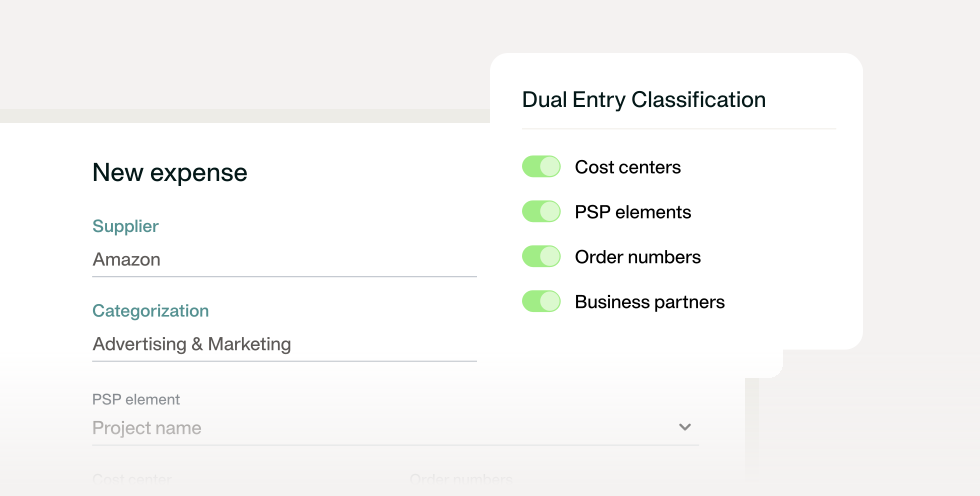
Instead of forcing finance to manually split, re-map, or re-import data per subsidiary, single transactions can be automatically distributed to the correct NetSuite entities and dimensions (e.g., subsidiary, cost centre, department, class, location) before they hit the ERP. That keeps entity-level reporting clean and reduces the month-end scramble caused by mis-coded spend.
We have five entities in the Payhawk platform, and everything is automatically pushed to NetSuite with the right dimensions.
— Heroes
Custom field sync (dates, free text, body fields)
Enterprise teams rarely run NetSuite “out of the box.” They rely on custom segments, transaction fields, and records to power analytics, approvals, and audit evidence. With custom field synchronisation, Payhawk can pass through the extra context finance needs — beyond standard department/class/location — so transactions arrive in NetSuite enriched, reportable, and audit-ready.
Payhawk's integration with NetSuite is a game-changer. It gives us real-time visibility and ensures everything is correctly coded and reconciled.
— Heroes
Once spend management is connected to NetSuite with a live integration, the day-to-day operating model for finance changes. Instead of collecting, correcting, and re-uploading spend data at the end of the month, teams can keep expenses accurate as they happen — with corporate cards, employee reimbursements, and vendor bills flowing into NetSuite (and NetSuite OneWorld) in real time.
Real-time coding at the point of spend
Transactions are coded while the context is fresh — by the employee in the app or via pre-defined rules — so finance isn’t forced to guess, chase clarifications, or fix incomplete fields during reconciliation.
NetSuite master data stays in sync across subsidiaries
Accounts, tax rates, departments/classifications, and other dimensions can remain aligned between systems, reducing duplicate setups and preventing “mapping drift” as subsidiaries evolve.
Expenses land on the right dimensions, vendors, and projects
With segment and custom-field support, spend can be tied to the correct project codes, entities, and vendor records before export — improving reporting accuracy and making approvals/audit checks far easier.
Manual data handling drops dramatically
A real-time, bidirectional connection removes the need for CSV imports, spreadsheet trackers, and repetitive re-coding. With a high share of transactions exporting without manual intervention, finance teams can redirect time from admin work to controls, analysis, and strategic planning.
Now, every expense flows seamlessly into NetSuite in real time — our employees love it!
— Aventum Group
Pre-switching to Payhawk, we used credit cards with no connection to NetSuite, which made reconciliation time-consuming and error-prone.
— State of Play Hospitality
Setting up a NetSuite spend management integration is typically straightforward — but the difference between a “working connection” and a high-performing one is configuration: getting master data, mappings, and multi-entity logic right from day one so exports run smoothly in real time.
Step 1: Connect your NetSuite environment
Start by connecting Payhawk to your NetSuite instance (including NetSuite OneWorld, if applicable). This establishes the foundation for a live integration and enables the initial data exchange needed for configuration.
Step 2: Sync master data and mapping logic
Next, sync the core finance structure that transactions rely on — such as your chart of accounts, tax rates, classifications, departments, and vendor data. Then define the mapping rules so expenses, vendor bills, and reimbursements land in the right accounts and segments automatically.
Step 3: Configure custom fields and amortisation logic
If you use custom segments or transaction fields in NetSuite, configure those in the integration so the right analytics and audit context flows through. This is also where you align amortisation-related logic so recurring/prepaid spend can be treated correctly without manual spreadsheets.
Step 4: Test transaction flows across entities
Before rolling out widely, test the real-life scenarios that usually cause trouble: multi-entity expenses, shared cost allocations, vendor bill exports, and edge cases like split transactions. This ensures each transaction type posts correctly across subsidiaries and dimensions.
Step 5: Monitor syncs and optimise over time
Once live, monitor sync health and exceptions (e.g., unmapped fields or rejected transactions). The goal is to keep exports “touchless” as often as possible — and adjust mappings or rules as entities, vendors, or reporting needs change.
We benchmarked the solutions and opted for Payhawk, which was relatively unknown but had a very well-made integration with NetSuite.
— Flowdesk
Does the integration support multiple NetSuite entities?
Yes. Payhawk is designed for multi-entity environments and works with NetSuite OneWorld, so transactions can be exported to the right subsidiary and dimensions (e.g., department, class, location, cost centre) without manual rework.
Can I sync amortisation schedules and analytics?
Yes. Payhawk supports amortisation-aware workflows by carrying the relevant amortisation data into NetSuite for local calculations, while also syncing the analytics context needed for reporting and control.
What about expense splitting and vendor matching?
Payhawk supports transaction-line splitting before export — useful for marketplace purchases (e.g., Amazon) where one card transaction needs to be allocated across multiple suppliers or cost lines. Vendor data can also be synchronised to reduce mismatches and manual corrections.
Are custom fields and project codes supported?
Yes. Beyond standard NetSuite segments, Payhawk can sync custom fields (including dates, free text, and body fields) and project-related dimensions, so enterprise teams can keep their reporting structure intact.
Is master data sync bidirectional?
Yes — the integration supports keeping key master data aligned between systems (e.g., accounts, tax rates, classifications/departments, and vendor-related data), helping finance maintain consistency across subsidiaries and reduce ongoing admin.
With over 15 years of experience in SaaS and digital communications, Paul specialises in translating complex financial concepts into clear, engaging narratives. At Payhawk, he combines creativity and analytical insight to help finance teams thrive through data-driven storytelling.