Procurement automation: five processes you should have automated yesterday
28 Oct 20268 min


eInvoicing compliance changes more than invoice formats. Based on lessons from live mandates in Belgium and Poland, this article explains what finance teams should prepare for: missing invoices, supplier readiness, validation errors, routing, rejection workflows, and AP controls.

By submitting this form, you agree to receive emails about our products and services per our Privacy Policy.
Your supplier is sure the invoice went out. Your AP team can’t find it. This situation happens all the time in the first months of an eInvoicing mandate. It’s rarely down to getting the tax rules wrong; most teams get that part right. The problem is usually further down, in how the invoice actually moves and gets handled day to day.
The most useful lessons right now come from countries where eInvoicing is already live.
Payhawk has run eInvoicing with more than 50 customers in Belgium and Poland and processed tens of thousands of invoices between them. That’s where the real lessons come from. Once the invoices start moving through your AP processes instead of your inbox, that’s the hard part.
This article covers six learnings worth acting on before you go live, how Payhawk fits eInvoices into your AP workflow, what’s coming with the French mandate, and a checklist to work through before go-live.
Note: For the wider picture on the rules, see this guide to eInvoicing in the European Union.
Get AP ready for the mandate

eInvoicing is where invoices move from PDF to structured data, usually XML. And this file becomes the legal invoice. Although the format change is part of the rollout, the biggest shift for companies is the operational one.
Invoices now have to move through Peppol or a national platform, instead of email. They automatically get checked against a set of rules before they count as received. So now, your AP process must receive, check, route, approve, and pay invoices without things like manual steps and email chasing filling those gaps.
When invoices start moving through structured networks, instead of email, these are the patterns that most commonly show up:
Belgium is a good example because the rules were clear. The first month or two were still messy. Access points had to sort out cases where a buyer was adamant that an invoice never arrived, and both sides had to trace where it went. Some suppliers might keep sending PDFs too, out of habit. That’s fine for a while, as long as everyone knows that the structured file is now the real invoice and the PDF is just a copy for reading.
PDFs are deeply embedded, particularly among smaller suppliers, so moving away from them isn’t a quick fix. Cultural habits matter just as much as the technology. Some markets find the switch easier as they’re already digitally native.
To avoid having to check two versions of every invoice in the early days of the mandate rollout, set expectations with all suppliers early on.
This was the most common issue in the live rollouts. A supplier is sure they sent an invoice, but it never shows up in the buyer’s system. With structured eInvoices, ‘sent’ and ‘received’ aren’t the same thing anymore. The invoice can fail a check because of a missing field, never reach the network, or go to the wrong place. Each side assumes the other one lost it.
The fix is visibility, because a supplier telling you they sent it isn’t proof you’ll receive it. You need to see the real status of each invoice: issued, sent, received. With that, you can tell a failed check from a routine mistake immediately, and chasing invoices stops being guesswork. Without it, you’ll spend hours chasing invoices that eInvoicing should be saving you.
You can do everything right, and the process can still break because it also depends on your suppliers and their software. In Belgium, some supplier tools didn’t show the right routing details or Peppol ID.
A bit of groundwork helps a lot. Send suppliers a short note with your routing details and the formats you accept. Ask them to confirm they’ve got it, and expect some back-and-forth in the early weeks. Give one person ownership of supplier questions, so they don’t get passed around the finance team.
Many businesses use one platform for cards and another for AP, or split AP across a few tools. eInvoicing tends to expose this setup. In Belgium, suppliers often just used the buyer’s tax ID, without checking which route the buyer actually wanted. France allows extra suffixes on IDs to make this cleaner, but only if suppliers use them.
If your AP is split across tools, tidy up the routing before go-live, and check suppliers have the right ID and route. A setup that worked fine over email can start losing invoices once everything runs through structured networks.
Receiving structured eInvoices is only part of the job; you also need a clean way to reject invoices that are wrong, sent to the wrong place, or not legitimate. France has a built-in refusal status for this. Reject an invoice, and the supplier can see it was refused and ask why.
This only works if rejecting is a normal part of the AP process, not an extra step someone has to remember. In Payhawk, when you reject or delete an invoice, the status is automatically sent to the local public platform in the background (so there’s no extra eInvoicing compliance step to remember!).
eInvoicing makes it easier to trace where an invoice came from, since senders are registered or checked. But that doesn’t mean every invoice you get is legitimate. Anyone who knows your tax ID can send you one. A structured invoice that passes the checks is still just a correctly formatted document.
Keep your approval process in place. Passing the checks means the invoice is formatted correctly. Approval means you’ve decided to pay it. Keep them as separate steps.
Automation helps here rather than getting in the way. Workflow-based approvals help by automatically routing every invoice to the right person, based on rules like supplier, amount, or department. So a well-formatted invoice still can’t skip the approval step just because it passed the checks.
If you’re facing your first mandate, it’s worth noting that the friction in lessons one to six is temporary.
What finance teams learned going live
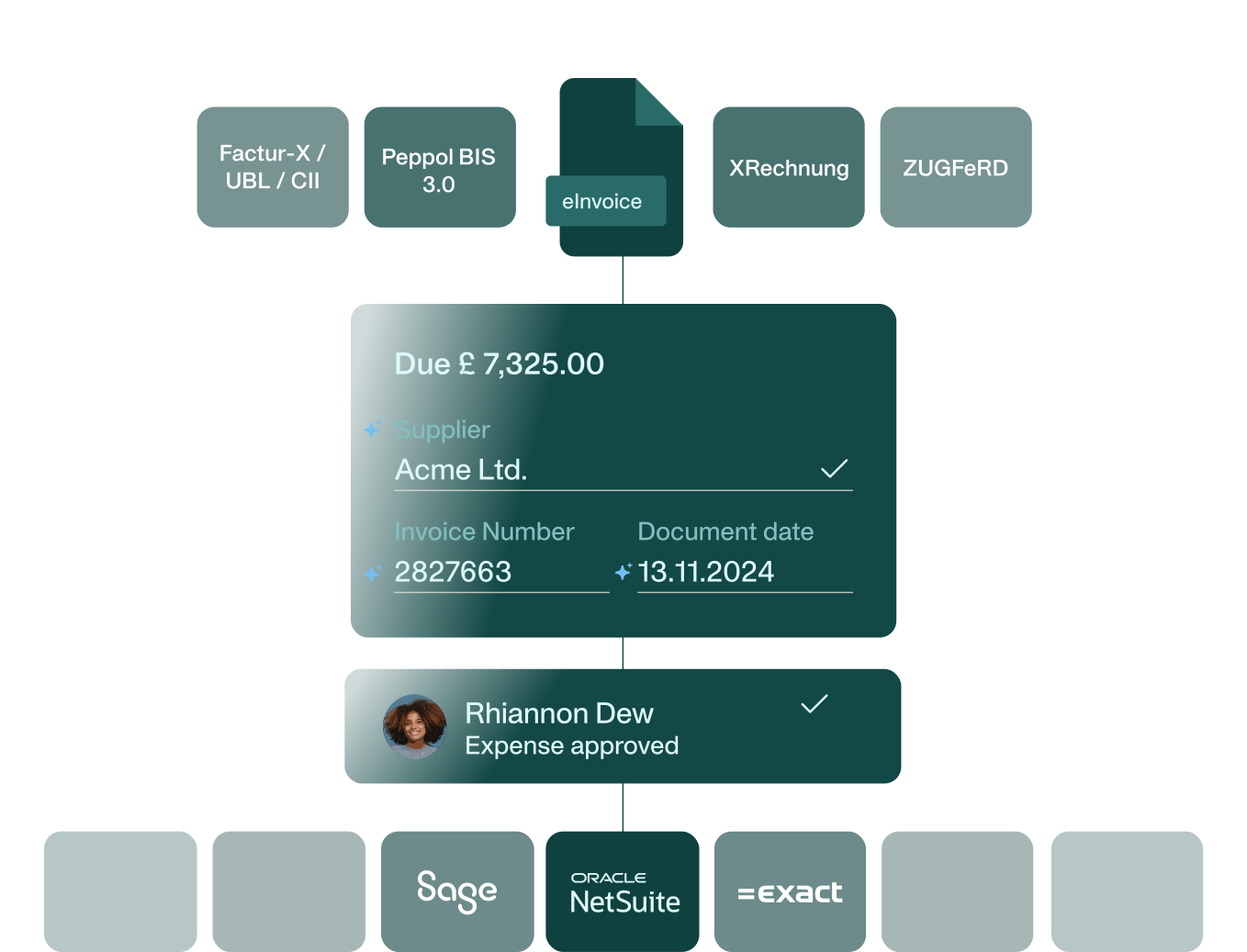
Payhawk brings eInvoices directly into the same AP software your team already uses to review, code, approve, pay, and sync invoices. It’s not a separate tool bolted on. Instead of registering with every country separately, Payhawk connects to national platforms and networks through its partnership with Invopop.
Here’s how it works:
For a business with several entities across different countries, you get ready for several mandates without building a new process for each one.
France is the next to roll this out in stages. From 1 September 2026, every business operating in France must be able to receive structured eInvoices. Larger and mid-sized companies must also issue them and start reporting transaction data to the tax authority.
Small and micro businesses follow a year later, on 1 September 2027.
The mandate covers domestic B2B invoices, and the reporting rule also covers consumer sales and cross-border transactions.
Invoices won’t pass directly between companies anymore. They’ll instead go through certified private platforms, now called ‘approved platforms’ (Plateforme Agréée). The public portal will only hold a central directory of companies, rather than acting as a free exchange.
Each business picks an accredited platform and accepts formats like Factur-X, UBL 2.1, and CII. There’s a voluntary pilot from late February to the end of August 2026, worth using to test your setup before go-live.
The point the live mandates keep making is that receiving invoices is a hard requirement from day one, even if issuing them comes later for you. The teams that struggle are the ones leaving AP readiness late.
Other countries are also in the process of rolling out an eInvoice mandate in 2026, including Greece, Oman, Morocco, and the UAE.
2027 also brings eInvoicing changes (second or initial stages) for Slovakia, Germany, Spain, and Norway.
So, keep on top of mandates affecting your business, whether you’re a locally established business in that country, a foreign business with local VAT registrations, or an external international supplier.
Use this checklist to spot gaps before the go-live date arrives:
Supplier readiness, invoice visibility, checks, routing, rejections, and approval controls all sit in AP. Together, they decide whether the first few months go smoothly. That's the real work behind an eInvoicing deadline; it's worth treating as an AP project, not just a tax one.
You can book a demo to see how finance teams receive, check, approve, and pay structured eInvoices in one AP workflow, with ERP sync built in. For more detail on formats and country coverages, these eInvoicing FAQs go deeper.
With over 15 years of experience in SaaS and digital communications, Paul specialises in translating complex financial concepts into clear, engaging narratives. At Payhawk, he combines creativity and analytical insight to help finance teams thrive through data-driven storytelling.