Why connect spend management to DualEntry
29 Sept 20269 min


Missing receipts, mismatched codes, and reconciliation errors turn month-end into a scramble. Thinking about using Xero AP automation to fix this issue? This guide compares leading accounts payable software for Xero. Uncover whether a standalone tool or an orchestrated platform is the best setup for your business.

By submitting this form, you agree to receive emails about our products and services per our Privacy Policy.
Xero AP automation lets you capture bills, route them for approval, pay them, and automatically code and sync data to Xero with minimal manual work. When Xero is your accounting system, AP automation should cut admin and reduce errors. It should also share numbers your team can digest quickly.
Without this technology, month-end feels like a rescue mission rather than a review. Your team closes the books, but only after chasing missing receipts, fixing coding errors, and untangling duplicate payments across disconnected tools. For many teams, admin-heavy AP is the norm. But you can change this situation with automation.
The gap automation can close is big. Best-in-class AP teams process an invoice in 3.1 days for $2.78, compared with 17.4 days and $12.88 for everyone else, according to Ardent Partners' State of ePayables 2024. So, should you use a standalone tool or a spend automation platform for your AP processes?
This guide explains what AP automation is and what it should help your business achieve. It also compares the leading accounts payable software for Xero and helps you decide which setup is the right fit.
See what clean AP data in Xero looks like

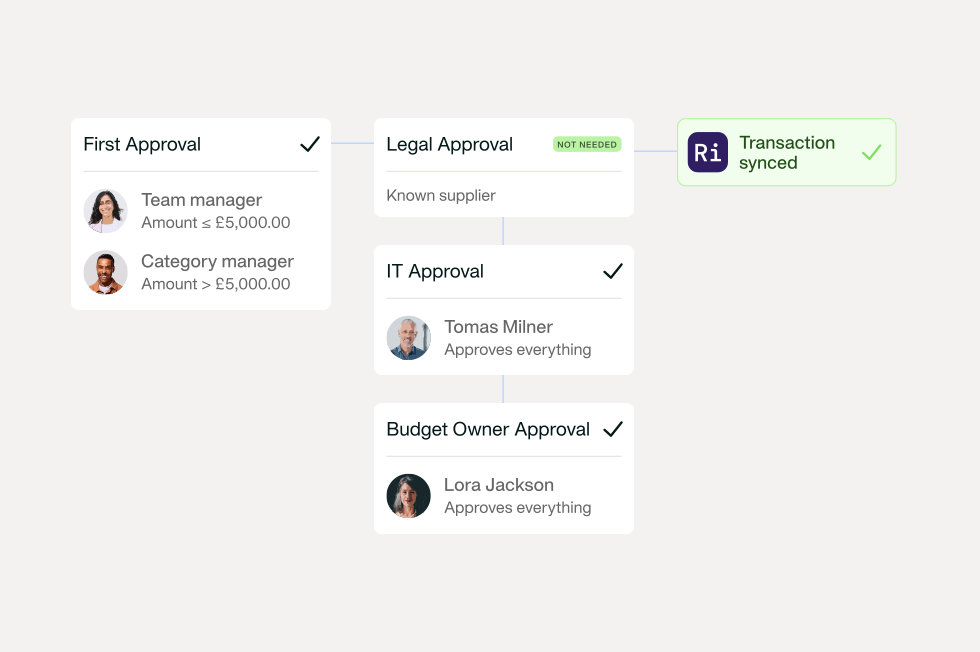
Xero AP automation is technology that takes every invoice from capture to reconciliation. This keeps accurate data in Xero and your spend management platform. Accounts payable software for Xero should support the invoice lifecycle and create a single source of truth.
Here’s what a good solution does in the invoice lifecycle when Xero is your endpoint and why the AP automation software Xero links to matters:
All in all, the real test is the quality of data landing in Xero.
When searching for an AP automation solution, you’ll come across many tools. But what supports a finance team using Xero?
Your Xero AP automation solution should offer:
See Xero AP automation in action

The best accounts payable software for Xero share similarities. So, what are your real options for accounts payable automation software and which differentiators matter? This table focuses on how the best AP automation software Xero solutions handle automations, controls, integrations, and pricing.
| Tool | Best for | Supplier payments in the platform | Cards and expenses | Pricing model |
|---|---|---|---|---|
| Payhawk | Mid-market and multi-entity Xero teams | Yes, paid and auto-synced to Xero, in 115+ currencies | Yes, corporate cards and expenses | Plan-based |
| Tipalti | Global or multi-entity teams with complex supplier and tax needs | Yes, with per-transaction fees | Yes, Visa card; expenses as an add-on module | From £99 a month, plus per-transaction fees and custom quotes |
| ApprovalMax | Teams that need deeper approval controls and audit | Only with the ApprovalMax Pay add-on (GBP payments and multi-currency wallets); otherwise via Xero or your bank | Expense approvals; no cards | Per organisation, unlimited users |
| Lightyear | Inventory, POs and complex invoice capture | No, via Xero or your banking tools | Expenses yes, cards no | Usage-based tiers (credits per document) |
| Ramp | Card-led spend control with built-in AP (UK since September 2026) | Yes, for eligible GBP suppliers | Yes, including GBP reimbursements | Free plan at £0 per user; Plus is custom-priced |
We’ve compared each Xero AP automation solution on:
AI & automation: Agentic automation across AP, cards, expenses and procurement in one platform. AI invoice capture/OCR (60+ languages, plus eInvoicing) with AI coding suggestions and 2-/3-way matching. The Financial Controller Agent fetches receipts and invoices from vendor portals for card spend and chases missing documents and approvals; the Procurement Agent guides each request from intake to invoice matching. Master-data integrity: supplier auto-match with duplicate detection, an automatic nightly sync of suppliers, GL accounts and tax codes from Xero (new suppliers are pushed to Xero straight away), and segregation of duties on supplier bank details — a human stays accountable for the decision.
Xero, controls & payments: Native Xero integration imports your chart of accounts, tax rates and tracking categories, keeps them updated with an automatic nightly sync, and pushes reviewed expenses and settled payments to Xero automatically. Bills land in Xero posted, not as drafts, so nothing needs re-checking there; if something needs correcting, you return it for review in Payhawk and the bill in Xero is updated. Pay suppliers and auto-sync to Xero without leaving the platform, and issue corporate Visa cards with limits by amount, merchant, merchant category, country and time. Multi-entity and multi-currency from one dashboard, with the option to hold balances in seven currencies and pay suppliers in 115+ currencies.
Pricing: Plan-based — you pay only for the products you use.
Strengths & watch-outs: Customers save time and cost by replacing multiple tools with one platform for expenses, AP, cards and Xero AP automation. Very small businesses with only a few invoices a month may find it more feature-heavy than they need.
Best for: mid-market Xero teams that want to capture, approve, pay and reconcile supplier bills while managing cards, expenses, procurement and multiple entities in one platform.
AI & automation: AI-based invoice capture with two- and three-way PO matching to reduce manual posting. Approval routing applies policy before bills post. Supplier onboarding includes TIN validation, and a built-in tax engine supports VAT coding and tax compliance.
Xero, controls & payments: A pre-built Xero integration sends bills, supplier contacts and payments from Tipalti to Xero to support payables reconciliation. Supports multiple entities with different payables workflows, and payments in 120+ currencies to 200+ countries and territories.
Pricing: AP plans start from £99 a month, with no per-user fees. Transaction fees apply per invoice and payment, and larger set-ups are quoted individually.
Strengths & watch-outs: Built for standardising supplier onboarding and global payments. The Xero integration sends data from Tipalti to Xero, so check it covers the records you need. Expenses and Procurement are separate add-on modules, and a Visa corporate card is available to UK businesses.
Best for: global or multi-entity UK Xero teams with complex supplier and tax needs.
AI & automation: Approval automation first: structured approval chains for bills, POs and expenses that replace email sign-off and keep a clear audit trail. Invoice capture uses OCR through the ApprovalMax Capture add-on. Since October 2026, an Approval Agent (Advanced plan and above) checks each bill against supplier history and flags unusual amounts, coding or currency before approval, while a person still makes the decision. Bill-to-PO matching is available on higher plans.
Xero, controls & payments: Holds bills and POs until approval, then syncs them with Xero. Supports multi-entity and location-based approval policies. Approved bills can be paid in GBP through the ApprovalMax Pay add-on, with multi-currency payments through ApprovalMax Pay Wallets; otherwise, payments run through Xero or your bank.
Pricing: Per organisation, with unlimited users. Capture and Pay are optional add-ons, sold as packages with a monthly allowance.
Strengths & watch-outs: A good fit when approval governance is the main gap. In-platform payments need the Pay add-on, there are no corporate cards, and AI features depend on your plan.
Best for: Xero finance teams that need deeper approval controls and audit without changing AP systems.
AI & automation: AI-powered line-item extraction from bills, credit notes and receipts. Three-way matching of POs, goods-received notes and bills at line-item level is available on the Standard plan and above. Rules-based approval routing by bill value or supplier runs before posting, and supplier statement reconciliation and duplicate-bill alerts help catch missing or repeated documents.
Xero, controls & payments: Prepares coded, approved bills and exports line items to Xero with GL coding. Supplier payments run through Xero or your banking tools. Parent and child accounts support multi-entity groups.
Pricing: Usage-based tiers priced on monthly document credits rather than seats, with unlimited users and sub-entities on every plan.
Strengths & watch-outs: Suited to PO- and inventory-heavy teams that need line-level detail. Expense management covers staff reimbursement claims. Corporate cards and supplier payments are not part of the product, so you'll need other tools for these.
Best for: teams with inventory, POs and complex invoices that need strong capture and matching, and are comfortable pairing AP with separate card and payment tools.
AI & automation: AI checks receipts, coding and policy compliance on card and bill transactions and flags the ones that need review. OCR captures invoice data, including VAT, and an AP agent learns coding from past invoices. Ramp also flags discrepancies between invoices and contracts. Policy, Accounting and AP agents are part of the Ramp Plus plan.
Xero, controls & payments: Xero and QuickBooks Online integrations are on the free plan; NetSuite, Sage Intacct and Microsoft Dynamics 365 Business Central are on Plus. With Xero, bills go from Ramp to Xero, accounts come from Xero, and payments, contacts and tracking categories sync both ways. Approval rules can be set by supplier, amount, department or location, with multi-layer and parallel approvals on Plus. In the UK, Ramp offers GBP cards, GBP reimbursements and payments to eligible GBP suppliers. Multi-entity and multi-currency are on Plus.
Pricing: The free plan is £0 per user a month and covers cards, expenses, reimbursements and AP. Ramp Plus is custom-priced and billed annually. Ramp notes that international payments may incur fees.
Strengths & watch-outs: Combines cards, expenses and AP on a free entry plan. Multi-entity, deeper ERP integrations and advanced approvals need the custom-priced Plus plan.
Best for: UK (since September 2026) and US finance teams that want card-led spend control with built-in AP, particularly single-entity businesses on Xero or QuickBooks Online.
Most 'best AP for Xero' content stops at OCR. The more useful question in 2026 is how much of the work the AI actually removes, while a human stays accountable.
Four things to check:
How easy is the intake? The best tools let anyone raise a bill in plain language, then the AI reads it, extracts the detail, and starts the record. No rigid forms, and no manual downloading from supplier portals. In Payhawk context the Procurement AI Agent guides each request from the first ask, and the Financial Controller Agent auto-fetches invoices and receipts from vendor portals and employees.
How much can the AI support the decision? Look for AI that suggests, and does not focus on decisions: coding (account, tax rate, tracking category), supplier matches, and duplicate flags, all drawn from your history and applied inside your rules. It can take most of the routine work off the team while finance keeps the exceptions. Autonomous purchasing is not the goal; support inside controls is.
Does it chase for you? Missing docs and stalled approvals are where month-end dies. The strongest tools chase missing receipts and pending approvals automatically, ramping up near close, and escalate to a human only when needed.
Can it trust the master data? AI is only as good as the data it acts on. The controls to look for: automatic supplier matching with duplicate prevention, a two-way supplier and GL sync with your accounting system, and segregation of duties so no one can change a supplier's bank details and approve the payment.
The principle throughout: AI that works inside your controls, not around them, and that only holds when cards, expenses, POs and invoices live in one system rather than five.
Whether it’s invoicing or approvals, point tools handle one job well. The problem is that most finance teams run two or more at once. Each sends Xero its own version of financial data, and nobody catches mismatches until month-end. Such software complexity costs businesses around 7% of annual revenue.
A spend management Xero integration fixes this. Card spend, invoices, and reimbursements reach Xero the same way: once reviewed, as posted bills. This streamlines reporting and helps reduce month-end close Xero errors. It also gives Finance a Xero accounts payable integration that runs procure-to-pay automation end-to-end. You improve oversight, insights quality, and cost.
For example, Vertice, a fast‑growing SaaS procurement platform, had slow expense workflows and weak visibility over spend. The finance team moved to Payhawk to automate card and expense capture, speed up reimbursements, and sync reviewed spend data to Xero automatically. That change has cut manual admin and gives finance more control over cash and budgets.
Vertice now:
Speaking on the transformation, Charlotte Wright, Finance Controller at Vertice, said:
Our spend data transfer to Xero just happens immediately. It’s easy; there’s no barrier to use. And it removes the tedious expense data admin and saves me hours every week. Plus, it removes all human error, which is a great benefit.
Other businesses share similar results:
Speaking on her team’s Xero AP automation upgrade, Carolina Einarsson, Finance Director at Essentia Analytics, shared:
The integration Payhawk has developed for Xero is one of the strongest I've seen in the market. You just need to click in Xero, and all the information is shared in Payhawk.
You may start with standalone tools for simple AP needs and local spend. Point tools work but leave Finance reconciling between systems. As your business grows, gaps in visibility, approvals, and data quality can creep in. What wins is AP automation as a single orchestrated layer, with AP, cards, expenses, and procurement in one place.
Judge Xero AP automation solutions by the quality of data they share. The best AP automation software for Xero gives rich, clean data, reduces manual admin, and provides a comprehensive view of spend. The right solution drives growth, accelerates financial close, and protects margin. Want to learn how Payhawk’s AP automation to Xero can help your business? Book a demo.
With over 15 years of experience in SaaS and digital communications, Paul specialises in translating complex financial concepts into clear, engaging narratives. At Payhawk, he combines creativity and analytical insight to help finance teams thrive through data-driven storytelling.