Why connect spend management to DualEntry
29 Sept 20269 min


AI in accounts payable already reads invoices, codes them and retrieves them from supplier portals. What it cannot do is take accountability. This guide sets out which parts of AP AI runs reliably, which decisions stay with your financial controller, and how to evidence the split when an auditor asks.

By submitting this form, you agree to receive emails about our products and services per our Privacy Policy.
AI in accounts payable uses machine learning and large language models to read, code, match, and route supplier invoices. This new process replaces the fixed rules older AP automation relied on. But adoption isn’t the open question any more; it’s all about governance.
As a financial controller, if you’re running three entities at a mid-market company, closing the books every month, you’re already aware that AI can read an invoice much quicker than any team member. What you don't know yet is which judgement calls you can safely hand over, and what to show an auditor when you do.
This article explores three areas. Firstly, a clear line between what AI should automate and what your team still needs to verify; then an answer to the question you’re quietly asking: ‘what happens to my job?’, and, perhaps the most useful bit, ten control questions to take with you to every vendor demo.
AI in AP is software that reads your invoice, codes it and proposes a match against a purchase order or goods receipt, using a model that’s trained on patterns rather than a rule someone wrote in advance.
OCR (optical character recognition) extracts data from a page. Rules-based AP automation takes that data and runs it through logic someone has already mapped out. So, if the supplier is X, code to account Y.
Although both are useful (and both have been in AP software for years), AI works in a different way. AI handles the invoice nobody wrote a rule for, i.e. the invoice with a different layout, a new supplier, a partial delivery, or a query that doesn’t map to a template.
If you can specify it, traditional software can automate it; if you can verify it, AI in accounts payable can automate it. This shift matters to a controller specifically because you aren’t going to write a rule for every exception in advance; no one can manage that. A trained person can check a proposed answer in a matter of seconds, though. That’s the capability now good enough to build a workflow around, and it changes who does the checking, not whether checking happens.
Some things that haven’t changed include the ledger, the approval policy, and who’s accountable when something goes wrong.
Accounts payable gets the first AI agent in most finance stacks, ahead of FP&A or treasury. Why? Because it has volume, it’s repetitive, the documents are structured, and there’s a checkable right answer: this is the kind of profile an AI model handles well.
Six capabilities make up most of what AI does in AP today. They’re not equally mature, and pretending otherwise is how a rollout gets cancelled.
AI can read invoices in various formats, whether they arrive as e-invoices, supplier portal exports, or PDFs. It reads and extracts header fields, tax data, and line items all without a template for that particular supplier. Some tools can take it further and retrieve the invoice themselves: authenticating into a supplier portal on behalf of an employee, pulling the document down, instead of relying on someone to remember it’s there.
This is how Agent Fetch invoice retrieval works in Payhawk, and 68.6% of its retrievals complete without anyone stepping in. Fetching the document is one half of the job. Getting the expense submitted at all is the other, and it is the same agent doing the chasing.
The visual below is based on Payhawk’s internal product-usage data, aggregated across its customer base. It shows how long it takes employees to submit a card expense, measured on the slowest 10% of expenses, because the long tail is what holds up a close. Before the AI agent started chasing (Oct–Dec 2025), the slowest online purchases took 23.8 days to submit. By August 2026 that was 12.3 days, down 48%. In-person card purchases fell from 8.1 to 4.9 days, down 40%.
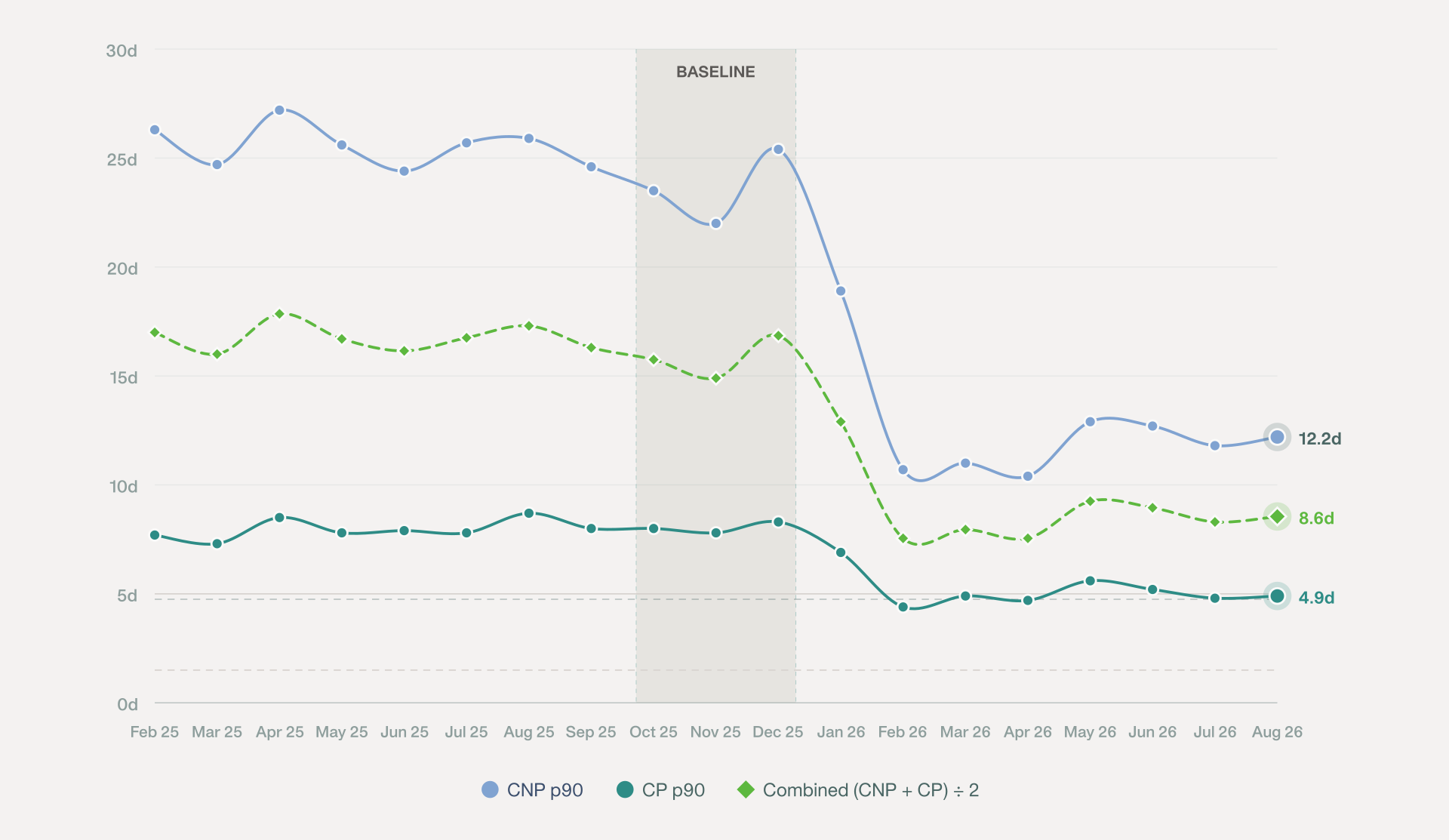
For a UK mid-market business running multiple entities on different charts of accounts, this removes a large proportion of the work in chasing invoices in that first week of every close. Automated invoice capture is the most mature capability on this list.
If there’s enough historical coding to learn from, AI proposes a GL code, VAT treatment, and cost centre for every invoice. It makes these proposals based on coding from similar supplier invoices. It’s only reliable if the history is clean. If it isn’t clean, the model can propose incorrectly, which is why this capability is mature conditionally, but not outright. The hard case is the multi-line invoice: one supplier invoice with lines for three cost centres, two VAT rates and a capital item. Splitting it across coding templates is where manual error rates climb. So judge AI coding at line level, not invoice level: precision per field, and the error rate on the lines a reviewer corrects. For coding you can leave unattended, the bar is above 99% field-level accuracy. Below that, it needs a review step.
Matching an invoice to a purchase order, and a purchase order to a goods receipt, is genuinely solved for the simple case, i.e. one line, on-contract pricing, and fully delivered. It’s not solved for multi-line purchase orders, part-received goods, or service contracts billed against a milestone.
So, if you’re a UK business buying services against a monthly retainer, you will still need a person on that exception.
Rather than routing every flagged invoice to a queue for someone to triage from scratch, AI can identify what’s wrong, propose a resolution based on how similar exceptions were handled historically, and route only genuinely ambiguous cases to a human.
Forrester’s Top Agentic AI Use Cases For AP Automation In 2026 names exception handling as one of six use case categories where this kind of agentic AI is now delivering measurable value in AP, alongside capture, matching, supplier comms, reporting, and fraud detection.
AI can answer routine supplier questions like “Has invoice number 1234 been paid?” AI checks the payment record and replies, all without needing a human to intervene and open the ledger. These seemingly small tasks remove multiple minor interruptions from an AP inbox.
Pattern matching against duplicate invoices and unknown supplier behaviour is one of the more reliably mature capabilities on this list. AI efficiently catches duplicate, fictitious and anomalous invoices. The fraud section below covers each type, and the new risk an acting agent introduces.
It’s not necessarily how much AI can do; it’s more about where the human checkpoint belongs, and in real deployments, that’s earlier than most vendor marketing implies. The Bank of England and FCA’s 2024 survey of UK financial services firms found that while 55% of AI use cases involved some form of automated decision-making, just 2% were fully autonomous.
Regulated UK finance isn't heading toward full autonomy, and AP shouldn't either.
You stop coding invoices and start reviewing coded invoices. Reviewing a proposed answer is a higher-value use of a qualified accountant than producing it by hand, and the control environment gets stronger because someone is now looking at every exception, rather than nobody looking at anything.
There are four things that should never run autonomously in accounts payable, and each one maps to a segregation-of-duties control your auditor will already check for.
No, AI removes tasks from accounts payable, not the role itself. The role left behind is a different job, and that change is already measurable.
What goes: manual invoice retrieval, first-pass coding, chasing missing receipts, and straightforward two-way matching.
What doesn’t go, and why: judgment on exceptions, supplier relationships, control decisions, and accountability for the number that ends up in the ledger. Remember, just 2% of AI use cases in UK financial services are fully autonomous, which tells you that industry experts expect humans to stay.
The job left behind has fewer data-entry tasks, with the same or more people doing review, exception handling, and control design. So, headcount in high-volume AP teams may not grow with invoice volume the way it once did.
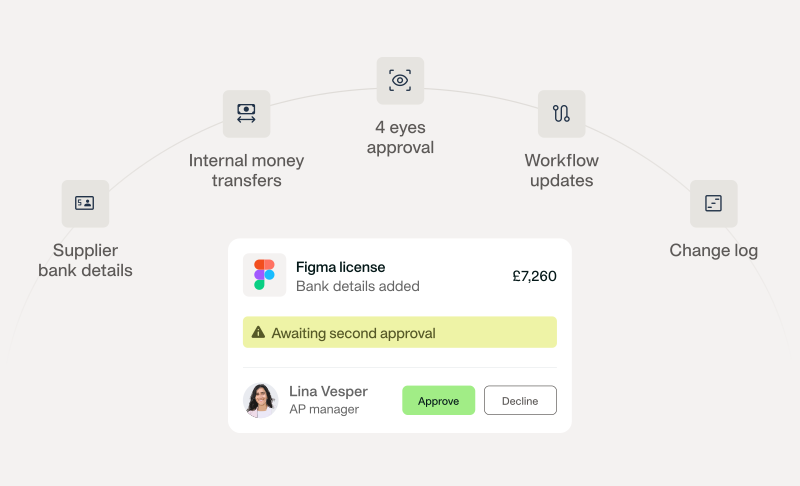
Four-eyes approval on every bank detail change
AI genuinely improves fraud detection in AP, and pointing an agent at a payment run creates a fraud surface that didn’t exist before.
There are three risks worth naming here.
Risk one: An agent with write permissions is a new privilege for an attacker to compromise. If it can change a payment, whoever controls it can change a payment.
Risk two: A supplier invoice is now an untrusted document read automatically by an AI system, and content designed to influence that reading is a live category of attack; one AP is an obvious target.
Risk three: Confident wrong answers are harder to catch than an obvious one; a miscoded invoice that looks plausible sails through review far more easily than one that looks wrong.
The same control answers all three of the risks above. Bank detail changes never go to an agent alone. Four-eyes approval, segregation of duties and a human on any change to where money moves. It’s the same answer to the fraud question as the governance question, because it’s the same underlying logic.
A team running both AI-assisted fraud detection and this control is better protected than a team running neither.
Take these ten questions to any AI accounts payable vendor demo. A vague answer to any of them is itself an answer.
| Question | What a good answer looks like |
|---|---|
| Which model provider processes our supplier invoice data? | A named provider, not “our proprietary AI.” |
| How long are AI prompts and outputs retained, and where? | A specific retention period and a named data region. |
| Is the system classified under the EU AI Act, and as what? | A specific risk category and the reasoning behind it, not 'we're compliant'. |
| Can I see why a field was coded the way it was? | Yes, with a reference to the historical pattern it matched. |
| Does a write action preview before it executes? | Yes, always, with an explicit approval step. |
| Does the agent run with the user’s permissions, or a service account? | The user’s permissions, respecting existing role controls. |
| What happens when the agent isn’t confident? Does it guess or decline? | It declines and routes to a person. |
| Is every AI action logged with user, action, and outcome? | Yes, as a standing audit log, not on request. |
| Can I switch a specific automation off for one entity? | Yes, at the entity level, not only globally. |
| What’s the measured success rate, not the marketing claim? | A specific number, with the basis for it. Payhawk, for example, publishes Agent Fetch's autonomous success rate: 68.6%. |
An auditor reviewing AI-assisted AP will want four things:
Payhawk’s own AI disclosure page is a working example of the first two points. It sets out what Payhawk’s AI can do and cannot do, including that it can’t process payments outside approved workflows or execute unauthorised transactions. It also logs every AI action so outputs stay traceable and reviewable.
The format an auditor recognises includes three moves: name of the automation, name of the control that catches it if it’s wrong, and name of the human who owns that control.
If you get this right, the documentation will do the real work. Before AI, nobody reviewed 100% of coding, because nobody had the time to. After AI plus a review step, somebody is now reviewing it. This documentation turns AI in AP into a genuine control improvement in the audit file.
Most implementation advice assumes the blocker is capability. Payhawk's CFO AI Readiness Report surveyed 1,500 senior finance professionals across Europe, the UK and the US, and found the opposite. Among the 405 self-declared AI leaders, only 26% have all five conditions needed to scale AI. Skills and tools is the most widely met (78%); minimum rules is the least (55%). In the report's own words: "the market constraint is not literacy, it's governability."
That last condition is where most AP projects end. Cisco's 2025 AI Readiness Index found only 19% of organisations have fully centralised data, against 76% of the best performers.
AI trained on inconsistent historical coding proposes inconsistent coding, confidently, which is worse than an obviously wrong answer, because nobody thinks to stop and question it. Training doesn’t fix this, what does is a written rule set, and a named owner.
Each step below has a "who decides" line, because it's the detail most process diagrams leave out, and the one that matters most. The structure mirrors our guide to agentic AI procurement workflows, so the two read as one intake-to-pay picture.
Step one: the invoice arrives, or is retrieved. An invoice lands by e-invoicing, supplier portal, or email, or an AI agent retrieves it directly from an employee-authenticated portal. Who decides: AI retrieves.
Step two: AI extracts and codes it. The AI extracts header fields, tax data, and line items, and then proposes a GL code based on historical supplier patterns. Who decides: AI proposes.
Step three: the system matches it. The invoice matches against a purchase order and goods receipt (where one exists). Who decides: AI proposes the match; a human confirms anything that doesn’t line up.
Step four: exceptions route to a human. Multi-line orders, part-deliveries, and low-confidence flags go to a human reviewer, with the AI’s reasoning attached. Who decides: a human, every time.
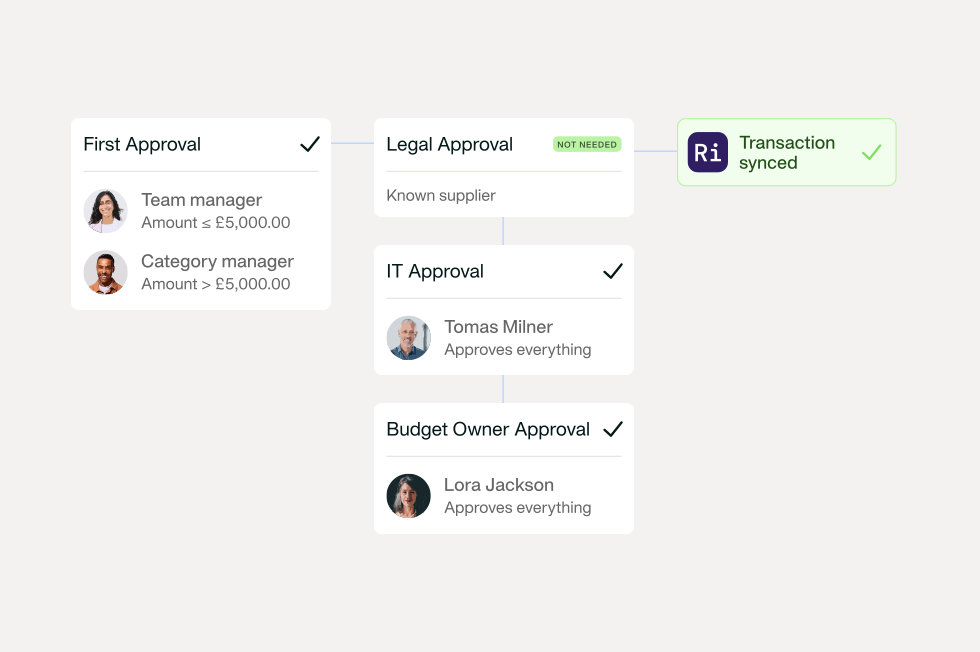
Step five: approval applies the policy. The invoice moves through the approval chain set by your company policy, spend threshold, and entity. Who decides: the named human approver, per your existing rules.
Step six: payment executes under segregation of duties. Bank-detail changes and payment releases require four-eyes approval, always. Payhawk’s Fall ‘26 Edition adds dedicated segregation of duties for vendor changes, directly answering the ‘what stops someone changing the bank details?’ question. Who decides: always a human.
Step seven: the ERP receives clean data. Coded, matched, and approved invoice data syncs to the ledger, with the full history attached.
State of Play’s Group Financial Controller, David Watson describes the alternative before switching to Payhawk:
“Pre switching to Payhawk, we used credit cards and separate tools for accounts payable. It didn’t integrate with NetSuite or combine workflows, so there was a lot of switching between systems.”
AI in accounts payable doesn’t remove the controller, instead it moves you from producing the data to owning the rules that produce it. That’s a better job, and a stronger control environment than the one it replaces.
Traditional software automates what you can specify, whereas AI automates what you can verify. The workflow above only holds together because requests, invoices, approvals, payments, and ERP data sit inside one system, rather than stitched together across several. It's also why a controller can now query that system directly through the Payhawk MCP and run repeatable finance routines as Playbooks.
That’s orchestration, not integration.
And that’s the difference between an audit trail you can produce on request and one you have to reconstruct. Get the governance right, and AI adoption in AP stops being a risk you manage and becomes a control you can point to.
See how Payhawk handles accounts payable with AI agents that work inside your existing approval policy. Or book a demo to see the audit trail in action.
With over 15 years of experience in SaaS and digital communications, Paul specialises in translating complex financial concepts into clear, engaging narratives. At Payhawk, he combines creativity and analytical insight to help finance teams thrive through data-driven storytelling.