
How to choose the best international payment system


Your finance team doesn’t have to live in spreadsheets, bank portals, and emails to manage international vendor payments. This guide teaches you how to pay overseas vendors with more control and less effort. Learn how to choose between international payment systems to reduce admin, cut FX surprises, and drive growth.
- What a good international payment system does for Finance
- The rails an international payment system should support
- Evaluating international payment systems: Five decision criteria
- Bank vs fintech: Which option is best for your business?
- What to look for in an international payment provider
- Best international payment systems for paying suppliers
- Common mistakes when choosing an international payment system
- Is your international payment setup ready to scale?
- Choose a system that gives control, not just speed
By submitting this form, you agree to receive emails about our products and services per our Privacy Policy.
Your setup for paying overseas suppliers determines FX costs, settlement speed, and the control Finance has. Here’s where an international payment system comes in: the platform and rails your business uses to pay suppliers, staff, and other entities across currencies and countries.
A platform for international vendor payments goes far beyond triggering a bank transfer. Good international payment systems hold multiple currencies, select suitable rails, enforce approvals, and reconcile at every step. You might access one through your existing bank, a fintech platform, a money transfer specialist, or a combination of these. You decide who approves payments, how FX applies, and how accounts payable (AP) data reaches your ERP.
Picture this. You’ve just wrapped up a bumper quarter with climbing sales and a growing product catalogue. But your company’s international payment systems tell a different story.
Using multiple solutions without a single audit trail creates admin, bottlenecks, and profit leaks. You see FX fees and intermediary costs after clearance. By then it’s too late to react. Each solution for international supplier payments offers varying levels of transparency in status and ERP syncing, obscuring actual spend.
These issues remain common. Cross-border payments today still take three to five days to settle, with costs of around 6.3%. In this guide, you’ll uncover what a good international payment system does and why the choice matters. You’ll also learn which rails it should support, how to compare models, and choose the best option.
One platform for supplier payments, FX, and approvals
What a good international payment system does for Finance
A payment platform is the control room for your international vendor payments. It shapes workflows, from FX decisions to data quality. A strong setup gives you control, faster payments, and fewer surprises. A good platform should:
- Hold multiple currencies to pay in the invoice’s currency and avoid double conversion
- Route each payment through the cheapest route, e.g., local rails or SEPA (Single Euro Payments Area) and ACH (Automated Clearing House)
- Make FX rates and fees visible before approval so budget owners can see actual costs
- Enforce approval before money moves, keeping finance in control of every payment
- Provide clear multi-entity management data on one dashboard for quick decision-making
- Sync each payment with its invoice, approval, and live status via ERP and accounting integrations
The rails an international payment system should support
Global money never moves in a straight line. It jumps rails, crosses borders, and can experience delays which affect delivery and cost. Knowing your options helps you choose the right rails. Let’s explore the main options.
SWIFT: Global reach, slower pace
Society for Worldwide Interbank Financial Telecommunication (SWIFT) is the backbone of cross-border banking. SWIFT moves messages between banks, not the money, and typically charges a £15- £30 flat fee. SWIFT applies an FX markup and a three- to five-day settlement window.
SEPA: Euro-area transfers at low cost
SEPA handles euro-denominated transfers across participating countries. SEPA uses shared standards to move money quickly at low to no fees at many banks. With SEPA instant, payments arrive in seconds, making European supplier payouts feel almost domestic.
Local ACH and domestic rails: Fast in-country payouts
ACH schemes and domestic rails like Faster Payments or BISERA move money within a single country. They offer near-domestic speed and low costs, especially on recurring invoices. Using local rails for cross-border setups often means pairing them with in-country accounts. Local accounts allow you to pay vendors from a local balance in their home market.
Digital wallets: Fast ad-hoc and contractor payouts
Digital wallets store payment details so users can pay from a phone, app, or website. They allow quick and easy payments, often with just the recipient’s email or phone number. Speed and reach make them popular. Digital Wallets are tipped to reach around 54% of online transactions by 2026.
Corporate cards: Instant spend with strong controls
A corporate card is a company payment card for authorised spend. They provide instant rails for SaaS subscriptions, travel, and card-accepting suppliers. Commercial and corporate card spending remains popular. Forecasts anticipate market growth to $88 billion by 2034. Corporate cards, including virtual options, play a key role in controlling and tracking business payments. Card spend converts at the Visa or Mastercard network rate on the settlement date, so the FX is transparent and close to mid-market (issue the card in the transaction currency to avoid an added conversion fee).
SEPA vs SWIFT
For multi-currency payments within Europe, SEPA gives lower fees and faster settlement. SWIFT is best for global payments outside of Europe where you need wider currency coverage but can accept higher cost and slower timing. For example, your team could pay a supplier in Germany via SEPA to keep fees low. SWIFT gives them access to corridors and currencies that SEPA doesn’t cover, like the US and the dollar.
See supplier payments move on the right rail

Evaluating international payment systems: Five decision criteria
When comparing international payment systems, you’re deciding the costs, speed, controls and integration that’ll shape your company’s profitability and growth. It’s critical to know how cross-border payments work. There are five core criteria to evaluate cross-border systems. Let’s break them down.
1. Cost and FX transparency
Headline FX rates alone are a trap. The total cost of multi-currency payments includes the sending fee, FX markup, and intermediary banking charges too. Ask: can my team see the full cost of each payment before approval? Also, check whether the system allows you to:
- Compare rails and providers for each corridor
- Decide whether to batch or pay individually
- Avoid routes that hide margin through spreads or bank fees
2. Rails coverage for your supplier countries
Payment rails are channels and methods for sending money. For example, say your suppliers are in the eurozone and Asia. Your team needs the right coverage for each region to ensure on-time international business payments. So, match rails to your business reality:
- Map supplier locations: List your vendors’ locations. Check which rails (e.g., SEPA, local ACH) your setup supports
- Align rails with volumes: Prioritise low-cost rails for high-volume corridors. Use faster, more expensive rails for high-priority transfers
- Review gaps regularly: When adding a new country, confirm current rails cover it. If not, decide whether to add a different rail or negotiate currency
3. Settlement speed
The G20 cites slow cross-border settlement as a barrier. The Bank of England also highlights that delays and opaque processes still create risk for global businesses. Many payments take days to clear. To ensure settlement windows match your needs:
- Review settlement times: Measure how long each rail takes to deliver
- Align speed with risk: Pick a system with flexible payment speeds. For example, it should offer fast rails for critical invoices and slower for regular ones
- Investigate provider reliability: Determine how often the solution meets on-time delivery targets. Favour options with consistent settlement times
4. Financial controls (approvals, invoice currency, audit trail)
Weak payment controls let duplicate disbursements, AP errors, and fraud eat into margins. Around 1.5% of outgoing AP cash is duplicate or erroneous disbursements. Also, companies lose about 5% of revenue to fraud each year. When comparing international payment systems, look for a platform that builds controls into every transaction.
Ensure it:
- Separates decision from payment: Check that budget owners can approve each invoice and monitor activity
- Supports payments in the relevant invoice currency: Ensure the platform has extensive currency options to avoid hidden FX fees from double conversions
- Keeps a complete audit trail: From approval to payment rails, the system should record all actions to make resolving issues easier
5. Integration (ERP sync and multi-entity)
Clean integrations turn uncertainty about how to pay overseas vendors into quick, repeatable workflows. Your team moves from data entry and tool switching to making strategic AP calls that boost cash flow. For example, your team can see all payments in a single view with Payhawk’s ERP and accounting integrations. They also get accurate data for financial close, accelerating processes.
Your payment solution should:
- Sync complete financial records: Payment data must flow into ERP and accounting systems, including invoices, FX, approvals, and statuses
- Support multi-entity management: Keep companies separate for reporting, but visible in one place for control and planning
- Reduce manual work and errors at close: Prioritise systems that use automation to improve invoice reconciliation
International payment system options
| System | Typical cost/FX | Speed | Rails coverage | Financial controls |
|---|---|---|---|---|
| Traditional bank | High (flat fee + ~3–5% FX) | 3–5 days | SWIFT | Weak (manual approval, no ERP sync) |
| Money-transfer specialist | Low FX, per-transfer fee | 1–2 days | Local + SWIFT | Weak (manual approval, no ERP sync) |
| Card/wallet | Visa/Mastercard network rate + any card FX fee | Instant – 1 day | Card networks | Limited at scale |
| Single fintech/Spend mgmt platform (e.g. Payhawk) | Low FX from ~0.30% | Seconds–T+1 on instant/local rails (GBP, EUR); up to 3–5 days on ACH/SWIFT | Local + SEPA + SWIFT | Strong approvals, invoice-currency payment options, multi-entity, ERP sync |
| Multi-provider stack | Varies | Varies | Varies | Fragmented (no single audit trail) |
Bank vs fintech: Which option is best for your business?
When supplier payments span multiple currencies and entities, consolidation wins. A single system reduces reconciliation work, control gaps, and confusion.
Take Alma, for example. The finance team was switching between providers to reimburse employees and pay suppliers across currencies. This slowed approvals and reduced visibility.
They onboarded Payhawk to unify international spend management and payment software in a single platform. Now, the team saves time and money on cross-border payments. Speaking on the upgrade, Simon Shohet, Finance and Strategy Senior Manager at Alma, said:
Payhawk's international bank payments feature means we now have one platform to manage our payments, from employee reimbursements to paying suppliers across different currencies, including USD. We love that we don't have to switch between different providers to make payments and have a complete overview of spend in Payhawk.
What to look for in an international payment provider
Once you’ve chosen a payment system, the next task is choosing the best provider. Use this checklist to evaluate options.
Does the provider:
Hold balances in the currencies your company uses
- Yes
- No
Pay suppliers in the invoice currency without forced conversion (the real benefit: no double FX).
- Yes
- No
Let you choose rails per payment - Local, SEPA, SWIFT, or partner-led FX
- Yes
- No
Show FX, transfer, and intermediary fees clearly before approval
- Yes
- No
Release payments only after approval
- Yes
- No
Sync every payment to your ERP with invoice, approval trail, and status updates
- Yes
- No
Give AP, Treasury, and Finance one data dashboard across entities
- Yes
- No
Meet security and compliance needs (PCI DSS; safeguarded funds, sanctions screening)
- Yes
- No
If you answered “Yes” to all questions, you can treat the provider as a strong candidate for your shortlist.
See what hands-off accounts payable looks like

Best international payment systems for paying suppliers
Top solutions combine international supplier payments with other finance workflows. These include invoice processing, approvals, corporate cards, expense management, ERP integration, and multi-entity oversight.
We compared six leading international payment software platforms across five areas:
- Suitability for different business models
- International payment capabilities
- Approval and accounts payable controls
- ERP and accounting integrations
- What you should verify before purchasing
Payhawk
- Best for: Mid-market and multi-entity businesses that want to manage supplier payments, cards, expenses, approvals, entities, and finance data in one platform.
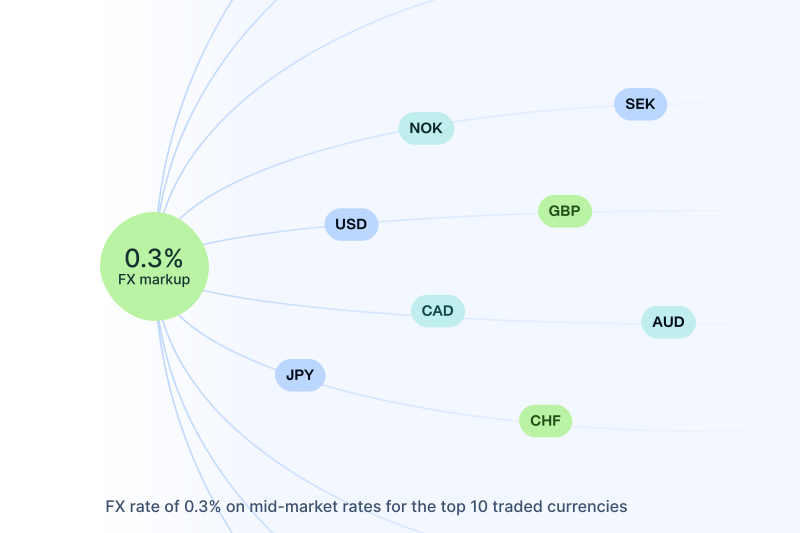
- International payments: Sends supplier payments in 115+ currencies to more than 150 countries, using both local and cross-border rails, with market-leading FX from 0.30% on the top 10 currencies (0.70% / 0.95% on other tiers) and no forced double conversion. Finance can follow each payment from submission to completion in one place.
- Approvals & AP controls: AI-backed Optical Character Recognition (OCR) invoice capture, customisable approval workflows, supplier payments, card controls, and role-based access, with a full audit trail, so finance teams see each step of the AP process in real time.
- ERP & accounting integration: Connects directly to ERP and accounting systems and auto-syncs invoice, approval, payment, and coding data, keeping ledgers accurate and giving Finance up-to-the-minute data on cash and payables.
- What to verify: Where Payhawk is available, which account and payment currencies it supports, how your main payment corridors price out, and what implementation and licensing look like for your entity structure.
Airwallex
- Best for: International businesses that want international vendor payments, multi-currency accounts, wide payment coverage, and bill payments alongside other finance workflows.
- International payments: Multi-currency accounts, cross-border transfers, and local payment options; its Bill Pay solution lets teams collect, approve, and pay supplier invoices from one screen, though card payment is only possible when the vendor accepts cards.
- Approvals & AP controls: Bill Pay handles invoice upload, approval chains, and supplier payments, then feeds data into your accounting system for reconciliation. It also includes cards and expense controls, plus multi-entity expense management so finance can see balances and approvals across entities in one view.
- ERP & accounting integration: Integrates with Xero, QuickBooks, and NetSuite so teams can import bills, run approvals and payments, and push data back into their ledgers. Your ERP still manages consolidated statements and group-level reconciliation.
- What to verify: Which regions support Bill Pay, how approvals differ for transfers versus card payments, and how it handles your entities and currencies. Ask how transfer timings, bank business hours, and regional feature availability affect real-time payments and bill-capture depth on your main routes.
Spendesk
- Best for: European mid-market businesses that want spend control, international supplier payments, cards, AP, and multi-entity visibility.
- International payments: Uses Wise to let teams pay suppliers in more than 30 currencies at mid-market rates. You fund a central EUR or GBP wallet, and each overseas payout triggers live FX at settlement rather than holding balances in every currency.
- Approvals & AP controls: Centralises invoice capture, PO matching, approvals, and supplier payments with role-based controls and audit trails. Designed for European entities, and subsidiaries outside Europe that rely on reimbursement flows rather than local corporate cards.
- ERP & accounting integration: Accounting automation and exports move invoice and payment data into European-focused accounting tools. For ERPs like NetSuite, deeper intercompany and tax workflows still sit in your ERP rather than a full API-led sync.
- What to verify: Which countries and currencies the Wise integration covers for you. Ask whether non-European entities get the same card and AP features, how pre-funded wallets affect working capital, and how well the integrations fit your current ERP and tax setup.
Ramp
- Best for: US-led or US-headquartered businesses that want cards, AP automation, procurement, and international vendor payments in one stack.
- International payments: Pay international vendors through Ramp Bill Pay, alongside card spend and reimbursements. Payments fund directly from a linked US or local account, with live FX at the time of payment rather than multi-currency wallets.
- Approvals & AP controls: Ramp Bill Pay pulls in invoices, supports PO matching, routes approvals, manages vendor details, and tracks each bill through to payment. Some multi-entity controls and advanced features sit behind the paid Ramp Plus tier.
- ERP & accounting integration: Connects with ERPs and accounting systems like NetSuite, Sage Intacct, and QuickBooks so finance can sync bills and payments instead of posting by hand — but foreign-currency bills and local-currency payouts depend on using supported cloud ERPs or CSV flows.
- What to verify: Which countries and entities Ramp supports, how you fund the account, and whether your ERP unlocks local-currency payouts or forces USD-only payments. Confirm how Ramp Plus pricing and global policy rules fit your spend-control setup.
Pleo
- Best for: European businesses that value ease of use for cards, expenses, invoice approvals, and supplier payments.
- International payments: Upload supplier invoices, add approvers, and pay or schedule payments from Pleo. You can hold and pay in up to six currencies (EUR, GBP, USD, DKK, SEK, NOK), but multi-currency accounts only work with certain accounting setups or CSV exports; other users still fund a main local-currency wallet and face FX fees.
- Approvals & AP controls: Pleo AP combines simple invoice capture, approval steps, payment scheduling, and expense management. It suits straightforward vendor bills more than complex mid-market procurement, and multi-entity views work as an entity switcher rather than full intercompany or consolidation automation.
- ERP & accounting integration: Syncs invoices, approvals, payments, and expense data into systems such as Xero, QuickBooks, NetSuite, and Sage — but deeper, API-led sync is strongest on tools like Xero; higher-tier ERPs often rely more on CSV export and manual mapping.
- What to verify: How international supplier payments work in your region, and which currencies and destination countries Pleo supports for held balances versus one-off FX. Check how its multi-entity setup fits your group structure, and whether its AP flow is enough for your procurement and ERP complexity.
Tipalti
- Best for: Businesses with high-volume or complex global AP, supplier onboarding, tax, and compliance requirements.
- International payments: Sends payments to over 200 countries and territories in more than 120 currencies via ACH, global ACH, wires, prepaid cards, and checks. Global payouts run through entity-specific wallets, so each subsidiary needs its own funded account before payments go out.
- Approvals & AP controls: Covers supplier onboarding, invoice automation, approval workflows, tax-form collection, payment validation, sanctions screening, and supplier communications. Procurement flows and corporate cards sit in separate add-on modules, so deeper PO matching often still depends on your ERP's procurement setup.
- ERP & accounting integration: Pre-built integrations with major ERPs and accounting systems, but many enterprise connectors run in scheduled batches rather than instant, real-time syncs. Vendor and invoice updates appear in the ledger after the next sync window, not immediately.
- What to verify: Quote-based platform pricing, per-invoice and per-payment fees, FX markups on cross-border payouts, and how its multi-entity structure fits your group. Ask how often your chosen ERP integration syncs compared with the control your team needs.
How Payhawk supports international vendor payments
Payhawk combines global payments with a comprehensive spend management platform to make completing AP tasks efficient, cost-effective, and safe. For example, your team can:
- Pay in 115+ currencies and hold balances in major ones to reduce double conversion costs and FX surprises
- Use the right payment rail for each transaction, with local rails where available, to move money without higher costs or multiple providers
- Release supplier payments and reimbursements after sign-off, to avoid unauthorised payments and maintain audit trails
- Provide Visa corporate cards with built-in spend controls to accelerate reconciliation and month-end close
- Sync card transactions to your ERP and accounting tools in real time with integrations to reduce manual work and data errors
- Let Finance, AP, and Treasury see payments and audit trails across entities from one dashboard with Payhawk’s multi-entity management solution
- Offer PCI DSS-level security, safeguarded funds, sanctions screening, and role-based access to keep payments compliant and budgets safe
Common mistakes when choosing an international payment system
Without the right knowledge, mistakes can happen as your finance team tries to improve supplier payments. Let’s look at the most common ones.
| Problem | Why it happens | Fix |
|---|---|---|
| Choosing a system based on headline FX rate alone | Teams focus on the visible FX rate and ignore extra intermediary markup fees | Compare total cost, including FX, transfer, and intermediary fees |
| No approval process for payments | Payments move on habit or trust without requesting approval before release | Require approval before releasing payments to cut fraud and error risk |
| Forced source-currency conversion | The system only lets you pay from a home currency, so every invoice needs converting | Hold balances and pay in the invoice currency to avoid double FX conversions |
| No ERP sync | Payments sit in separate systems and spreadsheets until month end | Require automated ERP sync and a full audit trail |
| Running finance processes on disconnected providers | Different teams adopt different tools for card and bank payments | Consolidate payment options into one international payment system with unified control |
Is your international payment setup ready to scale?
Before making changes, assess where your current setup stands among international payment systems. Use this scorecard to see how ready your setup is for growth.
Instructions: Answer “Yes” or “No” to the following questions and total your “Yes” answers.
- Do all supplier payments run through one system?
- Can you hold and pay in your suppliers’ currencies?
- Are FX and fees visible before approval?
- Does every payment require approval before release?
- Does each payment sync to your ERP automatically?
- Can you see payments across entities in one place?
Scoring (“Yes” answers):
- 0-2: Your setup costs you money and control. Consolidate onto one system, fix any missing approval processes, and ERP sync to avoid costly errors
- 3-4: You have a solid base but have gaps. Tighten FX visibility and approvals. Merge more flows before scaling international vendor payments
- 5-6: Your platform is ready to scale internationally. Focus on improving policies, analytics, and team workflows
Choose a system that gives control, not just speed
The real differentiator for finance teams is control and quick, accurate reconciliation. Good international payment systems balance cost, speed, reconciliation, and control, not just cheap, fast transfers.
When Finance keeps approvals, FX visibility, clean data, and integrations at the centre of its setup, your business stops leaking margin and time. From here, your company grows more profitably, strengthens cash flow planning and makes better decisions.
For a deeper dive into rails, FX, and strategy, download the ultimate guide to international payments. If you want to see how you can optimise your setup, explore how Payhawk’s international payment system works.
With over 15 years of experience in SaaS and digital communications, Paul specialises in translating complex financial concepts into clear, engaging narratives. At Payhawk, he combines creativity and analytical insight to help finance teams thrive through data-driven storytelling.
Related Articles


What is the best AP automation software that integrates with Xero?

