
.avif)
The $4.7tn problem: Hidden Costs of employee financial fraud
27 Mar 20244 minutes


Invoice fraud enters accounts payable at six points: purchase orders, supplier details, invoice intake, approvals and payment, off-process requests and refunds. The strongest controls are Confirmation of Payee, a second approver for bank-detail changes, duplicate checks, segregation of duties and paying from the system, not a file.

By submitting this form, you agree to receive emails about our products and services per our Privacy Policy.
Invoice fraud is when a business is tricked into paying a fake, altered, or duplicate invoice, or into sending a genuine payment to the wrong bank account. You prevent it by putting a control at each point an invoice or payment request enters accounts payable (AP). Spotting fake invoices covers only one of those points.
UK Finance recorded 2,305 invoice and mandate fraud cases in 2025, and victims lost £41.3m, with only 48% returned. Those are only the cases reported to banks, so the real cost is higher.
Because the money is so hard to get back, prevention matters more than recovery. This guide maps out six points where invoice fraud enters AP, the control that closes each one, and how a finance system enforces it. At the end, there’s a red-flag checklist for your AP team and the questions you should ask AP software vendors.
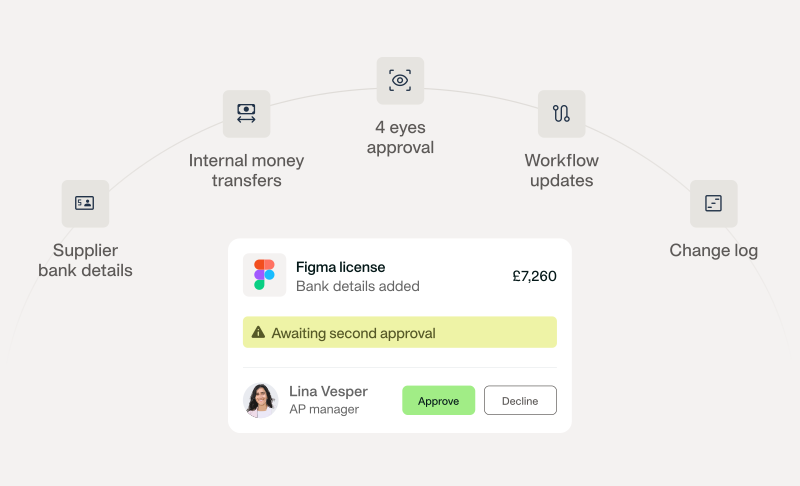
Four-eyes approval on every bank detail change
Invoice fraud is any scheme that gets a business to pay money it doesn’t owe, or to pay what it does owe into an account a fraudster controls. UK finance teams call it invoice fraud or mandate fraud. US sources call it accounts payable fraud. Whatever term you use, it’s the same problem.
Where the fraud starts decides which control stops it. External fraud arrives through a spoof email or a hacked supplier mailbox, so verification closes it. Internal fraud starts inside the business, often with a supplier’s help, so separating duties closes it. The table below shows the most common types and where each one enters AP.
| Type | What happens | Where it enters AP |
|---|---|---|
| Mandate fraud | An email posing as a supplier asks you to change their bank details | Supplier details |
| Fictitious supplier | A fake company is set up as a supplier, often by an insider | Supplier details |
| Fake or false invoice | An invoice for goods or services that were never supplied | Invoice intake |
| Altered invoice | A genuine invoice with changed bank details, often from a hacked supplier mailbox | Invoice intake |
| Duplicate invoice | The same invoice paid twice. Often not malicious: a supplier chases payment and resends it, sometimes with a new number | Invoice intake |
| Inflated pricing or kickbacks | An insider and a supplier agree on prices above the contract | Purchase request and PO |
| Split invoices | One bill split in two to stay under an approval limit | Approval and payment run |
| CEO fraud | An email posing as an executive demands an urgent payment | Requests outside the process |
| Overpayment refund scam | A ‘supplier’ asks for a refund to a new account | After payment |
Employee expense claims carry their own risks, which our business expense fraud guide covers.
Each fraud entry point below tracks the same pattern.
How it works: a supplier bills for goods nobody ordered and counts on the invoice looking routine. Or an insider agrees a price above contract with a supplier and shares the difference.
The control:
How a system enforces it: purchase requests route for approval before a PO is raised, and two- and three-way matching runs on every invoice linked to a PO. Payhawk matches more than €100m of supplier invoices against POs and delivery notes each month. For the wider framework, see our guide to accounts payable internal controls.
As Tim Green, Head of Finance Transformation at Aventum Group, puts it:
The PO features have given us a lot more visibility and control. Now, with the approval workflows in PO, we can embed the controls in-house and give our procurement manager complete control.
The supplier master file is the most valuable target in AP. One edit to a bank account redirects every future payment to that supplier.
How it works: fictitious supplier fraud is when someone, often on the inside, sets up a fake company as a supplier so its invoices pass as normal. Mandate fraud is when a fraudster posing as a real supplier says ‘our bank details have changed’, so the next payment lands in the fraudster’s account.
The control:
How a system enforces it:
How it works: fake invoice fraud is an invoice for something never delivered. This is usually from an unfamiliar sender. An altered invoice is a real one but with new bank details, and it's usually sent after a supplier’s mailbox is already compromised. A duplicate invoice is the same bill submitted twice, sometimes with a new number. Often there’s no fraud behind it: a supplier chases an unpaid invoice and sends it again. Either way, it’s AP’s job not to pay it twice.
The control:
How a system enforces it: duplicate detection flags repeat invoices by amount, supplier, date, and document number. Invoices sent to the Payhawk Mailbox are checked for duplicates on arrival, and duplicates are removed before anyone reviews them. Matching then ties each invoice to its PO and delivery note.
As Shuhul Koul, Financial Controller at Arc and Naya, puts it:
Before, we just paid whatever came in. […] Payhawk builds in those checks, and that’s a game-changer.
How it works: an approver sees only an amount and signs it off. A bill is split in two to stay under an approval limit. One person changes a supplier’s bank details, confirms the payment, and authorises it. A payment file is edited between export and upload to the bank.
The control:
The second control has a name: segregation of duties (SoD). In payments, it means no single person can set up, approve and pay the same transaction. In a small team where a step can’t be split, add a compensating control, such as an independent review of the payment run or of bank-detail changes.
How a system enforces it: approval workflows route bills by amount threshold. In Payhawk, segregation of duties for bill payments is on by default: the person who confirms payment details can’t authorise that payment.
Teams confirm and authorise supplier payments in the platform, and the authoriser can approve the final step in the web app or on their phone. UK and EEA transfers run from the Payhawk currency account, so there’s no payment file to edit.
How it works: CEO fraud is where an email posing as a senior executive asks for an urgent transfer, often asking them to keep it quiet. A different version can have a ‘supplier’ asking to be paid today to a new account. CEO fraud is rarer than mandate fraud, but each case costs more on average. UK Finance recorded 197 CEO fraud cases in 2025 with £5.6m lost, and only 20% returned to victims.
Business email compromise (BEC) goes a step further. The fraudster gets into a real mailbox, so the request comes from a genuine address, often in the middle of an existing thread. Inside a finance or supplier mailbox, they can also intercept invoices and resend them with new bank details, or approve a request by replying to it.
The control:
How a system enforces it: the workflow is the control, so when every payable has to go through approved suppliers and the approval chain, an urgent email can’t fast-track a transfer; it joins the queue like any other payment request. Because approvals and bank-detail changes happen in Payhawk rather than in an inbox, a hijacked mailbox can’t approve a payment on its own: the attacker would also need a Payhawk login protected by two-factor authentication.
How it works: an overpayment refund scam is when a ‘supplier’ claims you’ve paid twice and asks for the difference back to a new account. Fraud that slipped through earlier can stay hidden until someone compares the records.
The control:
How a system enforces it: payments sync to the ledger for invoice reconciliation, and every action sits in a full audit trail you can check against supplier statements.
Every control above depends on who can log in and what they can change. Require two-factor authentication (2FA), give each person a role that reaches only the steps they own, and keep an audit trail with before-and-after values on every change.
Payhawk logs every supplier change with who made it and when, shows old and new bank details on every change that needs approval, and emails admins when supplier bank details change.
Fraudsters who can’t get past the controls try to change them instead: editing a payment workflow to remove an approval step or switch a control off, inviting or promoting a second admin so one person can satisfy four-eyes approval, or using a bulk import to quietly change supplier bank details or give employees admin rights.
Payhawk extends four-eyes approval to these changes too. Any edit to the approve, review, confirm details and authorise steps of a payment workflow, any invitation or promotion into a privileged role, and any import that changes supplier bank details or assigns a privileged role will need a second person to approve it.
Below are some key signs that an invoice or payment request needs a second check before it’s paid.
| Red flag | Why it matters |
|---|---|
| Invoice bank details differ from the supplier record | Classic sign of an altered invoice |
| Bank-detail change requested by email | The core move in mandate fraud |
| Pressure to pay today, or ‘keep it confidential’ | Urgency is how CEO fraud skips checks |
| New supplier with a large first invoice | Fictitious suppliers often bill big, early |
| Invoice number out of sequence or already used | Points to a duplicate or a fake |
| Amounts just under an approval limit, or several from one supplier in a short period | Classic split-invoice pattern |
| No PO, or a PO raised after the invoice | Someone might never have approved the purchase |
| Sender domain one character off the real one | A lookalike domain impersonating a supplier |
| Supplier address or bank account matches an employee’s | Possible insider fraud |
| Layout, logo, or VAT number differs from earlier invoices | Possible fake or altered invoice |
| Domestic supplier asks to be paid to an overseas or personal account | A common diversion route |
A red flag is a reason to verify through a known channel; it’s not proof of fraud. If money has already gone, call your bank immediately and report it.
The controls above only work if they run in one place, rather than across inboxes, spreadsheets and bank portals. That’s harder than it sounds: in research Payhawk ran with Raconteur, 63% of CFOs and 70% of CIOs said centralising control and visibility was ‘extremely challenging’.
The right AP software takes most of that work off your team. Use these questions to test how well a vendor prevents invoice fraud:
| Question | Why it matters | What a strong answer looks like |
|---|---|---|
| Does it check the payee name against the account? | Stops payments to a fraudster’s account | Confirmation of Payee (CoP) for GBP and Verification of Payee (VoP) for EUR, with explicit confirmation on any mismatch |
| Who can edit supplier bank details, and does a change need a second approver? | Closes the main mandate fraud route | Named roles only, and a second approval before any change takes effect |
| Are bank-detail changes alerted and logged? | Lets you trace every change | A log of who, when, and why |
| Is separation between confirming and authorising enforced by the system? | Policy alone depends on memory | Enforced in the workflow, on by default |
| Which fields does duplicate detection check? | Number-only checks miss renumbered duplicates | Supplier, amount, date, and document number |
| Does it match invoices to POs and delivery notes? | Catches invoices for things nobody ordered | Two- and three-way matching with discrepancies flagged |
| Does it warn before the first payment to a new payee? | First payments carry the most risk | An in-flow warning before release |
| Are payments executed in the platform or exported as a file? | Exported files can be edited | Payments executed in the platform |
| Is 2FA required, and are roles granular? | Controls rely on access | 2FA at login and role-based permissions |
| Can you export the audit trail for an auditor? | Evidence for audit and investigation | A full, exportable trail of actions and changes |
A platform like Payhawk covers these inside one workflow, from purchase request to payment. See how controls work together in our invoice fraud prevention overview, or explore our accounts payable software.
Invoice fraud enters accounts payable at six points, so one control can only cover part of the risk. The biggest opportunities sit in the gaps between steps: off-process requests, bank-detail changes, and refunds.
Controls work best when the system enforces them, so they hold up on the busiest payment day without anyone having to remember.
If you’d like to see these controls in your AP process, book a demo.
With over 15 years of experience in SaaS and digital communications, Paul specialises in translating complex financial concepts into clear, engaging narratives. At Payhawk, he combines creativity and analytical insight to help finance teams thrive through data-driven storytelling.

