
A smoother way to book and manage executive travel
23 Jun 20266 minutes

.avif)
On 29 September we walked through the Fall '26 product showcase: Prompt your finance. We covered the Payhawk MCP that lets your own AI assistant read and act on Payhawk, finance playbooks that run a whole job like month-end close end to end, the new Implementation Agent, business travel enhancements, native integrations with Pennylane, Rillet, Campfire and Dual Entry, and two-person control for the actions that matter most.

By submitting this form, you agree to receive emails about our products and services per our Privacy Policy.
Finance leaders came to Prompt your finance with a lot to ask. More than 150 questions came through the Q&A panel and the chat, from finance teams at 68 companies. Hosted by Laura Gamiz, Country Director for Spain and Europe, the session went over the Payhawk MCP, 100+ skills and 30 Playbooks, the new Implementation Agent, travel, ERP connections and eInvoicing. Nikolay Pohlupkov, General Manager, Dan Osburn, Chief Payments Officer, and Martin Reindl, GM and SVP of Customer Success, covered as many questions as the hour allowed, which still left plenty on the table. Here are the answers.
Questions are grouped by topic, with the ones raised by the most companies first. Where a feature is still being built, you'll find direction rather than a date, because dates move and this post will outlive them. Where something isn't supported today, that's said plainly, with the workaround if one exists.
By far the biggest topic of the day. Most of you wanted to know whether it's real, how to find it, and what it costs.
Yes. The Payhawk MCP is live and available to every Payhawk customer today. It works with Claude, ChatGPT and Codex, and since the webinar also with Microsoft 365 Copilot, Microsoft Copilot Studio, GitHub Copilot in VS Code, Cursor, Notion AI, Dust and Langdock (full list in the next answer), always using your own Payhawk login and permissions. There is no release date to wait for. How you add it depends on your assistant: on a Claude Team or Enterprise workspace a Claude Owner adds the Payhawk connector once and everyone then connects to it with their own login; on personal Claude plans and in the other assistants, each user adds the connector themselves with the Payhawk MCP server URL.
Payhawk is not yet listed in the Claude or ChatGPT connector directories (the listing is pending approval on their side), so it won't appear in search. Add it as a custom connector instead: in Claude go to Customize > Connectors > Add custom connector, paste the Payhawk MCP server URL (https://mcp.payhawk.com/mcp) and sign in with your Payhawk credentials. On a Claude Team or Enterprise workspace only a Claude Owner can add custom connectors, so ask them to add Payhawk once; each person then connects individually. Once the directory listing is approved it becomes a one-click install.
MCP is the Model Context Protocol, an open standard that lets an AI assistant connect to a real system such as Payhawk. Instead of copying data into a chat by hand, you connect Payhawk once and the assistant can look things up and take actions for you, with your permissions.
The Payhawk MCP launched for Claude, ChatGPT and Codex and since the webinar we have also enabled Microsoft 365 Copilot, Microsoft Copilot Studio, GitHub Copilot in VS Code, Cursor, Notion AI, Dust and Langdock; any of them connects with the same Payhawk MCP server URL, although our setup guides and testing still focus on Claude and ChatGPT. Gemini isn't on the list yet; tell us if that's your assistant and we'll prioritise it. Because the connector follows the open MCP standard, expect the list to keep growing.
Very well. The hard parts (computing insights, running playbooks, applying permissions) happen server-side in Payhawk, not in the model. The assistant mostly orchestrates and presents, so a much less expensive model is expected to work just fine and keep token costs down.
No extra cost from Payhawk. The MCP and all the AI Office agents (Financial Controller, Procurement, Payments, Implementation) are included in every Payhawk plan. The only exception is the Travel Agent, which is part of Payhawk Travel. On the AI side you just need an assistant plan that supports connectors; custom connectors are available on every Claude plan.
Everyone in the organisation can use it. Administrators activate the connection; after that each person connects with their own login and sees exactly what their Payhawk role allows. Playbooks are offered based on the permissions their steps need, so an approver sees approval triage and an employee sees their own expenses and requests.
Learn more: Payhawk MCP playbooks and AI agents
The second-most common worry: if an AI assistant can act in Payhawk, who is it acting as, and who can see what?
Yes, exactly. The agent always runs under the permissions and entity scope of the person chatting with it: nothing more, nothing less, and never blended across entities. Every write action previews first and waits for your explicit confirmation, and it goes through your normal approval workflows.
Every action is fully audited, and the actor is always the signed-in Payhawk user, never "the AI". In the activity history, changes made through Claude or ChatGPT are labelled "via Claude" or "via ChatGPT", so you can tell what was done through an assistant and what was done in the web app. For other assistants the action is still logged against the user; the client name isn't shown yet.
The agent can only reach what the person using it can reach in Payhawk, and it only accesses data when you ask it to; it doesn't crawl your account in the background. So the practical control is the one you already use: Payhawk roles and permissions. If a user shouldn't see employee bank details in the web app, the agent acting as that user can't see them either. For sensitive actions, segregation of duties adds a second approver on top.
The Payhawk MCP reads and acts on Payhawk data; the ERP sync itself keeps running through the native integration. What you can do is connect your ERP's own MCP (if it offers one) alongside Payhawk in the same assistant and ask it to work across both, for example to compare vendor records or reconcile a rejected export. Payhawk doesn't orchestrate that cross-system logic natively, so it's worth testing on your specific ERP.
A skill does a task. A playbook does the job. Here's what you asked about building and running them.
Skills (single tasks like "submit an expense" or "fetch an invoice") are provided by Payhawk and are static. Playbooks are where you customise: you combine skills into your own playbook by describing the job in the chat, and the agent drafts the steps, the "done when" condition and what it can reach. This works in the Payhawk web and mobile chat and through the MCP, and custom playbooks are stored in Payhawk, so your whole team can use them (up to 10 custom playbooks per user).
A custom playbook can check for expenses with no linked PO and flag or return them before approval. For hard enforcement (blocking submission) the more robust route is your workflow and request settings, which the Procurement Agent respects. Our suggestion: policy in settings, monitoring in a playbook.
Yes. Payhawk extracts the invoice data (supplier, amounts, tax, dates, line items) with OCR and AI data extraction, and the Financial Controller Agent combines that with your coding history and supplier defaults to propose or fix the category, tax rate and custom fields. The "Find and fix the coding" step of the month-end close playbook and the "Fix inconsistent coding" playbook do exactly this.
You can build a custom playbook that encodes your checks, runs across open invoices and flags or comments on the ones that fail. Country-specific tax rules such as CIS deductions are not a built-in rule set today, so the playbook relies on the criteria you describe. We'd love to work through a real example with you; our product team will reach out.
Payhawk already checks every document for the essentials: missing receipts or invoices, missing or inconsistent fields, duplicates, VAT numbers and policy violations, and the Financial Controller Agent flags anomalies. A full multi-country tax-compliance engine ("this receipt is not a valid VAT invoice under French rules") is not a built-in feature today; you can encode your own country rules in a custom playbook. It's a request we're hearing more often, and it's with the product team.
Yes. The close playbook is stored in Payhawk, not in Cowork, so anyone on your team who connects Payhawk to their own Cowork can run it by asking "let's do month-end close". Two things to know: Payhawk only offers it to people with admin or finance access, and each person runs it as themselves, so they only see and change what their role allows. Sharing the Cowork chat itself is a Cowork feature.
Through the normal Payhawk channels, so nobody needs an AI assistant to receive them: email and a mobile push notification, plus Slack or Microsoft Teams if you have those connected. It's the same as posting a comment on the expense in the portal and @-mentioning the person.
Nothing you couldn't do otherwise. You get the same agent, the same playbooks and the same permissions whether you use the Payhawk chat in the web or mobile app or your own AI assistant via the MCP, and everything the agent does you could do by hand in the UI. The value is in where the work happens (inside the tool your team already lives in) and in the playbook doing the whole job end to end instead of you clicking through sixteen steps. Our rule of thumb: 95% of the work should happen in the background, with humans in the loop for the 5% that needs judgement.

Agent Fetch logs into vendor portals and pulls the invoice for you. The questions were all about logins.
Agent Fetch only needs you the first time, or when a session expires. It sends you a secure login link; you log in to the vendor portal as you normally would, including any code, magic link or SSO step, and the agent stores that session securely and fetches invoices from then on without you. If a portal forces a fresh code on every login, you'll be asked to step in each time the session expires, and the same applies if you hit a CAPTCHA. If a specific portal keeps blocking you, send the vendor name to support and we'll look at it.
Today Agent Fetch keeps one stored session per vendor per user, and it picks the vendor from the supplier on the expense. Several accounts with the same vendor under different logins isn't handled automatically yet; the workaround is for the Payhawk users who own each account to authenticate their own session. Multi-account vendors are on our radar as a request.
Yes, everywhere. There's no separate button: tell the Financial Controller Agent "Fetch my invoice from [supplier name]" on an expense. You'll be asked to log in once, and the agent fetches the invoice for you.
Every invoice on the right expense, without the chasing. Meet Agent Fetch.


Not yet, and it was the most-asked travel question of the day. Trains are firmly on the roadmap: we're starting with the UK, with Germany, France and Spain following. Until then the Travel Agent covers flights and hotels, and train tickets bought elsewhere can still be paid with a Payhawk card and captured as an expense.
Payhawk Travel is built on Duffel's travel API, which gives the agent live airline and hotel inventory in a similar way to the aggregators you know. It's Payhawk, not a third-party agency, that books, pays with a Payhawk card and reconciles the trip. Duffel connects to airlines through NDC as well as traditional and low-cost channels, which is how you get US low-cost carriers too. Your negotiated hotel rates are applied automatically.
Learn more: FAQ on trips and travel
There's no direct integration with third-party booking tools. You have two good options: move bookings into Payhawk Travel so policy, approval, payment and reconciliation happen in one place, or keep your tool and let Payhawk capture the spend through cards and invoice fetching. Your account team can help you compare the two for your volumes.

This release added Pennylane, Rillet, Campfire and Dual Entry, plus a guided HRIS setup. You asked about the systems we didn't show.
Payhawk has a native, real-time integration with SAP S/4HANA (cloud and private edition). SAP Business One isn't a native integration today; customers on Business One work with Payhawk's export templates, including the custom template builder, or the Payhawk API. If you're on Business One, tell us: it helps us prioritise.
Any system Payhawk integrates with. Xero was simply the example in the demo. The Implementation Agent walks you through connecting whichever ERP you use (NetSuite, SAP S/4HANA, Business Central, Sage, QuickBooks, Rillet and others), and the Financial Controller Agent reads back export rejections from that system.
Learn more: Overview of the Implementation AI Agent
The Payhawk MCP works with Payhawk data whatever your ERP, so an Odoo customer can use it today for everything inside Payhawk. What isn't there yet is an AI-driven bridge into Odoo itself; that has been passed to the product team.
Three different things. First, the HiBob HR integration exists today and this release improves the HRIS setup: a guided connection and filters so you choose exactly which employee statuses and contract types belong in Payhawk, with joiners, movers and leavers flowing through automatically. Second, the Microsoft Teams integration is about using the Payhawk agents inside Teams; it's unrelated to how HiBob authenticates. Third, the Payhawk MCP doesn't natively combine with HiBob, but you can connect HiBob's own MCP alongside Payhawk in Claude or ChatGPT and ask the assistant to use both.
Learn more: Connecting Payhawk to HiBob
Payhawk connects to 55+ HR systems through Merge, including BambooHR, HiBob, Personio, Microsoft Entra ID and Sage HR. Access PeopleHR is on Merge's supported list, so it can be connected; your implementation manager can confirm the field mapping for your setup.
Learn more: Overview of shared data with HR systems
Yes. Payhawk gives you a range of standard Excel and CSV exports built for common accounting systems, plus a custom template builder so you can shape the file exactly the way your accountant's software imports it. Your accountant downloads the export, or receives it on a schedule, and uploads it on their side.
Yes. When your chart of accounts changes, Payhawk pulls the updated GL accounts from the ERP (Settings > Fields library > Category > Update from [ERP]) and the Implementation Agent suggests mappings for your categories based on account names and common patterns, which you confirm or adjust in the chat.
Learn more: Getting ready for your first spend
Sync errors are handled by the connection wizard rather than the Implementation Agent, and most of what goes wrong on a first sync sits between the two systems, with nothing for you to act on. Once connected, your supplier list is pulled from your ERP daily and created, updated or deleted to match it, and anything you change in Payhawk syncs back in real time. The one thing worth doing beforehand is de-duplicating suppliers that share a VAT number or name; that's the most common reason a record fails to come across.
The Banking & AP section closed the webinar, and the chat lit up. One request drowned out the rest.
This was the loudest request of the webinar, from a lot of you at once, and we heard you. Partial payment of a bill isn't supported today; the current workarounds are to create a bill expense per instalment against the same invoice with a note, or to split the expense into line items and mark the amount already paid. Proforma invoices and prepayments are supported and are consumed against the final tax invoice. Partial payments and instalments are now with the product team for prioritisation, and they'll be in touch with the customers who raised it.
You can now. Credit notes are a document type within Bills and follow the same submit, approve and review flow. When you pay an invoice from that supplier, Payhawk surfaces the available credits and reduces the payable amount, and the net payment closes both the invoice and the credit note in your ERP. Credit notes received after an invoice is paid stay open and can be applied to future invoices.
Learn more: Managing credit notes
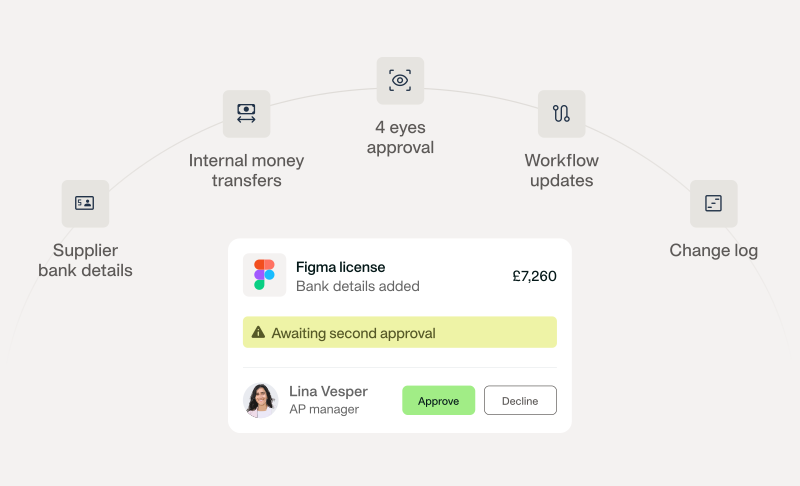
It's in this release. Segregation of duties now adds a second, independent approval (four eyes) for high-risk actions: supplier bank-detail changes, workflow changes and transfers between currency accounts, with a change log for every one. You configure the number of approvals and the eligible approvers per entity or across the group.
Learn more: Setting up segregation of duties
Yes. Bill workflows support amount-based conditions, so anything above a threshold can route to an additional approver, and segregation of duties on bill payments makes sure the person who confirms payment details isn't the one who authorises the payment.
Yes, Supplier is one of the workflow conditions, alongside amount, team, custom field value and category, so you can send every bill from a given supplier to finance. One thing to check: the Supplier condition works at entity level, because each entity keeps its own supplier list, so the rule has to reference the supplier record of the entity the bill lands in.
Payhawk categories map to GL accounts from your chart of accounts, and that includes balance-sheet accounts. Create (or sync from your ERP) a category mapped to the prepayment or intercompany account and select it on the expense or line item. For prepayments specifically, the proforma invoice flow tracks the advance and consumes it against the final invoice.
Yes: interest-bearing US accounts and faster US payment rails are coming next. We'll share details as they go live.
Yes, two ways. The Payhawk Mailbox gives your company a unique address (yourcompany@invoices.payhawk.com); whitelist a supplier's email and they can send invoices straight to it, and Payhawk creates the bill, matches the entity and starts the workflow. And where eInvoicing applies, suppliers deliver structured invoices directly through Peppol, SdI (Italy), KSeF (Poland), Finvoice (Finland) or the French platform.
Learn more: Configuring the Mailbox
It's live. Italian-registered entities receive structured e-invoices directly through SdI: go to Settings > Integrations > eInvoicing on your Italian entity, register Payhawk's recipient code with the Agenzia delle Entrate, and supplier invoices arrive in Payhawk automatically. Finvoice (Finland) is new too, alongside France, Poland and all Peppol countries.
Learn more: Connecting Payhawk to SdI
No immediate plans to offer payroll inside Payhawk, although it's something we're considering for the future. We connect to 55+ HR systems so employee data flows in, and reimbursements can be paid directly from Payhawk, but running payroll itself stays with your HR or payroll platform.
Two things help today: you can split any expense into line items and type percentages (say, 50%) instead of amounts, and in the web portal you can describe a split in your own words ("70/30 between Sales and Marketing") and the Financial Controller Agent proposes the line items. Reusable, named allocation templates are a good idea and have been logged as a request.
Learn more: Splitting expenses into line items in the Portal
The Payhawk web portal and mobile app are available in French (set it under your profile), and export templates let you choose the language and formats of the file. We know some emails and a few surfaces still show English, and we're working through them. Accented characters are supported in the product, so if you're seeing them break somewhere (an export, a card name, a notification) please tell support where, because that's a bug we want to fix.
Today a mention on an expense reaches you by email, mobile push and in your Payhawk inbox, and the Slack and Teams apps deliver approval requests and agent reminders. Bringing @-mention pings into Slack and giving you finer control over which notifications go where is on our list, and your vote counts.
It's available, just not in the bulk expense export. Call GET /api/v3/accounts/{accountId}/expenses/{expenseId}/workflow for an expense and the steps array returns each approver (user.name) with its status (approved or pending). It works per expense, so loop over the pending ones. Exposing the approver in the list endpoint is a fair request and we've noted it.
Learn more: Overview of the Payhawk Developer API
Many at once. Bulk issuing in the web portal creates several physical or virtual cards in one go; you can assign them straight away or later and set limits individually or through spend policies. If you connect your HR system, new joiners get added automatically too.
Not available through the MCP today. Bulk document download exists in the web portal (export with documents), and the request to expose documents and payment confirmations through the MCP makes complete sense; it's with the product team for prioritisation.
Our view: the mechanical skills (coding, chasing receipts, matching, exporting) are the first to move into the background, and the skills that grow in value are the ones around judgement and design: setting the policies, budgets and workflows the agents enforce, deciding what "unusual" means for your business, and reading the insights to make decisions. That's why we design for 95% in the background and 5% with a human in the loop: approvals, exceptions and anything that moves money still wait for you.
For anything not covered here, your implementation manager or account executive is the fastest route to an answer. In the meantime:

The Payhawk Editorial Team consists seasoned finance professionals boasting years of experience in spend management, digital transformation, and the finance profession. We're dedicated to delivering insightful content to empower your financial journey.

